



I spent $200 in my first week, and that made the choice simple. I liked Viktor’s workflow, but the credit burn was hard for me to track. After I used up a $100 plan and then another $100 in credits in one day, I moved the same marketing setup to Claude Cowork for tighter cost control.
If you’re comparing these two tools, here’s the short version:
- I needed agent-based marketing work
- I needed context across sessions
- I needed clear budget control
- I wanted easy migration if I had to switch
The main takeaway is simple: Viktor fit my workflow, but Claude Cowork fit my budget. My switch had less to do with output and more to do with spend visibility, approval steps, and how easy it was to move my Markdown-based setup.
Quick Comparison
| Criteria | Viktor | Claude Cowork |
|---|---|---|
| Pricing | $100/month base plan plus credits – my usage would have scaled to $3,000/month. | Fixed subscription setup – Viktor tasks covered by the $100/month plan. |
| Usage tracking | Credit-based and harder to monitor mid-project | Easier to plan month to month |
| Workflow style | More autonomous | More hands-on with approval points |
| Migration | Worked well in Slack | Worked well with local Markdown files |
| My week-1 result | $200 spent in 2 days | Same workflow with steadier cost control |
It might surprise you to hear that the product switch itself was the easy part. The hard part was trusting a tool once spend got hard to predict.
Claude Cowork vs Viktor – AI co-pilot vs autonomous AI agent

sbb-itb-e8c8399
Viktor: Strong Product, Poor Credit Visibility for My Use Case
Viktor runs inside Slack, connects to 3,000+ integrations, and handles tasks end to end [1]. The product itself was solid. For my use case, the weak spot was credit tracking.
Why I Paid After the Free Trial
The free trial came with $100 in credits, which was enough for me to test actual marketing workflows instead of toy prompts. The output quality was strong [1], and it kept context across sessions, so I didn’t have to rebuild the setup every time.
That was enough for me to upgrade right away. It felt easy to justify because the product worked the way I needed it to.
Where the $100/month Plan Fell Apart for Me
The $100/month plan included 20,000 credits, but my multi-tool workflows used 500 to 1,500 credits per run [1]. That meant the monthly allowance vanished fast.
I added another $100 in credits and burned through all of it in a single day. There was no alert and no warning before I hit zero. I also couldn’t see usage clearly enough to catch the problem in the middle of a project.
That’s the reason I moved the same setup into Claude Cowork without changing the workflow.
Is Your Startup Falling Behind Its AI-Native Competitors?

Claude Cowork: Fast Migration, Better Budget Control, Same Workflow
I moved the workflow in 5 minutes. I connected Gmail and Google Drive, pasted my existing instructions into the project, and kept working. Once everything ran cleanly, the big win was better budget control.
How I Moved My Setup Without Losing Context
My context already lived in a shared Obsidian vault, so Cowork could use those same files right away. Cowork is built around local Markdown, which meant I could move the same workflow over with almost no friction and nothing to reformat [4][6].
Why Claude Cowork Works Better for My Budget
That part mattered because I needed a tool that wouldn’t chew through credits without warning. Cowork uses plan-based pricing, so it’s much easier to map out than a credit system. It also gives you clearer control over spend.
When it starts a job, it shows a visible to-do list and checks off each step as it goes [3][5]. That sounds small, but it changes how the whole process feels. You can see what it’s doing, where time is going, and when to step in.
Its "Ask before acting" mode adds another layer of control. It pauses for approval at key steps in a multi-step job [3]. In other words, you stay in the loop instead of hoping the tool made the right call.
Viktor was easy to like, but hard to monitor. Cowork is easier to budget and easier to supervise. That’s why the budget comparison mattered more than the product switch itself.
Viktor vs Claude Cowork: The Week-1 Comparison That Made the Call
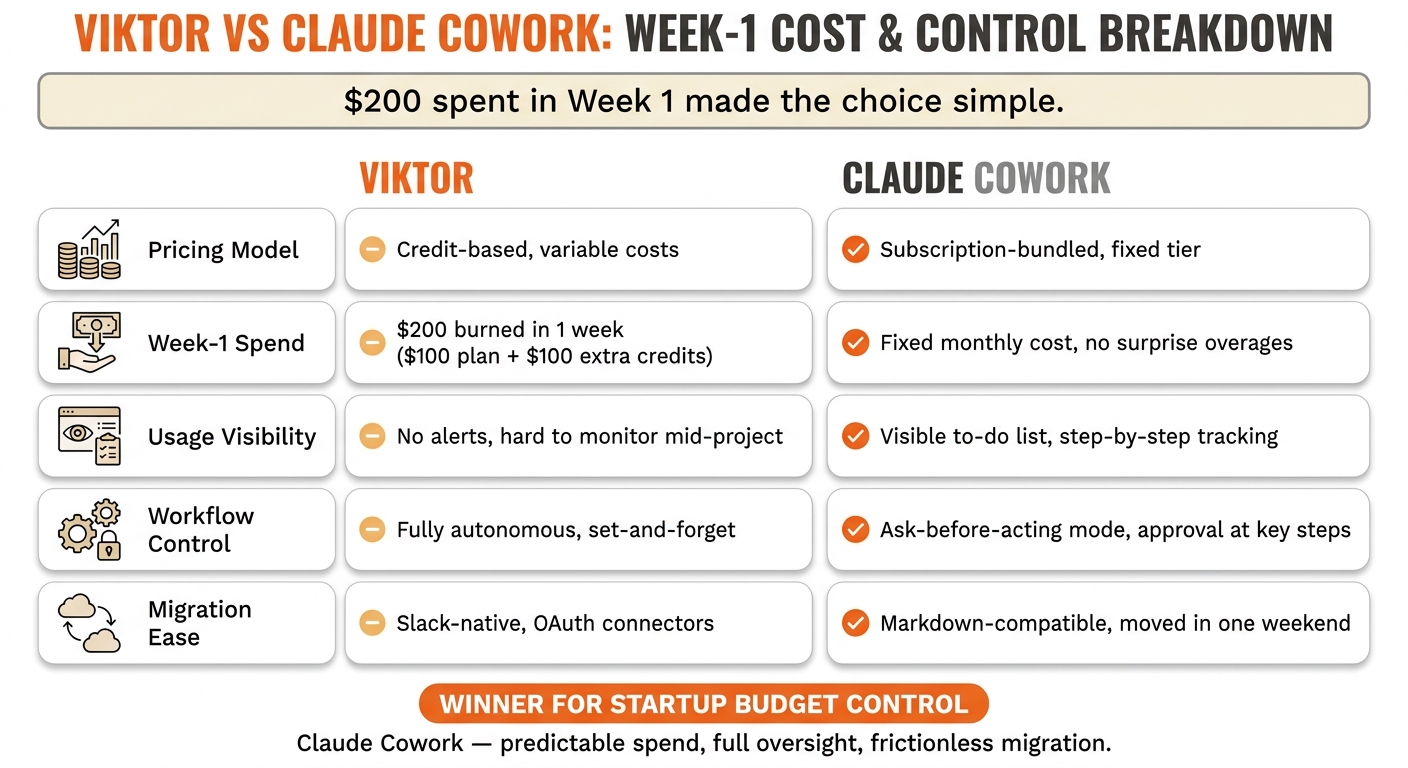
Viktor vs Claude Cowork: Week-1 Cost & Control Comparison
Cost, Oversight, and Portability: Side by Side
Week one made the difference clear. Viktor was strong, but I couldn’t control spend closely enough. I ran the same marketing workflow in both tools, so this was a clean control test, not a new setup. In actual use, the cost climbed fast.
Claude Cowork was already part of my Claude subscription, so spend stayed fixed and simple to track.
After one week of actual work, the tradeoff was clear: the output quality was close, but the level of control was not.
| Dimension | Viktor | Claude Cowork | Impact on My Decision |
|---|---|---|---|
| Pricing Model | Credit-based, variable beyond base | Subscription-bundled, fixed tier | Cowork fits a fixed startup budget without guesswork [1][8] |
| Usage Visibility | Credit meter; burns vary by task | Fixed plan cap | Cowork made monthly spend easier to plan [1][8] |
| Ease of Switching | Slack-native, OAuth connectors | Desktop app, instructions in Projects | My Markdown setup moved over quickly [1][3][7][9] |
| Workflow Continuity | Persistent memory | Project-scoped context | Viktor is set-and-forget, but Cowork was easy to port [2][3] |
| Marketing Fit | Autonomous | Collaborative | I needed oversight more than speed [2][1] |
Portability ended up being the swing factor. My instructions already lived in a shared Obsidian vault, so the context wasn’t trapped inside Viktor’s system. Because everything was already in Markdown, I moved it into Cowork in minutes. That was enough to make the call in week one.
Conclusion: What This Switch Tells You About Picking AI Tools for Startup Marketing
I burned through two $100 credit chunks in the first week, so the call was easy. I left because Viktor’s spend was hard to predict. For startup marketing, that gap matters.
Viktor is genuinely impressive. However, the credit model made cost hard to forecast. Heavy use can push past a lean budget fast.
My instructions already lived in plain Markdown, so I moved them over without a rebuild. That made the switch almost frictionless.
The lesson here is simple. If you can’t forecast tool cost in week one, you can’t build a disciplined marketing system around it. I want tools I can monitor, migrate, and explain to a client or teammate.
FAQs
Why did the credits run out so fast?
Credits can disappear fast because agentic work uses a lot more compute than a standard chat. A broad or fuzzy request can set off multiple sub-agents, tool calls, file processing, and background steps like screen captures or image recognition. Each of those actions uses tokens.
You also pay for compute on failed tasks or hallucinations. That part catches people off guard. Even when the output misses the mark, the system still spent resources to get there.
Using the same conversation for brand-new topics can push token use up, too. The AI has to sift through old context that no longer helps, and that extra history adds cost.
Can this workflow be moved without losing context?
Yes. Your instructions, project knowledge, and agent setups live as plain text files in a local folder, so the workflow stays portable.
You can point a new agent to that same folder, and it can use your existing files, including voice guides, instructions, and session history, to pick up where you left off.
Which setup is better for a fixed budget?
For a fixed budget, the best setup has tight scope and clear instructions. That keeps token use under control and cuts waste from the start.
Broad or vague prompts tend to burn through tokens fast, especially when the AI scans a lot of files or starts recursive actions. In other words, if the task feels open-ended, the bill usually follows.
To stay within budget, keep each task focused, limit the source material, and use persistent configuration or caching. That way, the AI doesn’t keep re-reading the same documentation every time.