
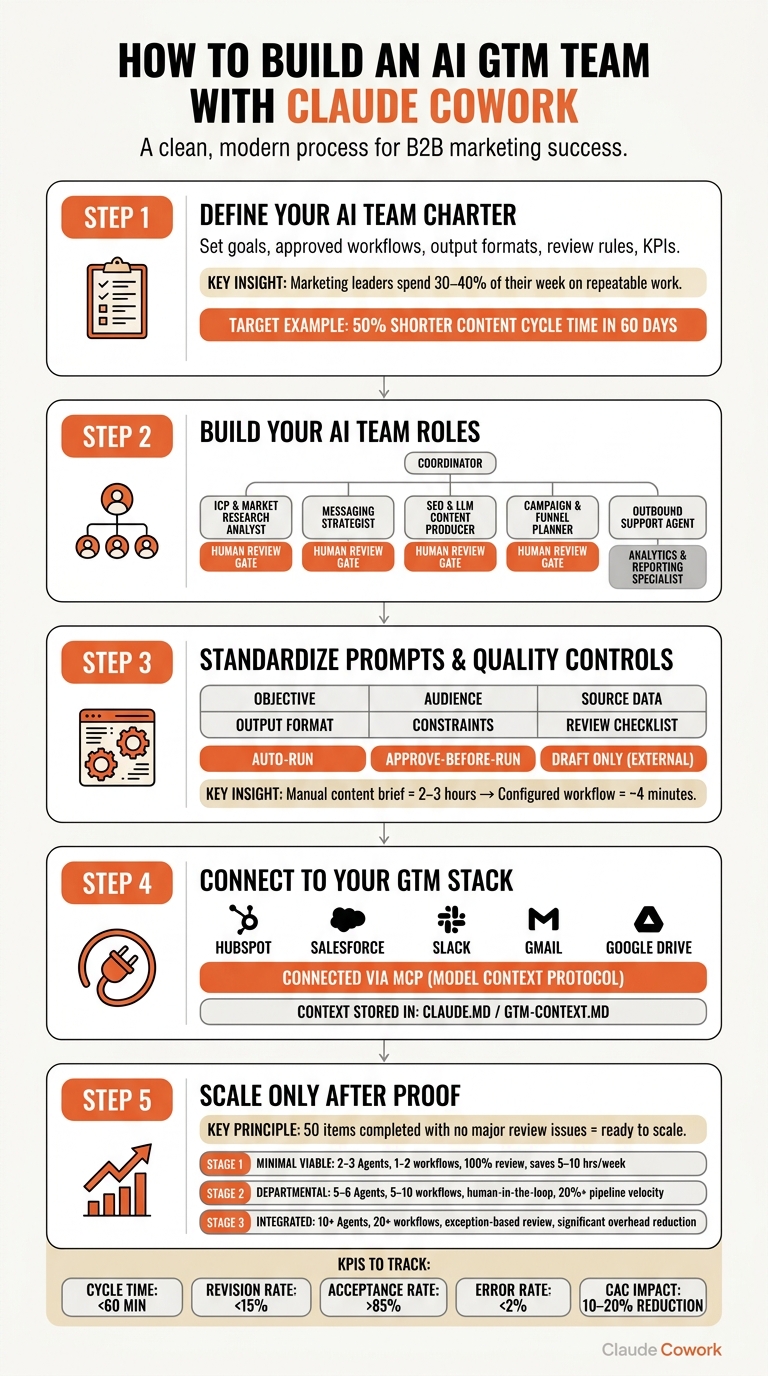
You can turn scattered AI prompts into a small, structured GTM team with one coordinator, a few specialist roles, shared context files, and clear review gates. I’d start with 2 to 3 workflows that repeat every week, track cycle time, revision rate, acceptance rate, error rate, and CAC impact, and keep human approval on anything customer-facing.
It might surprise you to hear that the article’s core point is pretty simple: Claude Cowork works best when you treat it like a team system, not a chat tool. The big win comes from assigning fixed roles for research, messaging, content, outbound, campaign planning, and reporting, then tying each one to specific inputs, outputs, and one review step.
Here’s the full blueprint in plain English:
- Set a one-page charter
- Define goals, approved workflows, output formats, review rules, and KPIs
- Pick work that is frequent, structured, and time-heavy
- Use concrete targets like 50% shorter content cycle time in 60 days
- Build a small AI team
- Use 1 Coordinator
- Add specialists for:
- ICP and market research
- Messaging
- SEO and AI content repurposing
- Campaign planning
- Outbound support
- Analytics and reporting
- Standardize the work
- Give every prompt six parts:
- Objective
- Audience
- Source data
- Output format
- Constraints
- Review checklist
- Pass summaries between roles instead of raw data dumps
- Give every prompt six parts:
- Set guardrails
- Keep brand voice, ICP notes, and approval rules in files like
CLAUDE.mdorgtm-context.md - Use three approval levels:
- Auto-run
- Approve-before-run
- Draft only for external work
- Keep brand voice, ICP notes, and approval rules in files like
- Connect your stack
- Link Cowork to tools like HubSpot, Salesforce, Slack, Gmail, and Google Drive through MCP and plugins when available
- Keep access narrow and assign one owner per workflow
- Scale only after proof
- Start with high-ROI jobs like:
- weekly competitive intel briefs , ranking in AI search results,
- content briefs and drafts
- pre-call prep
- Expand after a workflow handles about 50 items with no major review issues
- Start with high-ROI jobs like:
A few numbers stand out. The article says marketing leaders spend 30% to 40% of their week on repeatable work, and a manual content brief that takes 2 to 3 hours can drop to about 4 minutes with a configured workflow. In other words, the payoff is less about more AI and more about cleaner execution.
If I were putting this into practice, I’d keep the setup lean, review every external draft, and scale only when the output stays clean for weeks at a time.
How to Build an AI GTM Team with Claude Cowork: 5-Step Blueprint
How to Use Claude Cowork – Full Workflow Automation Guide 2026
1. Define Your AI Team Charter and Priority Workflows
Start with the charter. Every coworker role and workflow comes from it. Before you assign a coworker, map the places where your GTM process slows down. You need a defined process before you automate anything.
Map Your Current GTM System
Audit your core GTM workflows: ICP research, segmentation, messaging, SEO/LLMO content, outbound support, campaign planning, and reporting. For each one, ask two simple questions: Is this task repetitive? And does it follow a predictable structure? If the answer is yes, that’s a strong sign an AI coworker can handle the repeatable parts while your team keeps the judgment calls.
As Titus Mulquiney, Founder of Octavius AI, puts it:
"Multi-agent collaboration is a multiplier on a well-defined workflow. If you don’t know what you want done, throwing more agents at it makes the confusion faster, not better." [6]
Here’s the practical rule I come back to: write down the exact steps a person follows today before you build the workflow. If you can’t explain the process clearly, you’re not ready to automate it.
Choose Use Cases by Impact and Effort
The weekly competitive intelligence brief is often the highest-ROI workflow to set up first [1][4]. In other words, start where the work is frequent, structured, and time-heavy. Good first picks include content briefs, transcript analysis, account research, campaign summaries, and performance reporting.
Marketing leaders spend an estimated 30%–40% of their week on repeatable work like this, so that’s usually where you see the fastest time savings [4]. A manual content brief can take 2–3 hours. A configured Cowork workflow can produce one in about 4 minutes [5].
Rank each workflow candidate by:
- How often it runs
- How structured the output is
- How much effort setup will take
That list becomes the base for your coworker roles in the next step.
Write a One-Page AI Team Charter
Treat the charter like a working doc, not a strategy deck. It should define five things: goals, approved workflows, output format, human review rules, and KPIs. That gives your AI team a clear job, a clear reporting path, and a clear point where humans step in.
Concrete goals work best. For example, you might aim to cut content production cycle time by 50% within 60 days, or produce a weekly ICP insight summary every Monday by 8:00 AM. Point each coworker to the same source files, such as brand-voice.md and gtm-context.md, so outputs stay aligned [1][6].
Keep it to one page. Once that’s in place, you’re ready to define the roles that will run it.
2. Set Up Claude Cowork Roles for Core Marketing and GTM Work
Turn the workflows in your charter into named roles with clear ownership. That simple shift makes output cleaner and review easier. A small set of focused roles also gives you steadier, easier-to-check work. Start with the roles tied to your highest-value workflows.
Assign 5 to 6 Focused Coworker Roles
Use six roles total: one Coordinator and five specialists. The Coordinator acts as the control layer. It routes work, assigns tasks, and checks output before anything moves forward.
The five specialists cover the core GTM surface:
- ICP & Market Research Analyst for competitor scans, enrichment, and ICP scoring
- Messaging Strategist for voice, positioning, and value prop work
- SEO & LLM Content Producer for keyword gaps, drafts, and audits
- Campaign & Funnel Planner for asset kits and calendars
- Outbound Support Agent for prep, follow-ups, and triage
- Analytics & Reporting Specialist for snapshots, summaries, and anomaly flags
Each role should have one human review gate before handoff, approval, publishing, or sending.
Define Inputs, Outputs, and Constraints for Each Role
Every coworker needs a clear input list before it can produce reliable output. Vague inputs lead to vague results.
The ICP Analyst needs CRM exports and competitor URLs. The Messaging Strategist needs your brand-voice.md file and customer interview notes. The Content Producer needs SEO data, content briefs, and your style guide. The Campaign Planner needs campaign objectives and your asset library. The Outbound Agent needs call transcripts and CRM deal history. The Analytics Specialist needs HubSpot exports, ad platform CSVs, and your KPI benchmarks.
Set clear constraints for each role too. That includes USD budgets, ET/PT send times, and US English.
Use a Role Design Table
Use the table below as the default operating map for each coworker. Then map your own workflows against it and adjust the inputs and outputs to fit your actual stack.
| Claude Cowork Role | Primary Tasks | Required Inputs | Expected Outputs | Human Review Point |
|---|---|---|---|---|
| ICP & Market Research Analyst | Competitor scans, lead enrichment, ICP scoring | CRM exports (CSV), competitor URLs, ICP definitions | Structured research briefs, scored lead lists | Before leads move to sales handoff |
| Messaging Strategist | Brand-voice checks, value prop drafting | brand-voice.md, product docs, customer interview notes |
Messaging pillars, tone-of-voice audits | Before core messaging frameworks are approved |
| SEO & LLM Content Producer | Keyword gap analysis, article drafting, AEO audits | SEO data, content briefs, style guide | SEO-optimized drafts, audit reports | Final edit before publishing |
| Campaign & Funnel Planner | Asset kit creation, content calendar management | Campaign briefs, quarterly themes, asset library | Landing page copy, email sequences, social posts | Human approval before campaign launch |
| Outbound Support Agent | Meeting prep, post-call follow-ups, lead triage | Call transcripts, raw notes, CRM deal history | Personalized follow-up emails, CRM updates | Before any draft reaches a prospect |
| Analytics & Reporting Specialist | Weekly health snapshots, pipeline audits | HubSpot exports, ad platform CSVs, KPI benchmarks | Narrative performance summaries, anomaly flags | Weekly standup review |
Next, standardize prompts, handoffs, and quality controls so each role produces steady output.
3. Build Repeatable Workflows, Prompts, and Quality Controls
Inconsistent prompts lead to inconsistent output. When each team member writes prompts their own way, quality gets harder to predict and reviews drag out. The fix is simple: document how work moves between coworkers, what each prompt must include, and where a human checks the work before anything goes live. From there, standardize how each coworker receives, handles, and passes off work.
Standardize Prompt Templates and Handoffs
Every prompt sent to a coworker should include six fields: Objective, Audience, Source Data, Output Format, Constraints, and a Review Checklist [9].
The handoff chain matters just as much as the prompt itself. A clean workflow moves from a Coordinator to specialist roles, then to an editor. Each coworker should get a summary of the prior role’s output, not a dump of raw data, so the context stays tight and useful. The editor should fail the work and send back revision notes instead of rewriting it personally [6][3]. In practice, that kind of setup can take a brief to finished assets in a single session.
Set Guardrails for Brand, Privacy, and Approvals
Guardrails help you move fast without letting quality slip.
Store them in a shared context file like CLAUDE.md or a /context folder that all coworkers can check. This should include your tone-of-voice rules, brand guidelines, ICP notes, voice samples, and a clear map of which actions need human sign-off [6][8].
Use three approval levels:
- Auto-run for low-risk internal work
- Approve-before-run for internal drafts
- Drafts only; do not send externally for customer-facing work
"AI is fast, and mistakes at speed are expensive. The review gate is you, looking at the editor’s final output, before it goes anywhere external." – Titus Mulquiney, Founder, Octavius AI [3]
Measure Workflow Performance With Clear KPIs
Once workflows are live, track five numbers on a steady basis. These show whether the system is helping or just making noise faster [8].
| Metric Name | Definition | Data Source | Target Value |
|---|---|---|---|
| Cycle Time | Total time from brief to final approved asset | Cowork session logs | < 60 min (campaigns) |
| Revision Rate | % of outputs requiring more than 2 human edits | Human review logs | < 15% |
| Output Acceptance Rate | % of AI drafts approved for live use | Project management tool | > 85% |
| Error Rate | Frequency of brand or factual errors | Editor agent logs | < 2% |
| CAC Impact | Estimated reduction in customer acquisition cost | CRM / ad platforms | 10–20% reduction |
Once the workflow is measurable, connect it to your data sources, ownership model, and review cadence.
4. Connect Claude Cowork to Your Team and GTM Stack
With roles and KPIs in place, connect Claude Cowork to the tools your team already uses. Once roles, prompts, and KPIs are set, plug the system into the core tools that already hold your GTM data.
Connect Data Sources and Working Systems
Claude Cowork connects to your GTM stack through the Model Context Protocol (MCP) and a plugin marketplace for tools like HubSpot, Salesforce, Slack, Gmail, and Google Drive [1][11]. Keep access tightly scoped so Cowork only reaches the local folders you explicitly grant it [11].
Store your core context in a shared CLAUDE.md or gtm-context.md file. In practice, each connector should map to one named role and one specific workflow. On Team and Enterprise plans, admins can manage connectors and plugins from one place so everyone works from the same setup [1][2].
Once access is live, set clear ownership and review rules for each workflow.
Set Governance, Ownership, and Review Cadence
Every workflow needs a named owner, such as an AI GTM engineer. That person owns the prompt, the role definition, the approval gate, and the KPI report.
Require human review for anything tied to money, contracts, or live customers. That’s the line where speed matters, but judgment matters more.
A simple cadence can include:
- Weekly competitive-intelligence, pipeline-health, and GTM standup briefs
- Monthly positioning tracking
- Quarterly strategy synthesis [4][1][9]
Train Your Team to Manage AI Coworkers Well
The last step is teaching managers to run the AI team like a system, not a chat window. In other words, shift from ad hoc prompting to managed workflows.
Train managers to brief the Coordinator, not each specialist directly. The Coordinator takes the brief, breaks it into tasks, and manages the specialist subagents so the manager doesn’t turn into the bottleneck [3][6]. Keep the Coordinator focused on task routing and final synthesis, and use subagents for research and summary work [6].
"The real leverage comes when you stop opening one tab and start orchestrating a coordinated system of agents that work together." – Titus Mulquiney, Founder, Octavius AI [6]
The goal is fewer prompts, cleaner handoffs, and faster approvals.
5. Scale the AI Team Without Adding Chaos
Once your core workflows run cleanly, scale the ones that prove they can repeat and show clear results.
Start With a Minimal Viable AI Team
Start small. One Coordinator plus 2 to 3 specialists is usually enough to cover research, messaging, and content.
The three workflows that often show the fastest ROI are:
- weekly competitive intelligence briefs [1][10]
- content brief and draft generation [5]
- pre-call meeting prep [1][7]
These work well because they repeat, you can measure them, and they are easy to hand off.
A simple rule helps here: once one workflow runs cleanly for about 50 pieces of work with no major review corrections, it is ready to scale [3][6].
Refine Roles and Expand Based on ROI
Add roles only after the current team produces stable output. If quality slips, fix the context first instead of adding another role [3][2].
In other words, if the system gets messy, the answer usually isn’t more people or more agents. It’s better inputs, cleaner prompts, and tighter handoffs.
Some workflows just do not fit automation well. Retire work that is too irregular or too idea-heavy to automate with confidence. Then expand into nearby functions, like outbound support or reporting, only when an existing workflow shows steady, measurable gains.
Conclusion: The Operating Model Worth Keeping
The model follows the building blocks of an AI marketing system: define the charter, create focused coworker roles, standardize prompts and handoffs, govern the system tightly, and scale only after workflows prove their value.
Use this as a checkpoint, not a target to chase.
| Stage | AI Team Size | Workflows Automated | Human Oversight Model | Typical Growth Impact |
|---|---|---|---|---|
| 1. Minimal Viable | 2–3 Agents | 1–2 (e.g., Competitive Intel, Content Briefs) | 100% Review Gate | 5–10 hours saved/week; faster response times |
| 2. Departmental | 5–6 Agents | 5–10 (e.g., Lead Triage, Performance Reporting) | Human-in-the-loop (Edits) | 20%+ increase in pipeline velocity; consistent brand voice |
| 3. Integrated | 10+ Agents | 20+ (e.g., Full GTM Launch, Lead Follow-Up, Campaign Reporting) | Exception-based Review | Significant overhead reduction; consistent GTM execution |
The point of this approach is simple. It replaces ad hoc prompting with a repeatable operating model that improves speed, consistency, and output quality. The goal was never more AI. It was better execution.
FAQs
How do I choose the first workflow to automate?
Start with the task that eats up the most time each week, then automate that first. Pick a high-leverage workflow that gives you value right away, like a weekly competitive intelligence brief, lead triage, or meeting prep.
Once that workflow runs reliably without your involvement, expand from there. In other words, handle one time-heavy process first so you don’t create a bottleneck by trying to manage multiple agents too soon.
What should stay human-reviewed in an AI team?
Keep a human review step for AI-driven work that touches real money, live client communications, or high-stakes business decisions. AI can move fast, and that speed helps, but mistakes can get expensive fast. Models still carry risks like hallucinations and prompt injection, so a quick pass from a person is just smart operating practice.
Even for specialized tasks like contract review, check the AI’s flags and analysis yourself. In other words, treat Claude Cowork like a capable temp: useful, fast, and worth having on the team, but still in need of your oversight for quality and safety.
When is an AI workflow ready to scale?
An AI workflow is ready to scale when it runs on its own and keeps producing strong results without your direct involvement.
Start with the task that eats the most time each week. Build the team around that one workflow first. Then expand only after it can operate independently.
Give it about two weeks of testing and refinement before you add more steps or new tasks. That window helps you check for consistent, high-quality output before complexity starts to pile up.