

Want to save time on sales tasks while improving results? Sales workflow automation helps startups replace repetitive tasks like data entry, follow-ups, and pipeline updates with automated processes. The result? More time for meaningful conversations and closing deals.
Key Takeaways:
- What it is: Automating tasks like lead capture, follow-ups, and CRM updates using tools like monday.com, Zapier, and AI-powered platforms.
- Why it matters for startups in 2026 : Competing in a fast, data-driven market requires efficiency. Automation boosts productivity, shortens sales cycles, and improves conversion rates.
- Trends to watch: AI-driven lead scoring, real-time data enrichment, and no-code platforms make advanced automation accessible to small teams.
- How to start: Map your sales process, identify repetitive tasks, automate high-impact areas like lead capture and follow-ups, and track metrics like response time and pipeline conversion rates.
The bottom line? Automating your sales workflow isn’t just about saving time – it’s about scaling your startup with fewer resources and more focus on growth. Let’s break it down step-by-step.
Automate Your Sales Process in 2025 (Best Tools)
Mapping and Improving Your Sales Workflow
Start by breaking down every stage of your sales process – from how leads enter your pipeline (via web forms, emails, or referrals) to the final outcome. For each step, identify who’s responsible (founder, SDR, AE), the tools involved (like your CRM, email, calendar, or Slack), the inputs and outputs, and any delays or bottlenecks. Use visual tools like a flowchart or swimlane diagram to map out the stages, decision points (e.g., “qualified?”), and handoffs. Platforms such as monday CRM and Pipedrive make it easy to create these visual pipelines directly, helping you spot areas where manual tasks are slowing things down.
How to Document Your Current Sales Process
Talk to your team to understand every task, handoff, and decision point in your sales workflow. Capture the journey from lead capture through qualification, nurturing, demo scheduling, negotiation, and closure. Pay close attention to manual tasks, like sending call summaries or updating CRM fields by hand. Tools like Lucidchart or Miro are great for creating flowcharts to visualize the process. Use your CRM’s dashboards to monitor bottlenecks in real time. Look for stages that take longer than average or have high drop-off rates – these are clear signs of areas that could benefit from automation, like setting up alerts or nurture sequences. Also, audit how much time is spent at each step to uncover inefficiencies like delays in CRM updates or slow lead handoffs.
Finding the Best Automation Opportunities
Target tasks that are repetitive, rule-based, and high-volume. These might include lead scoring based on engagement, automated follow-up email sequences, or meeting scheduling through calendar links. Automating these tasks can save your reps 20–30% of their time while improving key outcomes, such as faster response times (under five minutes) and better conversion rates [1][2]. Start by automating lead capture processes – like automatically adding contacts to your CRM and assigning owners – and standardizing follow-ups for demo requests, trials, or no-shows. However, avoid automating steps that require judgment or complex negotiations. Instead, use AI tools to provide suggestions while keeping human oversight in place. Once you’ve identified automation opportunities, set clear metrics to track their effectiveness.
Setting Automation Goals and Metrics
Every automation effort should be tied to a measurable goal. For instance, you could aim to reduce the time it takes to respond to inbound leads from hours to minutes, increase the number of qualified meetings each rep books weekly, or improve CRM data accuracy by ensuring every opportunity includes a next step and close date. Before automating, establish baseline metrics like average response time, conversion rates (MQL to SQL), demo no-show rates, and the percentage of time reps spend on administrative tasks versus selling. Track activity metrics (e.g., automated emails sent, tasks completed, meetings booked), pipeline metrics (like stage conversion rates, sales cycle length, and win rate), and efficiency metrics (such as lead response time and CRM data accuracy). Start small by automating one or two workflows, measure the results, and then expand gradually.
If your startup doesn’t have an in-house RevOps team, consider working with a fractional CMO experienced in AI and data-driven growth. For example, Data-Mania offers consulting and strategy services tailored to technology and SaaS companies, helping align sales automation with broader business goals and multichannel growth strategies.
Common Sales Workflow Automation Use Cases
Once you’ve mapped out your workflow and pinpointed areas for automation, the next step is to put those plans into motion. By streamlining specific workflows, startups can boost both efficiency and revenue. Below, we’ll explore how automating inbound, outbound, and post-sale workflows can save time and minimize lead leakage, turning strategy into tangible results across the sales process.
Inbound Lead Management
Automation for inbound leads kicks in as soon as a prospect fills out a form, starts a chat, or signs up for a trial. The goal? Capture every lead, enrich their data, score them for relevance, and route them to the right team member – all with minimal manual effort. Many modern CRMs can automatically create contact records when prospects engage through forms or chatbots. Tools like Clearbit or built-in CRM features can then add key details, such as company size, industry, and job title, cutting down on manual research.
AI-driven lead scoring helps prioritize prospects based on their engagement and how well they match your ideal customer profile. From there, leads can be routed to the appropriate sales rep while triggering immediate follow-ups like personalized confirmation emails or same-day call tasks. Parallel workflows can also send automated follow-ups via email or SMS. For U.S.-based startups, it’s essential to comply with CAN-SPAM for email and TCPA for SMS by obtaining explicit consent on forms and offering clear opt-out options. According to a monday.com guide, automating email follow-ups and lead scoring often delivers noticeable results within weeks, making them some of the easiest wins for startups.
With inbound processes optimized, outbound workflows can use similar automation techniques to maintain personalized, multi-channel engagement.
Outbound Prospecting and Follow-Ups
Outbound automation allows your team to scale outreach efforts across multiple channels while keeping a personal touch at every step. Platforms like Outreach, Salesloft, and Apollo.io make it possible to create sequences that might include an initial email on day one, a LinkedIn connection request on day two or three, a phone call on day four, and a follow-up email shortly after. Dynamic fields personalize each message, while templates and automated timing let small teams manage large-scale outreach effectively.
Behavior-based triggers can further refine these efforts. For instance, if a prospect opens an email multiple times or clicks on a pricing page, the system can automatically create a high-priority call task, move the lead into a “hot interest” sequence, or notify the assigned rep via Slack. Conversely, if a prospect shows little to no engagement, automation can reduce the frequency of contact, move them to a lighter nurture track, or pause outreach altogether to avoid spamming. Website tracking tools, such as pixels or first-party analytics linked to your CRM, can send real-time alerts when a prospect visits key pages, enabling timely follow-ups. To prevent over-contacting, it’s a good practice to cap touchpoints at 2–3 per week per prospect and ensure all outreach is coordinated through a unified platform.
Pipeline and Post-Sale Automation
Pipeline automation helps keep your CRM accurate and your forecasts reliable without requiring constant manual updates. For example, you can set rules to automatically update deal stages based on actions like completing a meeting, replying to an email, or submitting a proposal. Logging a discovery call as “completed” might advance a deal from “Qualified” to “Discovery Done”, create a follow-up task, and adjust forecast categories. Integrations with calendar tools and conferencing platforms can log meetings and call summaries automatically, while AI assistants like those in Momentum, Gong, or Clari can extract key details – such as decision-maker names, budgets, and next steps – into CRM fields. Inactivity rules can also flag deals with no activity for a set period, helping to keep your pipeline clean and forecasts accurate.
Once a deal is marked as Closed-Won, automation can kick off onboarding workflows in tools like monday.com, Asana, or ClickUp. This might include assigning an implementation owner, scheduling a kickoff meeting, and sharing deal details with the onboarding team via Slack or email. Other automations can send welcome email sequences, create accounts or workspaces, and deliver resources like quick-start guides or video tutorials. For subscription-based startups, usage tracking can identify customers who are either under-engaging or exceeding their current limits, prompting customer success teams to intervene or explore upsell opportunities. Renewal workflows can also be automated to start outreach 90–120 days before a contract expires, ensuring timely follow-ups and approvals for any necessary discounts.
According to MarketsandMarkets, AI-driven sales automation can increase lead conversion rates by 15–20% and shorten sales cycles by 20–30%. By automating these inbound, outbound, and post-sale workflows, startups can achieve similar results while freeing up their teams to focus on high-value activities like discovery calls, demos, and strategic account planning.
sbb-itb-e8c8399
Selecting Sales Automation Tools
When choosing sales automation tools, focus on addressing the specific bottlenecks in your sales process. Begin with your documented workflow – not the tools themselves. This way, you can identify platforms that align with your processes, leveraging features like no-code builders, triggers, and rules. By sticking to this approach, you create a clear path for selecting tools that genuinely fit your needs.
Features to Look for in Automation Tools
Key features to prioritize include CRM integration, no-code builders, intelligent lead routing, multichannel sequencing, and AI-driven insights. Many top platforms, such as Zapier, HubSpot Sales Hub, Outreach.io, Zoho CRM, and Momentum.io, now offer advanced capabilities like behavioral triggers, predictive scoring, call summaries, and automated data entry.
Integration is crucial. Look for tools that work seamlessly with essential third-party platforms like email, calendars, Slack, Zoom, accounting systems, and payment processors to avoid creating data silos. Scalability is equally important as your team grows. Tools should offer customizable pipelines, roles, and permissions to handle increasingly complex automation needs.
For example, Pipedrive combines lead management, workflow automation, AI sales assistance, and forecasting into one platform. It’s affordable for smaller teams and offers extensive integration options. Avoid tools that only solve narrow tasks but require significant integration work. Also, opt for platforms with transparent AI features instead of opaque “black box” systems.
Budgeting and Evaluating Tools
Pricing for automation tools ranges widely, from free tiers to advanced plans costing $100+ per user per month. For early-stage startups, a budget of $30–$100 per user per month is a good starting point. Take advantage of free trials – like HubSpot’s free tier or Pipedrive and Close.com’s 14-day trials – to test usability and ensure the tools align with your workflows.
Before fully committing, pilot the tool for 30–60 days with a small group of reps. During this period, evaluate its usability, data quality, and early ROI. Be mindful of the total cost of ownership, which includes per-seat fees, administrative time, consulting, and integration work. Establish clear metrics to measure success, such as time saved on data entry, meetings booked, or shortened sales cycles. Use the platform’s built-in analytics to track these metrics.
Match the tool’s complexity to your team size. Small teams often benefit from intuitive, all-in-one CRMs with basic automation, such as EngageBay or Pipedrive, while larger, enterprise-level tools may overwhelm startups with just a handful of people. For inbound-heavy startups, HubSpot Sales Hub is ideal, offering integrated marketing, email sequencing, and lead scoring. For outbound prospecting, platforms like Apollo.io (offering access to 275 million contacts for $49/month) or Outreach.io ($100+/month) provide robust multichannel cadences.
Once you’ve defined your tool criteria and budget, consider seeking external expertise to fine-tune your strategy.
How Data-Mania Can Support Your Automation Strategy
Data-Mania’s Fractional CMO services can help technology startups craft automation strategies that align seamlessly with their sales workflows and business goals. Founded by Lillian Pierson, an experienced marketing leader and professional engineer with a strong background in data and AI consulting, Data-Mania specializes in supporting startups in industries like AI, SaaS, fintech, climate tech, and cybersecurity.
Their services include tailored strategy development, advisory coaching, and tool evaluations based on your budget and team size. Data-Mania ensures the selected platforms integrate smoothly with your product-led growth strategy, helping you scale efficiently and drive consistent, cost-effective revenue growth.
Implementing and Scaling Sales Workflow Automation
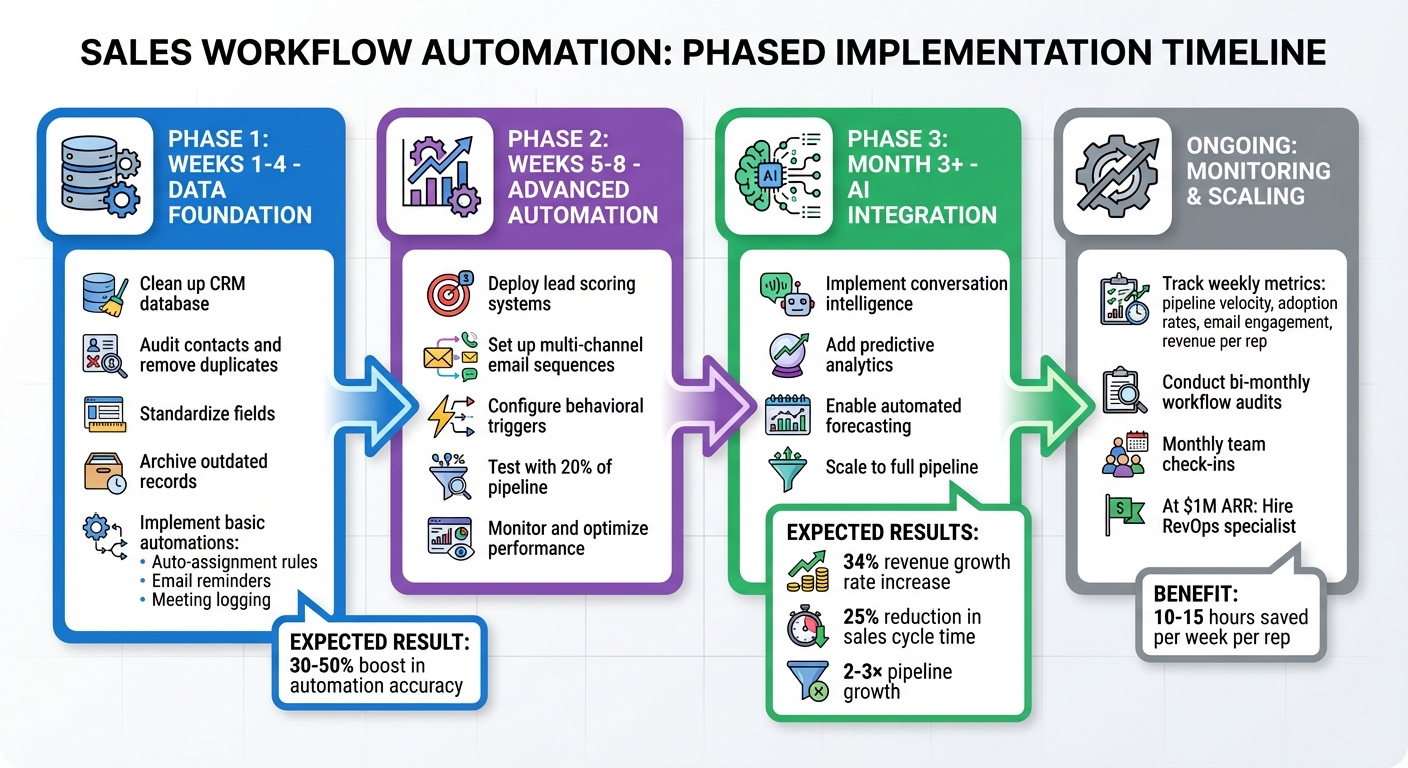
Sales Workflow Automation Implementation Roadmap for Startups
Phased Implementation Plan
Start by cleaning up your CRM during weeks 1–4. This involves auditing your contacts, removing duplicates, standardizing fields, and archiving outdated records. Clean data can boost automation accuracy by 30–50%, minimizing errors that could otherwise snowball. Once your data is in order, implement basic automations like auto-assignment rules, email reminders, and meeting logging. Tools like HubSpot Sales Hub’s free tier or Zapier can help you get started with these foundational workflows.
In weeks 5–8, move on to more advanced automations such as lead scoring, multi-channel email sequences, and behavioral triggers. Test these with just 20% of your pipeline to ensure everything runs smoothly. After the third month, integrate AI-powered workflows. These could include features like conversation intelligence, predictive analytics, and automated forecasting through platforms such as Zoho CRM’s Zia or Outreach.io. Taking this step-by-step approach helps prevent overwhelm and allows you to track ROI at each stage. Once your automations are live, make it a habit to monitor their performance to maintain consistent results.
Monitoring and Improving Automation Systems
Keep a close eye on weekly metrics like pipeline velocity, automation adoption rates, email engagement, and revenue per rep. Platforms like HubSpot and Outreach.io provide built-in reporting dashboards that make tracking these metrics straightforward. Research shows that sales automation can boost revenue growth rates by 34% and cut sales cycle times by up to 25%.
Every two months, audit your workflows by mapping out processes, reviewing Zapier error logs, and testing sample leads. Pay attention to bottlenecks, such as failed triggers or issues with conditional logic. Additionally, check in with your sales team monthly – whether through surveys or brief conversations – to uncover any usability issues. High-performing teams often credit their regular automation reviews for their success, with 80% of them noting these reviews as a key factor in scaling effectively. Once your monitoring systems are in place, you’ll be ready to expand beyond founder-led efforts.
Scaling Beyond Founder-Led Sales
With your workflows mapped and automations running smoothly, it’s time to scale beyond founder-led sales. Start by automating your personal sales processes, including outbound cadences, follow-up sequences, and meeting workflows. Document these processes thoroughly, then hire SDRs (Sales Development Representatives) and provide them with standardized tools like Apollo.io or Pipedrive. Many startups that follow this approach report 2–3× pipeline growth.
When your annual recurring revenue hits $1 million, it’s worth hiring a RevOps (Revenue Operations) specialist. This role focuses on centralizing data hygiene, tool integrations, and performance governance. A RevOps expert can help prevent silos as your team expands – for instance, when growing from one to ten reps – by using platforms like Clari for forecasting or Momentum.io for real-time alerts. AI orchestration tools can also significantly reduce manual data entry, saving 10–15 hours per week that your team can dedicate to selling.
For additional support, consider working with external advisors like Data-Mania. They can assist with go-to-market strategies, RevOps setup, and tool selection. Their expertise can help you sidestep common issues, such as poor integrations, which account for 40% of automation failures. By leveraging these resources, you can ensure a smooth transition and set your team up for scalable success.
Conclusion
Automating your sales workflow creates a foundation for scalable growth, freeing founders from tedious manual tasks. By mapping out your current processes, identifying repetitive actions like data entry and follow-ups, and choosing the right tools, you can build systems that consistently deliver results. Startups that roll out automation in phases often see tangible benefits, such as shorter sales cycles – by as much as 30% – and improved conversion rates thanks to more effective lead nurturing.
To make automation work, tie your strategy directly to your business goals. Let key performance indicators like pipeline velocity, CRM accuracy, and revenue per sales rep guide your decisions. This ensures that automation fuels predictable, steady growth.
The best tools are those that fit seamlessly into your existing sales process and tech stack. Whether you rely on platforms like HubSpot Sales Hub for inbound efforts or Outreach.io for outbound sequences, integration is key to avoiding data silos and wasted resources on unused features.
For startups navigating complex go-to-market strategies, expert advice can make a significant difference. Data-Mania’s Fractional CMO services specialize in helping AI startups and SaaS companies align automation with product-led growth. Their focus on RevOps setup and tool selection ensures your tools are driving revenue effectively. By combining proven automation techniques with strategic guidance, startups can confidently move toward scalable success.
FAQs
What steps should startups take to streamline their sales workflows before automating them?
Startups looking to make their sales workflows smoother should begin by taking a close look at their current processes. Map out every step, noting where delays happen or where potential customers tend to drop off. Having this clear picture makes it easier to spot problem areas and create straightforward, repeatable procedures.
It’s also important to revisit and tweak these workflows regularly. By keeping them updated, you’ll ensure they’re ready to handle growth and make the most out of automation tools, setting the stage for long-term success.
How can startups choose the right sales automation tools?
When choosing sales automation tools, startups should zero in on a few essential factors. First, make sure the tool works smoothly with your existing systems and workflows. Look for options that are easy to use and can adjust to your team’s specific needs. Customization is another big plus – being able to tweak the tool to match your business processes can save time and boost efficiency. Also, check if it integrates well with other software your team depends on.
Don’t overlook the vendor’s reputation and the quality of their customer support. A reliable support team can save you from potential frustrations down the road. If possible, use trial periods or demos to explore the tool’s features firsthand. This hands-on experience will help you see if it truly fits your needs before making a commitment. By taking these steps, you’ll be better equipped to choose a tool that aligns with your goals.
How can startups stay compliant with regulations like CAN-SPAM and TCPA when automating email and SMS follow-ups?
To ensure compliance, startups must secure explicit consent from recipients before sending out automated emails or SMS messages. Every message should include a straightforward, user-friendly opt-out option, and the content must always be truthful and transparent.
Leverage automation tools equipped with compliance features, such as automatic opt-out management and phone number verification. Regularly audit and update your contact lists to eliminate unsubscribed or inactive users. For extra peace of mind, work with legal professionals to confirm your practices align with the latest standards under CAN-SPAM and TCPA regulations.