
Managing your GTM workflows just got easier. MCP servers let AI tools like Claude connect directly to CRMs and data sources, automating tasks like lead routing, pipeline updates, and data enrichment, all in one place.
I’m Lillian Pierson, a fractional CMO and licensed Professional Engineer who’s taught more than 45,400 people to build AI marketing systems with Claude and MCP servers. These are the ones I reach for.
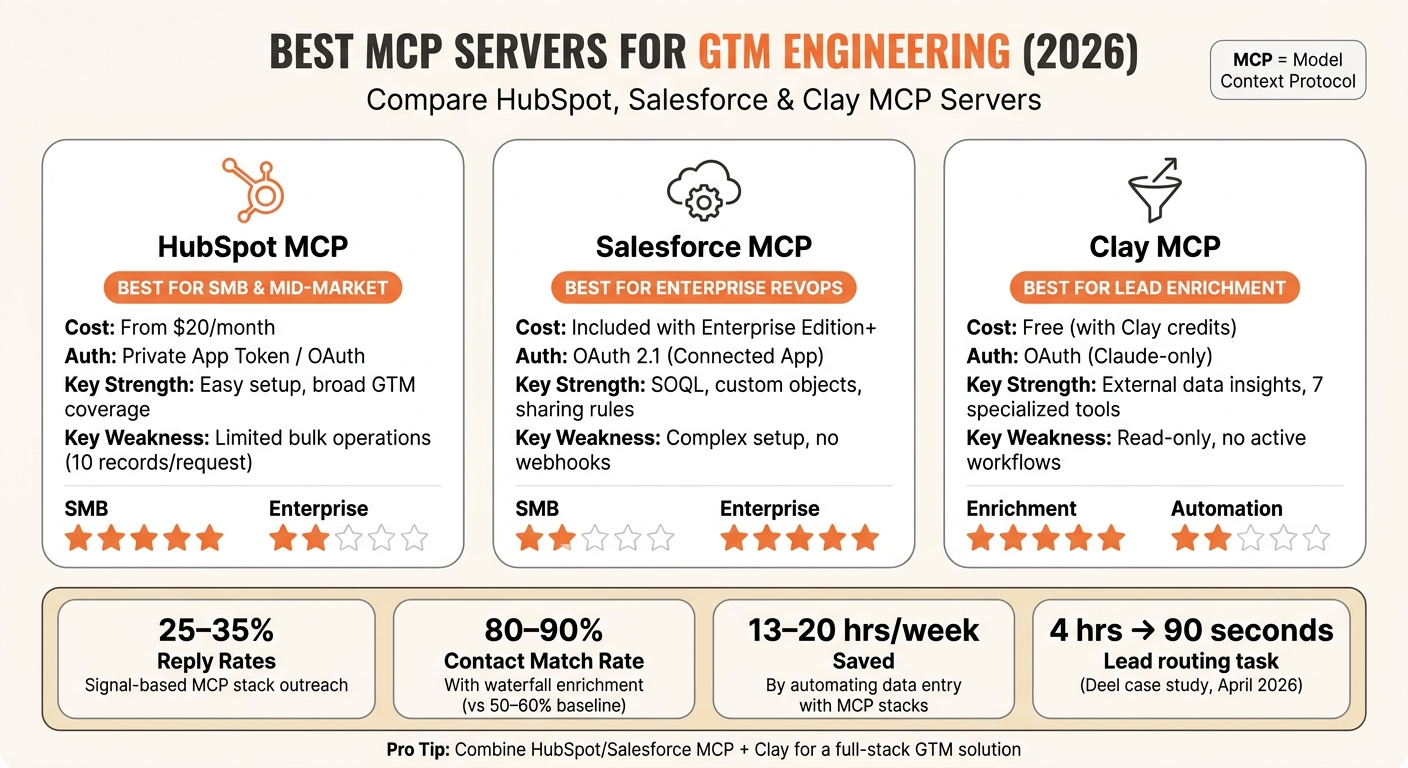
- HubSpot MCP: Ideal for small to mid-sized teams. It’s easy to set up, integrates with CRM objects, and works well for basic workflows. Costs start at $20/month with a Sales Hub Starter plan.
- Salesforce MCP: Built for enterprise teams. It supports complex workflows, custom objects, and advanced governance. Included with Salesforce Enterprise Edition and above.
- Clay MCP: Focused on lead enrichment. It pulls external insights for better data quality but works best for smaller datasets. Free to use with Clay credits.
- All-in-One Stacks: Combine multiple MCP servers (e.g., HubSpot + Clay) to handle everything from intent detection to outreach. This setup boosts reply rates by up to 35% and saves hours of manual work.
Quick Tip: Start with the MCP server that matches your CRM. For outbound teams, pairing a CRM MCP with a data enrichment server like Clay can dramatically improve lead match rates.
Quick Comparison
| Server | Best For | Cost | Key Features | Limitations |
|---|---|---|---|---|
| HubSpot MCP | SMB / mid-market teams | From $20/month | Easy integration, broad CRM tools | Limited bulk operations |
| Salesforce MCP | Enterprise RevOps teams | Included (Enterprise) | Supports SOQL, custom objects | Complex setup, no webhooks |
| Clay MCP | Lead enrichment | Free (with credits) | External data insights | Read-only workflows, small tasks |
Bottom Line: Pick the server that fits your team’s size and workflow needs. HubSpot works great for smaller teams, Salesforce is best for enterprises, and Clay is perfect for enriching data. Combine them for a full-stack GTM solution.
Best MCP Servers for GTM Engineering: HubSpot vs Salesforce vs Clay (2026)
Claude + HubSpot MCP: The Future of CRM is Here. See How I Use It.
1. HubSpot MCP Server
HubSpot’s MCP Server is a smart tool for GTM teams working with HubSpot. It connects directly to your CRM, letting you run queries like "Summarize all deals above $1,000 in the Decision maker bought in stage" for quick, actionable insights. A breakdown of its main features.
GTM and CRM Integration
The server offers full integration with CRM objects, including contacts, companies, deals, tickets, products, quotes, invoices, and subscriptions. It enables outbound workflows by enrolling contacts in email sequences and updating contact properties, which can trigger internal HubSpot automations like list segmentation or assigning reps. While marketing assets such as campaigns and landing pages are accessible in a view-only format, complex workflow rules are not yet part of the MCP toolset [7][12].
Data Access and Workflow Automation
The system allows Claude to read and write CRM objects and engagements, such as calls, emails, meetings, notes, and tasks. While it can log activities, it cannot send emails directly. Bulk operations are capped at 10 records per request [9], so for larger tasks, batch operations are recommended to avoid exceeding HubSpot’s API rate limit of 100 requests every 10 seconds [12].
"MCP servers offer the most flexibility for building automated GTM workflows," says Kushal Magar, SyncGTM [9]
Reliability and Governance
Hosted at mcp.hubspot.com, the server is vendor-built, ensuring strong reliability. Its permissions are based on an intersection model, meaning Claude can only access data that both the application and user are authorized to view within HubSpot’s interface [11]. Token permissions apply account-wide, restricting access to specific pipelines or teams. Sensitive Data Properties, such as PHI, are blocked [7]. Since the server is in public beta, it’s advisable to review any tool calls that modify your account to maintain consistent performance for GTM engineering tasks [8].
Pricing and Scalability
Basic operations like reading contact and company data are free. However, tasks such as deal pipeline updates and sequence enrollment require a Sales Hub Starter plan, which costs around $20 per month [2]. Additionally, using the HubSpot Connector via Claude.ai requires a paid Anthropic plan (Pro, Max, Team, or Enterprise). On the other hand, the HubSpot CLI and open-source MCP server packages remain free. The server handles hundreds of records efficiently, but performance may dip with datasets of over 10,000 records due to the absence of local caching, with each tool call adding a latency of 100–500ms [3][12].
2. Salesforce MCP Server
Salesforce has stepped up its game with its enterprise-ready MCP Server. Introduced in January 2026, Salesforce became one of the first CRM vendors to adopt the protocol at an enterprise level[2]. By April 2026, its hosted version was officially available for Enterprise Edition organizations and higher[13]. For GTM engineers working with Salesforce, this development transforms how CRM data is accessed and utilized.
GTM and CRM Coverage
The Salesforce MCP Server supports a broad range of Sales Cloud objects, including Leads, Contacts, Accounts, Opportunities, and custom objects. It also integrates with tools like Tableau Next, Data 360 SQL, and Agentforce 360, along with specialized DevOps and metadata resources. This extensive integration enables advanced workflow automation and data management, offering a comprehensive suite of tools for CRM operations[14][15].
Data Access and Workflow Automation
With natural language commands, users can perform SOQL queries, bulk CRUD operations, and trigger Apex Invocable Actions and Flows, all without needing to access the traditional Salesforce UI. This functionality simplifies tasks like automated lead routing audits, pipeline reporting for quarter-end reviews, and bulk updates on outdated leads.
"Why should you ever log into Salesforce again? This is where the enterprise interface is heading; the AI revolution is here," says Parker Harris, Co-Founder, Salesforce[13]
Efficiency can be further optimized using the --toolsets flag to load only the necessary toolsets (e.g., data, metadata, users) or the --dynamic-tools flag to load tools on demand during extended sessions. These features highlight the server’s focus on secure and efficient automation.
Reliability and Governance
Every AI-driven action runs under the authenticated user’s account, adhering to CRUD permissions, field-level security, and sharing rules. Admins retain control, with the ability to disable specific servers or toolsets. Governance is reinforced through MCP gateways like the MuleSoft AI Gateway, while authentication relies on OAuth 2.0 with PKCE, ensuring all actions are logged for audit purposes.
"MCP itself is a safety mechanism. Structured tool calls replace unstructured API access. The server defines exactly which operations are available; there’s no way for an AI assistant to call an API that hasn’t been explicitly exposed," says Ross Belmont, Senior Director of Product Management, Salesforce[13]
However, there are some limitations. Changes to External Client App settings can take up to 30 minutes to propagate, and the server doesn’t currently support webhooks or workflow triggers. This makes it better suited for on-demand, conversational workflows rather than recurring automated pipelines.
Pricing and Scalability
For Enterprise Edition organizations and above, Salesforce Hosted MCP is included at no additional cost, with scaling handled by Salesforce. Developers can also use Salesforce DX MCP, a free, open-source package available via npm that runs locally through the Salesforce CLI. For teams without CLI access, third-party tools like Gumloop offer an alternative, with a free tier and paid plans starting at $37 per month.
| Deployment | Auth Method | Best For | Cost |
|---|---|---|---|
| Salesforce Hosted MCP | OAuth 2.0 + PKCE | Teams, cloud AI clients, CI/CD | Included (Enterprise+) |
| Salesforce DX MCP | Salesforce CLI | Individual developers, local IDEs | Free (open source) |
| Third-Party (e.g., Gumloop) | Varies | Teams lacking CLI access | Free tier; paid from $37/mo |
3. Clay MCP Server
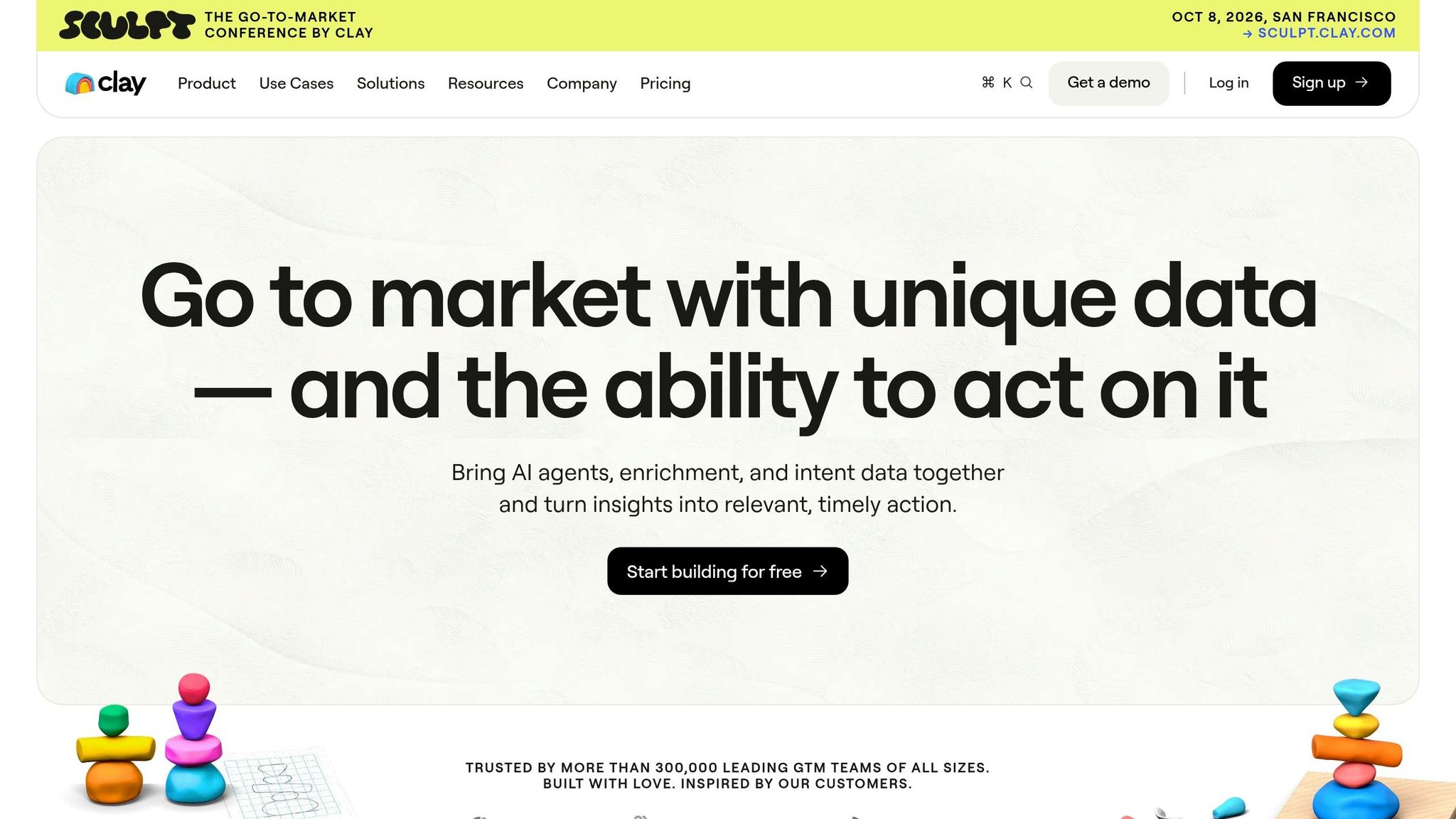
Salesforce and HubSpot are great at managing your existing records, but the Clay MCP Server takes things a step further. It works at the intelligence layer, pulling in new leads and enriching the data you already have with external insights that your CRM just doesn’t include. Hosted directly on clay.com and maintained by Clay, the server ensures data integrity and reliability [16].
GTM and CRM Coverage
Clay’s MCP equips AI agents with 7 specialized tools designed to find and enrich both contact and company data [16]. For example, you can search for contacts at a specific company by job title, department, seniority, or location. Want to track new hires at a target account? You can filter by timeframe, like "new hires in the last 3 months at Stripe" [16]. On the company side, it provides insights like headcount growth, tech stack, revenue model, recent news, and investor details. This enriched data syncs effortlessly with your CRM, streamlining your lead generation efforts.
Data Access and Workflow Automation
With sequential enrichment, GTM engineers can build detailed profiles step by step. Start by running find-and-enrich-company to create a comprehensive company profile, then use add-company-data-points to dig deeper into metrics like recent product launches [16]. Once integrated with a CRM-specific MCP, the workflow becomes seamless: for instance, Claude can find and enrich a lead in Clay and instantly create a record in your CRM, no manual steps required.
To get started, simply add the Clay MCP endpoint (https://api.clay.com/v3/mcp) to your mcp.json file in Cursor or Claude Desktop. Authenticate it with your Clay API key, which you can find in your dashboard [16].
Next,
Reliability and Governance
The server runs on Clay’s own infrastructure, ensuring that API credentials and data transfers remain within a vendor-controlled environment [16]. However, it’s worth noting that MCP servers aren’t optimized for bulk processing. Performance can drop when handling datasets larger than 10,000 contacts, so they’re better suited for smaller, targeted tasks [3]. To avoid disruptions during large enrichment runs, use the get-credits-available tool to monitor your credit balance [16]. Also, for security, avoid storing your API key in .mcp.json or CLAUDE.md. Instead, rely on environment variables or a secure credential store [10].
Pricing and Scalability
The MCP server itself is free to use [16]. However, you’ll need a Clay account with API credentials, and the platform operates on a credit-based system with a free tier available [16]. For teams running high-volume enrichment, keeping an eye on credit consumption is key, making the get-credits-available tool an essential part of your workflow.
| Tool | Purpose |
|---|---|
find-and-enrich-contacts-at-company |
Locate contacts by role or title within a specific company domain |
find-and-enrich-company |
Generate a complete company profile |
add-company-data-points |
Add detailed metrics, like tech stack or revenue, to a company record |
find-and-enrich-list-of-contacts |
Enrich data for a list of specific individuals |
get-credits-available |
Check the remaining credits in your Clay workspace |
4. All-in-One GTM MCP Stacks
While individual MCP servers handle specific GTM tasks, stacking them transforms Claude into a full-cycle GTM operator. This setup shifts Claude from being just a chatbot to a central command hub for GTM teams. By integrating various tools into a single workflow, it connects GTM and CRM functions seamlessly.
As Jan B, Head of Growth at Databar, explains:
"Once you connect 3–4 MCP servers, Claude Code stops being a chatbot and starts being an operator. It reads your pipeline, enriches contacts, checks analytics, and drafts outreach. All in one session." [1]
GTM and CRM Coverage
A well-built GTM MCP stack includes five core layers: AI (Claude as the orchestrator), Signal (intent detection tools like Clearcue or 6sense), Data (CRMs like HubSpot, Salesforce, or Supabase), Outreach (platforms like HeyReach, Lemlist, or Instantly), and Intelligence (analytics tools such as PostHog or Brave Search) [17]. These layers communicate through Claude, allowing a single prompt to trigger a series of actions, detecting a buying signal, enriching contact data, updating CRM records, and enrolling a prospect in an outreach sequence, all without switching between tools.
This integrated approach pays off: signal-based outreach through an MCP stack achieves 25–35% reply rates, compared to just 5–8% for traditional cold outreach. Additionally, automating data entry can save sales reps around 13–20 hours of manual work each week [17].
Data Access and Workflow Automation
One standout feature is waterfall enrichment, automatically running a prospect through over 100 data providers until a match is found. This process boosts contact match rates from 50–60% to 80–90%. To maintain performance, 3–5 active MCP servers per session are ideal to keep Claude’s context window focused and its tool selection accurate [1][3].
For example, in April 2026, Jonathan Molina, an Account Executive at Deel, used the Amplemarket MCP to analyze a database of over 200 million contacts. He routed leads to product-specific lists and generated summaries, all through Claude. What used to take 4 hours was cut down to just 90 seconds [4].
While automation speeds up workflows, it’s essential to implement safeguards to ensure data integrity.
Reliability and Governance
Using too many servers with write access can lead to issues like write access sprawl. Start with read-only permissions for CRM connections and test output quality over one to two weeks before granting write access incrementally [18][6]. For better control, use dedicated integration accounts with restricted field permissions rather than admin credentials. Also, avoid storing API keys in .mcp.json files [10]. For larger operations, splitting bulk tasks into 2–4 smaller sessions throughout the day can help avoid rate limit errors [19].
Pricing and Scalability
Once functionality and governance are in place, cost and scalability become the next considerations. Stack pricing depends on team size and specific needs:
| Stack Tier | Monthly Cost | Key Tools |
|---|---|---|
| Lean | Under $200 | Claude Desktop, Clearcue Starter (~$87/mo), Supabase (free–$25), HeyReach ($79) |
| Growth | Under $400 | Claude, Clearcue Pro (~$219/mo), HubSpot (free–$15/seat), HeyReach ($79) |
| Enterprise | Custom | Salesforce/HubSpot Enterprise, Clearcue Scale (~$483/mo+), Lemlist or Instantly ($30–$39) |
The overall cost is largely influenced by the SaaS platforms and their API tiers, rather than the MCP servers themselves [1]. For teams just starting out, a lean stack, combining Claude, one signal tool, and an existing CRM, can deliver immediate returns before scaling up to a more comprehensive setup.
Pros and Cons of Each MCP Server
Choosing the right MCP server is a key step in streamlining your GTM workflow. Each option has its strengths and limitations, making it essential to evaluate them based on your specific needs. A breakdown of the main contenders:
HubSpot MCP is the easiest to get started with. It supports basic reads even on free HubSpot accounts, while more advanced features like deal updates require at least a Sales Hub Starter plan, starting at $20 per month. However, many implementations rely on community-built servers instead of officially maintained ones, which could impact reliability [1][20].
Salesforce MCP is a great fit for enterprise teams with strict data governance requirements. It supports advanced SOQL queries and custom objects through OAuth 2.1, but you’ll need Salesforce CLI, Node.js 18+, and a dedicated admin to handle Connected Apps setup. As the Digital Applied team noted:
"Salesforce dominates enterprise… the Salesforce permission model is complex; budget setup time." [20]
Clay MCP is the most simple to connect, offering free initial credits. However, it mainly functions as a data viewer. While you can access Clay data via Claude, you can’t initiate enrichment waterfalls or workflows like Claygent directly within the AI interface. Its integration with Claude also limits its flexibility across other platforms [4].
The table below offers a side-by-side comparison to help you weigh your options:
| Server | Best For | Auth Method | Pricing | Key Strength | Key Weakness |
|---|---|---|---|---|---|
| HubSpot | SMB / mid-market sales | Private App Token / OAuth | Free server; HubSpot from $20/mo | Easy setup, broad GTM coverage | Community-maintained servers [1][20] |
| Salesforce | Enterprise RevOps | OAuth 2.1 (Connected App) | Free server; enterprise subscription required | SOQL, custom objects, sharing rules | High setup complexity [2][20] |
| Clay | Account research / drafting | OAuth (Claude-only) | Free credits on first connection | Official Claude directory integration | Read-only; no active workflows [4] |
Which MCP Server Should You Use?
Choosing the right MCP server starts with your current CRM platform. There’s no need to overhaul your CRM solely to integrate an MCP server. As Adam Bush from MCPFind explains:
"The right starting point depends on your existing CRM: pick the server that matches the platform your team already uses." [2]
For SMB or mid-market inbound teams, HubSpot MCP is a top pick. It works seamlessly with free HubSpot accounts for basic reads, doesn’t require a dedicated admin, and was the first CRM connector designed specifically for Claude AI [2][5].
High-velocity outbound teams should consider Pipedrive or Close MCP. These options allow for quick API key setup and smooth pipeline operations. For more details, check the table below.
Enterprise RevOps teams with advanced data governance needs should lean toward Salesforce MCP. Be prepared to allocate admin time for the Connected App setup and confirm your licensing includes both Agentforce and a Claude Team or Enterprise plan before moving forward [5].
For outbound teams looking to enhance contact match rates, pairing your CRM’s MCP with a data enrichment server like Databar can increase match rates from 50–60% to over 80–90% [1]. Additionally, Zapier MCP is a versatile option for connecting to over 7,000 apps via webhooks [1].
A quick summary of the recommended MCP servers based on team profiles:
| Team Profile | Recommended Server | Auth Method | Key Reason |
|---|---|---|---|
| SMB / Inbound | HubSpot MCP | Private App Token | Native Claude integration, low setup [2][5] |
| High-Velocity Outbound | Pipedrive or Close MCP | API Key | Minimal configuration, fast pipeline operations [2] |
| Enterprise RevOps | Salesforce MCP | OAuth 2.1 | Supports SOQL, custom objects, governance [2] |
| Outbound + Enrichment | CRM MCP + Databar | API Key | Waterfall enrichment for higher match rates [1] |
| Niche Stack / Gaps | Zapier MCP | Webhook-based | Connects to over 7,000 apps via webhooks [1] |
FAQs
What’s the safest way to give Claude write access to my CRM?
To connect Claude securely, set it up through a properly configured MCP server. This ensures safe communication with your CRM data. Use servers that are well-maintained and equipped with strong authentication measures. Configure OAuth or API keys for access, and restrict Claude’s permissions to only the data fields it truly needs. Make it a habit to review access regularly and stick to your CRM’s security policies to stay in control and reduce potential risks.
How do I avoid rate limits and slowdowns when running bulk updates or enrichment?
When performing bulk updates or enrichment tasks, MCP servers designed for high throughput are your best bet to avoid rate limits or slowdowns. Make sure your servers are set up to handle multiple connections efficiently and that API keys are managed carefully to prevent disruptions.
It’s also smart to monitor usage closely so you can adjust request volumes as needed. For smoother performance, consider spreading large updates over time and leveraging servers with built-in throttling controls to keep workflows running steadily, even during high-demand periods.
Can I trigger recurring workflows if the CRM MCP server doesn’t support webhooks?
If the CRM MCP server doesn’t support webhooks, setting up recurring workflows directly through it becomes impossible. To work around this, you’ll need to explore other methods or integrate additional tools that can handle the automation your pipeline requires.
Related Blog Posts
- Top 10 Claude MCP Servers for Marketing Teams (2026), Vetted & Tested
- Best GTM Engineering Tools 2026: How to Choose (Orchestration, Data Quality, Attribution, and Integration Depth)
- 10 Best AI Workflow Automation Tools for Startup Marketing (2026)
- Best MCP Servers for Marketing Analytics & Attribution (2026)