
Tired of juggling spreadsheets and platforms for your marketing data? MCP servers let you connect tools like Google Ads, GA4, and HubSpot directly to AI assistants like Claude, turning scattered metrics into live, actionable insights.
I’m Lillian Pierson, a fractional CMO and licensed Professional Engineer who’s educated 45,400 people on building AI-native growth systems, custom MCP servers included. Judge a server by whether it survives a messy attribution question, not by its demo.
MCP (Model Context Protocol) servers bridge the gap between your AI and real-time data. Instead of manually exporting reports or switching tabs endlessly, you can ask Claude questions like, “Which campaigns had the best ROAS last week?” and get instant answers.
Key Takeaways:
- SegmentStream: Best for multi-channel attribution and adjusting campaign budgets directly.
- Google Ads MCP: Official server for campaign metrics, but read-only.
- Meta Ads MCP: Great for social ads with creative fatigue detection and write capabilities.
- GA4 MCP: Access over 200 metrics for behavioral insights, but lacks ad spend data.
- HubSpot MCP: Ideal for CRM and pipeline visibility, especially for B2B teams.
- BigQuery MCP: Perfect for advanced data analysis with SQL-level access.
- Stripe MCP: Connects Claude to revenue data like MRR and customer LTV.
- Shopify MCP: Links store data with marketing platforms for e-commerce teams.
- Slack MCP: Automates report delivery and team alerts.
Quick Comparison:
| MCP Server | Best Use Case | Read/Write | Setup Time |
|---|---|---|---|
| SegmentStream | Multi-channel attribution | Read-Write | 1 min |
| Google Ads | Campaign metrics (read-only) | Read-Only | 30-60 min |
| Meta Ads | Social ad performance | Read-Write | 5-15 min |
| GA4 | Behavioral insights | Read-Only | 5-15 min |
| HubSpot | CRM and pipeline reporting | Read (Beta) | 10 min |
| BigQuery | Advanced data analysis | Read-Write | 20-30 min |
| Stripe | Revenue and subscription metrics | Read-Only | 5-10 min |
| Shopify | E-commerce analytics | Read-Write | 1 min |
| Slack | Report delivery and alerts | Read-Write | 5 min |
Start simple: If you’re just getting started, pair Google Ads MCP or GA4 MCP with SegmentStream for cross-channel insights. For e-commerce, Shopify MCP and Stripe MCP are a powerful combo for connecting ad spend with revenue.
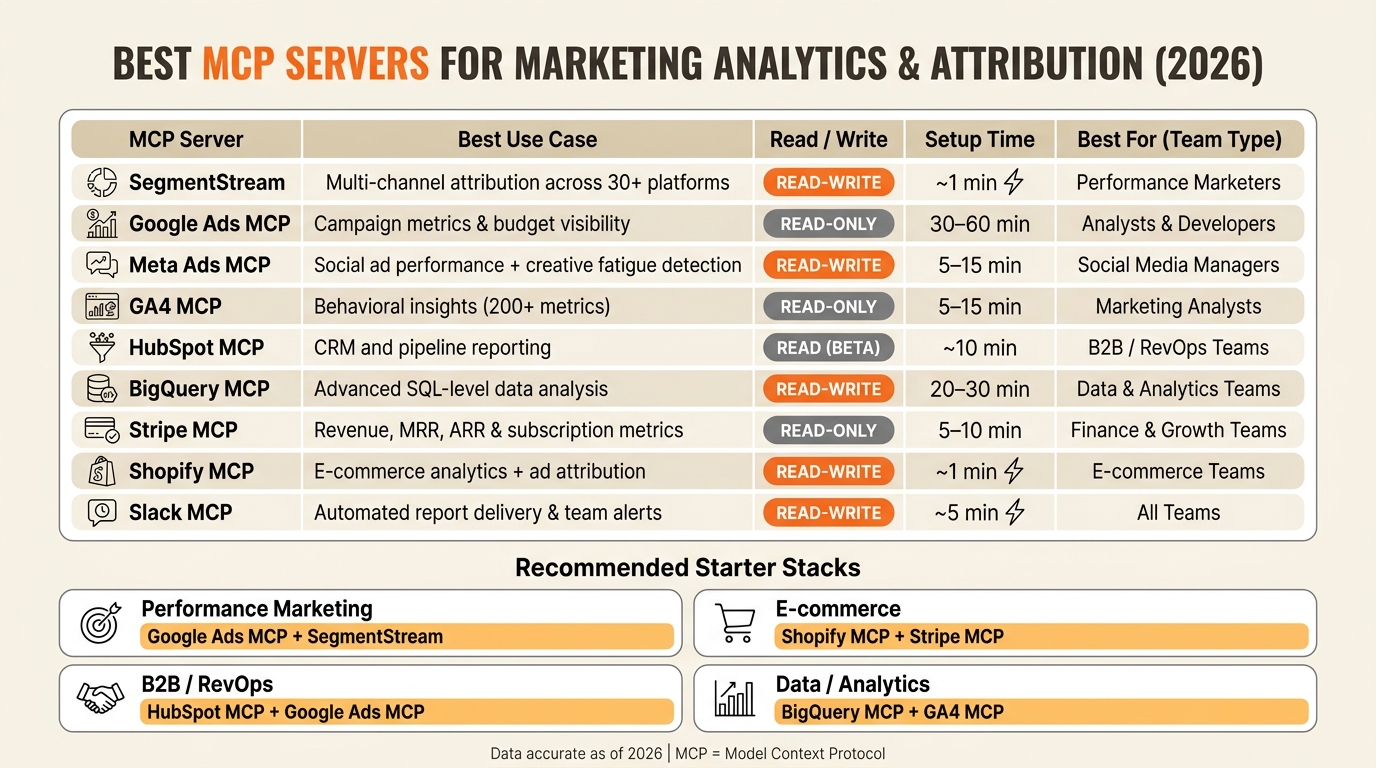
Best MCP Servers for Marketing Analytics: Side-by-Side Comparison (2026)
How to Use Claude MCP for a Complete GA4 Audit (2026 Tutorial)
1. SegmentStream
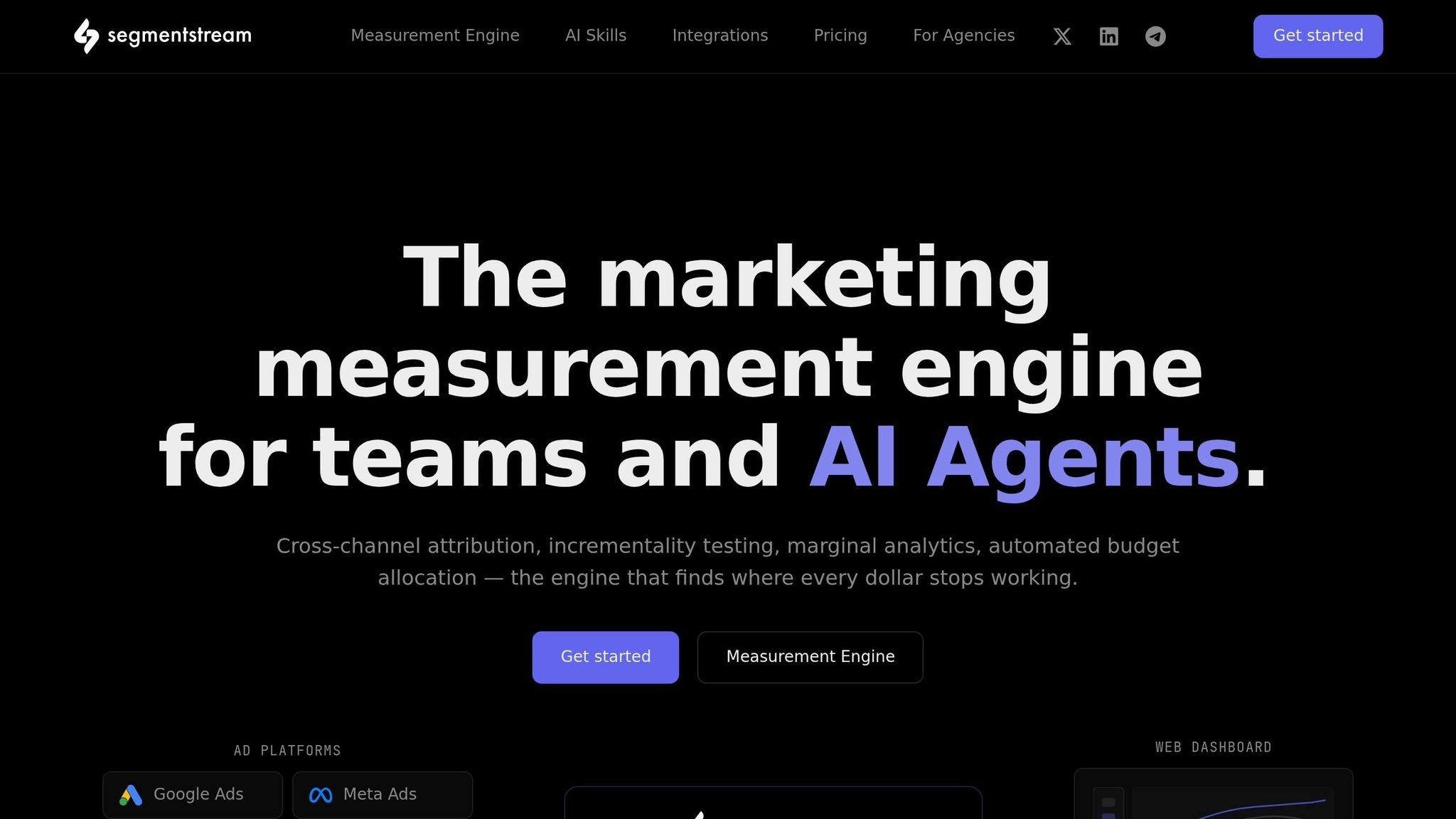
SegmentStream takes a different approach by using a complete measurement engine rather than just transferring raw data. It connects with over 30 advertising platforms, including Google Ads, Meta, TikTok, LinkedIn, Pinterest, and Snapchat. By pulling all this data together, it creates a unified view that’s corrected for attribution before Claude interacts with it [2].
What sets SegmentStream apart is its ability to handle both read and write operations. This means Claude can not only analyze the data but also take action, such as pausing campaigns that aren’t performing well and reallocating budgets based on dependable marketing attribution data [2].
"SegmentStream is the only MCP where the read-write capability is grounded in measurement, AI can execute budget changes because it has attribution, incrementality, and optimization data to base decisions on," says SegmentStream [2]
Getting started is quick: just activate your workspace and connect Claude via OAuth in under a minute. The initial setup involves granting access to ad APIs and BigQuery, ensuring your data remains securely housed in your own BigQuery warehouse with no risk of vendor lock-in [2]. SegmentStream boasts a 4.7/5 rating on G2 and operates on a subscription model, making it a strong option for performance marketers handling multi-channel campaigns.
One practical use case? You could prompt it to "Move $10,000 from underperforming Google Search campaigns to the top-performing Meta ad sets." This capability allows for precise, data-driven budget adjustments, making it ideal for marketers and media buyers managing complex, multi-channel ad strategies. When scaling, it is vital to choose cross-channel attribution tools that align with your specific business goals.
2. Google Ads MCP
Google Ads MCP builds on SegmentStream’s measurement engine, connecting Claude directly to live campaign data. Introduced by the Google Ads API team in October 2025 [9], it provides access to key campaign metrics, budget details, account statuses, and metadata for both single and multi-account (MCC) setups.
Setting it up depends on your approach. The official Google-maintained server is free and open-source, but it requires a bit of effort. You’ll need a 22-character Developer Token, a Google Cloud Project ID, and OAuth 2.0 credentials. Expect to spend 30–60 minutes on configuration [6]. On the other hand, third-party tools like AdFire or Pipeboard simplify things with one-click OAuth setups, skipping the need for a developer token and cutting setup time to under 5 minutes [10][11]. Once configured, you can explore how read and write capabilities differ across servers.
The biggest consideration here is read vs. write access. The official server offers read-only access, which is ideal for safe, AI-driven analysis [6][7]:
"The read-only boundary is the safety model. The official Google server refuses to mutate anything… it is the intentional guardrail that lets you put this in front of an LLM without a three-week security review," says Digital Applied [7]
If you need write access, community-built servers like Adspirer (priced at $49–$99/month) come into play. These servers allow Claude to take actions like pausing campaigns or adjusting bids. However, it’s a good idea to use dry-run mode for testing before making live changes [8].
This setup is especially useful for PPC managers, agencies managing multiple client accounts, or marketing leads who need quick analytics without diving into the Google Ads interface. For instance, once connected, you could ask Claude to "Pull campaign performance for the last 7 days. Show total spend, clicks, conversions, and ROAS. Highlight campaigns with ROAS below 2.0 or impression share lost to budget exceeding 20%."
3. Meta Ads MCP
On April 29, 2026, Meta introduced its Meta Ads MCP server [14]. Before this, connecting to the Meta Marketing API involved a lengthy App Review process that could take weeks. Now, with a quick OAuth authentication, you can get started in just 5–15 minutes. Third-party connectors make the setup even smoother, allowing you to dive into Meta’s advertising tools without delay.
Once connected, Claude integrates with 29 tools covering campaign management, product catalogs, signal diagnostics, and performance insights across Facebook, Instagram (Feed, Stories, Reels), and the Audience Network [12]. Among these, diagnostic tools like get_pixel_health and get_capi_diagnostics ensure accurate attribution by verifying that your Conversion API is firing correctly.
One standout feature is creative fatigue detection, which flags underperforming creatives in real time. This capability has proven to be a game-changer for marketers. As Sarah K., a Paid Media Manager at an e-commerce agency, shared:
"The Meta Ads API with Claude setup cut our weekly reporting from 8 hours to 20 minutes. We catch creative fatigue the same day now instead of 2 weeks later," says Sarah K., Paid Media Manager, E-commerce Agency [13]
During its open beta (as of May 2026), the server is free to use, though accessing advanced features through a Claude subscription starts at $20 per month. For those needing cross-channel attribution tools, combining Meta and Google Ads data, third-party tools charge $25 to $99 per month per account. These functionalities make the Meta Ads MCP particularly appealing for dynamic campaign analysis.
This tool is ideal for performance marketers, agencies juggling multiple ad accounts, and data analysts looking for seamless cross-account rollups without the headache of exporting CSVs. For example, once connected, you can execute a prompt like this:
"Pull the last 7 days of spend, ROAS, CPA, and frequency for every active campaign. Format as a Markdown table sorted by spend. Flag anything with frequency over 3.0 or CPA more than 30% above the campaign average."
Additionally, campaigns created via MCP start in a PAUSED state by default, ensuring no accidental overspending occurs [12].
4. GA4 MCP
GA4 MCP takes the hassle out of accessing behavioral and conversion data by connecting Google Analytics 4 (GA4) directly to Claude. While GA4 offers a treasure trove of data, extracting meaningful insights has traditionally meant wrestling with its interface or crafting complex API queries. With this integration, Claude taps into the Google Analytics 4 Data API (for reporting) and the Admin API (for configuring properties), making over 200 dimensions and metrics accessible in plain English.
Setting it up requires enabling the analyticsdata.googleapis.com and analyticsadmin.googleapis.com APIs in your Google Cloud project. For team environments, using a Service Account JSON key simplifies authentication and avoids repeated logins [15][17]. If you opt for a hosted solution, setup takes under a minute, whereas a local CLI install might take 5–15 minutes [16][21].
Matt Landers, Head of Developer Relations at Google Analytics, summed it up perfectly:
"This bridges the gap between the powerful conversational abilities of Large Language Models (LLMs), like Gemini, and the rich, specific data within your Google Analytics property." [17]
Once connected, Claude does more than just pull reports. It can write back to GA4, handling tasks like creating remarketing audiences, configuring conversion events, and updating data stream settings, all without touching the GA4 interface [16][18]. It even uses the Realtime API to access activity from the past 30 minutes, bypassing the usual 24–48 hour delay in standard GA4 reports [19]. One standout feature is attribution reconciliation, which compares and normalizes GA4 data against Google Ads, pinpointing discrepancies in conversion reporting [16].
This tool is a game-changer for growth marketers, content managers, and marketing operations teams, anyone who needs quick, actionable insights without building reports from scratch [23][24]. Nico Brooks, Head of Analytics at Two Octobers, shared his experience:
"I used it to generate meaningful insights for my clients, and was able to converse with it about data as if I had an eager, competent, and speedy analyst by my side." [22]
An example of what it can do: "Compare GA4-reported conversions vs. Google Ads reported conversions by campaign for last month. Show the gap." Tasks like this, which once required significant time and effort, now take about 2 minutes [16]. By integrating analytics into a conversational workflow, GA4 MCP empowers marketers to make faster, data-driven decisions with real-time analytics.
5. HubSpot MCP
The HubSpot MCP creates a direct link between Claude and your HubSpot CRM and Marketing Hub, cutting out the need for manual data exports or endless copy-pasting. As Jon McLaren, Developer Advocate at HubSpot, explains:
"It acts as a bridge, allowing your favorite AI tools to securely connect and interact directly with your HubSpot account." [25]
This integration provides a complete view of your customer data. Claude gains access to contacts, companies, deals, tickets, campaigns, landing pages, and detailed activity histories. It can also update CRM records by creating tasks, changing deal stages, or logging notes. However, marketing content like campaigns and landing pages is read-only, though this is typically enough for reporting and attribution tasks.
An example of what you can do with this setup: "Find all contacts from companies with 50+ employees who visited our pricing page this month. Summarize their recent interactions and suggest which ones are most likely to convert based on their deal history." Normally, such a query would require a developer or a custom report, but with Claude and HubSpot MCP, it’s done in seconds.
Setting up the HubSpot MCP isn’t overly complex. You’ll need to configure a HubSpot Private App using OAuth 2.0 and select the necessary permission scopes (e.g., crm.objects.contacts.read). This process takes about 10 minutes. Developers can install the Developer MCP (local CLI) with a single command (hs mcp setup), making it ideal for those building on HubSpot. Keep in mind, though, that a HubSpot admin must connect first before other team members can authorize their access.
This server is particularly useful for B2B marketing teams, RevOps, and agencies working with mid-market clients. It’s a top choice for SMB and mid-market agencies thanks to its broad CRM capabilities and streamlined workflows. The HubSpot MCP is included with any HubSpot subscription at no additional cost, but standard API rate limits apply (typically 100 requests per 10 seconds for private apps).
One key security feature to note: if your HubSpot account has "Sensitive Data" settings enabled, activity objects like calls and emails are automatically blocked from the MCP server. This integration not only makes accessing live data faster and more secure but also reduces manual work, helping teams make smarter, data-driven decisions.
6. BigQuery MCP
BigQuery MCP takes your data analysis to the next level by connecting Claude directly to your data warehouse. This means it can access all your marketing data stored in Google BigQuery, including exports from Google Ads, GA4, and Google Search Console. The best part? You can query it all in plain English, no SQL required.
With this integration, Claude can combine data from different sources, like GSC search data and GA4 conversion metrics, to calculate insights such as "revenue per keyword." These are the kinds of insights that standard tools often miss. It also taps into BigQuery ML features, enabling advanced capabilities like time-series forecasting (using ARIMA_PLUS), anomaly detection, and n-gram analysis. These tools help uncover patterns and themes that typical dashboards simply don’t reveal.
An example of what you can do with BigQuery MCP:
"What is the contribution margin by channel YTD, including gross revenue, net sales, COGS, fulfillment, fees, ad spend, and CM rate? Identify which products have the largest gap between gross revenue and net sales."
This level of analysis has real-world impact. In May 2026, a Shopify brand used this connection to discover a $20.2M returns gap that wasn’t visible in their usual dashboards. They also identified 14 SKUs in their "Sun Protection" category that were draining $264K in contribution margin. As Nischala Agnihotri, Head of Product Marketing at Saras Analytics, explained:
"The BigQuery MCP connection isn’t a technical configuration detail. It’s the difference between analysis and a convincing story about your business that happens to be wrong."
Setting it up is simple and takes about 20–30 minutes. You’ll need to create a billed Google Cloud project, activate the BigQuery API, authenticate using OAuth 2.0 or a service account JSON key, and assign the Dataplex Catalog Viewer role to avoid schema browsing issues [28].
Once configured, BigQuery MCP delivers cost-effective, real-time insights. BigQuery’s free tier includes 1 TB of query processing and 10 GB of storage per month, so for most sites, search data costs only $12 to $24 annually [26]. This makes it an ideal tool for data and analytics teams, performance marketers, and marketing leaders who want immediate, self-service access to warehouse-level data without relying on engineering.
7. Looker MCP
Looker MCP leverages Looker’s semantic layer to deliver reliable, consistent metrics. Deployed through Windsor.ai, it connects to over 325 data sources, including Google Ads, Meta Ads, TikTok Ads, LinkedIn Ads, GA4, HubSpot, Salesforce, Shopify, and data warehouses like BigQuery and Snowflake [29]. Unlike BigQuery MCP, which provides raw data access, Looker MCP focuses on delivering governed insights, making it easier to turn raw data into actionable metrics.
This structured approach enables marketing analysts and BI teams to perform meaningful analyses without unnecessary complexity. With Looker MCP, Claude can interact with LookML models, query explores, calculate ROAS, and integrate multi-channel data using pre-approved metrics from your BI team. For deeper dives, Claude can even transition directly into the Looker interface [30].
A practical example of its capabilities:
"List all measures in the ‘Ad Performance’ Explore, then run a query to show total spend and conversions by campaign for the last 30 days. If the ROAS is below 2.0, flag those campaigns." [30]
Improvado highlights the advantage:
"Building Looker explores for every marketing question slows your team down. Improvado MCP gives your AI agent direct access to campaign data… without LookML, without waiting for analysts." [31]
To get started, download the MCP Toolbox binary (v1.0.0+), set the LOOKER_BASE_URL environment variable, and update your claude_desktop_config.json file. Use API credentials (Client ID and Secret) for a quicker local setup, or opt for OAuth for an organization-wide deployment [30]. Looker MCP is ideal for marketing analysts, BI teams, and agencies that need real-time, governed reporting across fragmented data sources, without the hassle of rebuilding explores for every new query [31].
8. Stripe MCP
Stripe MCP goes beyond ad spend and pipeline metrics by delivering real revenue data. By connecting directly to the Stripe API, it provides access to crucial financial details like customers, subscriptions, invoices, payment intents, coupons, and products [33]. It also includes the execute_analytics tool, which leverages Stripe’s Analytics API to fetch key metrics such as MRR, ARR, and usage-based revenue. These metrics can be broken down by day, week, month, or year for a clearer picture of performance [32].
As Stripe’s own documentation explains:
"The Stripe Model Context Protocol (MCP) server provides a set of tools that AI agents can use to interact with the Stripe API and search our knowledge base." [33]
This functionality is a game-changer because, while ad platforms focus on conversions, Stripe delivers actual cash flow data, essential for validating campaign revenue [2][27]. Claude can even cross-check Stripe invoice data with CRM or ad platform records to identify discrepancies and fill in gaps [2][27].
To get started, add https://mcp.stripe.com to your mcp.json file and authenticate using a restricted API key (note that OAuth isn’t supported) [32][33]. Since Stripe MCP allows for write actions, like creating coupons, canceling subscriptions, or generating payment links, it’s critical to enforce human approval before executing these commands [33].
An example of a useful prompt once connected:
"Pull the last 500 invoices from Stripe. Group them by customer email and calculate the total lifetime value for each. Then identify the top 5% of customers by revenue so we can create a high-value lookalike audience."
This example highlights the power of Stripe MCP in providing actionable revenue insights. By streamlining access to data that would otherwise require manual exports from the Stripe Dashboard, this tool is ideal for growth analysts, performance marketers, and finance teams. It simplifies revenue analysis and primes your data for further integrations, setting the stage for the next MCP server review [2].
9. Shopify MCP

Shopify MCP links Claude directly to your store’s data, covering everything from orders and products to customers, inventory, and marketing performance. This connection allows for real-time insights. Depending on the server you choose, Claude can also integrate data from platforms like Google Ads, Meta Ads, TikTok Ads, GA4, and Klaviyo. This makes it possible to calculate metrics like true ROAS and CPA across channels. Different server options are available to match specific needs, whether it’s ROI tracking, attribution, or operational data.
- Adzviser MCP: Ideal for marketing ROI and cross-channel attribution.
- dtc-mcp: Best for teams using Klaviyo for email and SMS. It pre-aggregates data server-side, saving about 80% of the context compared to raw API wrappers [35].
- Shopify Analytics MCP: An open-source option tailored for store operations and customer segmentation, offering tools like RFM segmentation, churn risk scoring, and CLV segmentation [36].
Each server option brings unique benefits, allowing you to customize how Shopify data is used to meet your goals.
The Shopify AI Toolkit plugin is easy to install with a single command in Claude Code:
/plugin install shopify-plugin@shopify-ai-toolkit.
No authentication is required [37]. For advanced analytics, you can create a custom Shopify App through the Dev Dashboard to generate a Client ID and Secret. These credentials can be added as environment variables (e.g., SHOPIFY_STORE and SHOPIFY_CLIENT_SECRET) in your Claude Desktop configuration [36]. When working with large datasets, like a full quarter’s worth of orders, it’s recommended to limit API calls to 40 REST requests per second to prevent connection issues [34].
Shopify highlights the simplicity of this process:
"The Toolkit ensures your agent works with Shopify correctly, rather than guessing at how things are implemented." [37]
The efficiency gains are hard to ignore. Tasks that used to take hours, like calculating repeat purchase rates by acquisition channel, can now be completed in just a couple of minutes. Even more complex analyses, such as an inventory risk assessment that once took a full day, can now be done in seconds [38]. For example, you could ask:
"Given current inventory levels and the last 30 days of sales velocity, which products will stock out before Black Friday? Include current ad spend on those products."
This type of prompt provides a clear risk assessment, pinpointing which SKUs are at risk of selling out and the associated ad spend. It eliminates the need for time-consuming manual analysis.
Shopify MCP is especially useful for e-commerce marketing teams, DTC growth analysts, and performance marketers who need to connect campaign spend with actual store outcomes, without the hassle of manual data handling [38].
10. Slack MCP
Slack MCP connects Claude directly to your team, bypassing ad platforms or databases. Instead of dealing with raw metrics, it works as a delivery and collaboration tool. How: once a measurement MCP (like SegmentStream or GA4) generates a report, Slack MCP ensures that report lands in the right channel and reaches the right people, no manual exporting required [2].
With its read-write access, Claude can interact seamlessly within Slack. It can pull conversation data, post updates, upload files, and even trigger alerts. This means your report delivery and real-time actions are fully integrated into your Slack workspace [2][3].
Setting it up is simple. Using Claude Desktop, you just follow a standard OAuth prompt. Slack MCP scores a solid 4/5 for both its capabilities and ease of installation, and it’s already included with your Slack subscription. This integration effectively combines live data analysis with team collaboration, creating a foundation for automated marketing workflows.
"SegmentStream MCP builds the report with attribution-corrected numbers using custom attribution models, and Slack MCP delivers it to the channel," says SegmentStream [2]
For performance marketers, media buyers, and RevOps teams, this means immediate access to campaign insights, no need to switch between dashboards [2]. For instance, you can set up an instruction like: "When CPA exceeds $50 on any campaign, pause it and alert me on Slack." [2]
This single command brings together monitoring, decision-making, and communication into one streamlined, automated process.
Pros and Cons
Each MCP server brings its own set of advantages and drawbacks. Knowing these can help you shape a marketing stack that aligns with your goals.
A quick comparison of the strengths and limitations of various MCP servers, helping you craft a smarter analytics and attribution strategy:
| MCP Server | Key Strength | Primary Weakness | Read/Write | Best For |
|---|---|---|---|---|
| SegmentStream | Unified cross-channel attribution across 30+ platforms [2] | Requires a paid subscription [2] | Read-Write | Performance marketers |
| Google Ads | Official, authoritative campaign data [2] | Cannot modify bids or budgets [2] | Read-Only | Analysts & developers |
| Meta Ads | Ability to pause and modify campaigns [2] | Community-maintained with no official support [2] | Read-Write | Social media managers |
| GA4 | Over 200 dimensions and metrics [2] | Siloed from paid media spend data [2] | Read-Only | Marketing analysts |
| HubSpot | Live CRM and pipeline visibility [2] | Write capability is not available in beta [2] | Read (Beta) | B2B RevOps teams |
| BigQuery | Full SQL access with no vendor lock-in [2] | Requires SQL expertise [1] | Read-Write | Data teams |
| Looker | Unavailable as of early 2026 [5] | No official MCP integration yet [5] | N/A | N/A |
| Stripe | Deep payment and subscription data [39] | Limited to financial metrics only [39] | Read-Only | Finance & growth teams |
| Shopify | Zero setup; auto-enabled on all stores [2] | Not built for marketing attribution [2] | Read-Write | E-commerce teams |
| Slack | Seamless report delivery and team alerts [4] | Not an analytical tool [39] | Read-Write | All teams |
This breakdown highlights the variety of capabilities, from actionable write operations to robust reporting.
A key distinction lies between read-only and read-write servers. Read-only tools, like GA4 and Google Ads, provide reliable metrics but lack the ability to modify campaigns. On the other hand, read-write solutions such as SegmentStream and Meta Ads offer direct control, allowing you to pause or adjust campaigns. However, relying on community-maintained servers like Meta Ads comes with risks. They can break when APIs change and often lack official vendor support.
GA4 and Google Ads are limited to their respective platforms, making it impossible to determine whether a Google click or a Meta impression led to a conversion. In cases involving multi-channel spending, a server like SegmentStream can be worth its subscription cost by offering a unified view of cross-channel performance.
For teams that need deeper data access, BigQuery provides unmatched flexibility with full SQL capabilities and no vendor lock-in. However, this power comes with a learning curve, as SQL expertise is required. For teams lacking such expertise, using the managed version through Google Cloud can help reduce complexity [5].
"The biggest waste in paid media isn’t within a platform, it’s the budget misallocation between platforms that single-platform reporting can never surface," says MCP Playground [40]
Conclusion
Choosing the right MCP server boils down to understanding your specific goals and the questions you need to answer.
For paid media analysis, start with Google Ads and GA4. These tools are free, reliable, and cover the essentials. If you’re looking for multi-channel analysis, SegmentStream is a solid choice, offering a robust measurement engine with independent attribution capabilities.
When it comes to CRM and pipeline reporting, HubSpot is a go-to for SMB and mid-market B2B teams. It’s included with your subscription and gives Claude live access to contacts, deals, and revenue stages. For finance-related performance reporting, Stripe bridges the gap by connecting payment and subscription data directly to your AI queries. Remember to use a restricted API key with read-only access for security.
If your data is already centralized in a warehouse, BigQuery offers unmatched flexibility. It allows you to integrate marketing spend with internal business metrics in ways that single-platform servers can’t replicate.
A quick reference for building your starting stack:
| Team Type | Start Here | Add Next |
|---|---|---|
| Performance Marketing | Google Ads MCP | SegmentStream |
| B2B / RevOps | HubSpot MCP | Google Ads MCP |
| E-commerce | Shopify MCP | Stripe MCP |
| Data / Analytics | BigQuery MCP | GA4 MCP |
This framework ensures your marketing stack is both efficient and purpose-driven. Begin by connecting your largest spend source, then layer in attribution tools. Avoid overcomplicating things, focusing on just two or three well-configured servers will outperform a cluttered setup with poorly maintained connections.
FAQs
What’s an MCP server, and how is it different from a normal connector?
An MCP server (Model Context Protocol server) serves as a specialized connector designed to help AI models, such as Claude, interact with external data sources in real time. What sets it apart from standard connectors is its role as a unified bridge. Instead of linking directly to a single system, the MCP server standardizes access across multiple platforms. This streamlined approach makes it easier for AI to analyze live data without requiring manual exports or intricate coding setups.
Is it safe to let Claude change budgets or pause campaigns with read-write access?
Managing permissions for Claude to adjust budgets or pause campaigns with read-write access comes with risks. It opens the door to potential security issues, particularly if permissions are granted without proper oversight or if harmful instructions are introduced. To safeguard sensitive data and retain control over your campaigns, always restrict permissions and handle them with care.
Which MCP servers should I start with for my team (ads, B2B, e-commerce, or data)?
To start, MCP servers are essential tools for managing data from platforms like Google Ads, Meta Ads, and GA4. They provide access to critical marketing data and are relatively simple to set up. These servers are versatile, making them a great fit for a variety of teams, whether you’re focused on ads, B2B strategies, e-commerce, or data analysis.