
If I were explaining this to a founder over coffee, I’d put it this way: your AI costs don’t come from one bucket. They come from inference, serverless compute, orchestration, and memory/storage. If you track them as one blended number, you miss the leak. If you split them, you can price better, set limits earlier, and protect gross margin before you hit $1 million ARR.
Here’s the short version:
- Inference is the main cost center. Output tokens often cost 3x to 5x more than input tokens.
- Workflow design changes margin fast. Agent flows can use 20x to 30x more tokens than a simple chat path.
- Serverless works early when demand is uneven. Fixed capacity starts to make sense once usage is stable and predictable.
- Retries and tool calls hide spend. If you don’t track orchestration on its own, you won’t know what’s driving cost.
- The best first levers are simple. Shorter outputs, smaller-model routing, caching, batching, and retry caps usually cut spend fast.
- The metric I’d watch first is accepted-result cost. That tells you what you paid for answers that actually met quality and latency goals.
A few numbers matter right away:
- 50% utilization can make effective token cost 2x higher
- Cached tokens can be up to 10x cheaper
- A narrow 7B model can cut costs by about 80% versus a 400B model for focused tasks
- Kimi K3 pricing example: $3.00 per 1 million input tokens, $15.00 per 1 million output tokens, and $0.30 per 1 million cached tokens
| Cost layer | What to watch | Margin risk |
|---|---|---|
| Inference | Input/output tokens, model choice | Main COGS driver |
| Serverless | Utilization, burstiness, idle avoidance | Unit cost can swing with load |
| Orchestration | Retries, loops, tool calls, parallel steps | Hidden multiplier on spend |
| Memory & storage | RAG overhead, cache, vector lookups | Adds per-request cost |
The good news is you don’t need a giant finance stack to get control. I’d start with cost per request, cost per active user, accepted-result cost, and feature-level margin, then review them weekly while usage is still changing fast.
That’s the frame for the rest of the piece.
Inference Spend: Token Economics and Cost Per Request
Inference is usually the biggest piece of AI spend, so it makes sense to start at the request level. This is the line item that moves fastest in AI COGS. Every request adds cost, which means small changes to prompts and workflows can change margin fast.
The Variables That Move Inference Costs the Most
A few variables drive most of the bill. Output tokens cost 3x to 5x more than input tokens [1]. Model class is another major lever. Reasoning models like OpenAI‘s o-series can cost far more per task than standard inference [1].
Workflow shape matters too. Multi-step workflows can produce 20 to 30 times more tokens than a standard single-turn exchange [1]. That adds up fast.
The table below shows how token use grows with task complexity.
| Task Type | Average Tokens Consumed |
|---|---|
| Basic Q&A | 50–500 |
| Short Summary | 2,000–6,000 |
| Multi-step Workflow | 1,000,000+ |
Source: [2]
Utilization also changes the math. Low utilization pushes unit cost up. At 50% utilization, effective cost per token doubles [3].
Basic Margin Math for Founders and Finance Leads
The good news is the math here is pretty simple. However, many early-stage teams still don’t apply it in a steady way.
Start with cost per request. Take your input token count and multiply it by the input price. Then add output tokens multiplied by the output price. After that, add any cached token costs. For a concrete benchmark, Kimi K3 on OpenRouter costs $3.00 per 1M input tokens, $15.00 per 1M output tokens, and $0.30 per 1M cached tokens [3].
From there, move up one level. Calculate cost per active user by dividing total monthly inference spend by monthly active users. Then calculate contribution margin by feature with (Feature Revenue − AI Inference Cost) ÷ Feature Revenue.
| Metric | Formula |
|---|---|
| Cost per Request | (Input Tokens × Price_in) + (Output Tokens × Price_out) + (Cached Tokens × Price_cache) |
| Cost per Active User | Total Monthly Inference Spend ÷ Monthly Active Users |
| Contribution Margin | (Feature Revenue − AI Inference Cost) ÷ Feature Revenue |
| Accepted-Result Cost | Total Cost ÷ Number of Results Meeting Quality & Latency Targets |
One early fix is worth making: use accepted-result cost instead of cost per raw request. In other words, divide total cost, including retries and failed calls, by only the results that met your quality and latency target [4].
That number is more honest. It gives you the clearest signal on margin at the request level.
Once request cost is clear, the next question is whether different AI pricing models help or hurt unit economics.
Serverless AI Pricing: When Usage-Based Compute Helps or Hurts
Serverless AI pricing charges you per token or per request, with no reservation required. The provider handles capacity, scaling, and idle time. The real question is simple: does it lower your unit cost at your current volume? This isn’t just a pricing question. It’s a margin question under changing load, which is why utilization matters so much.
For founders, the metric that matters isn’t raw capacity. It’s paid utilization. Enterprise GPU utilization often sits at 15% to 30% [1], so idle capacity can eat your margin fast. Idle time is pure waste. Serverless pushes that risk onto the provider, which is why it often works well in the early stage.
| Deployment Type | Idle Costs | Scaling Behavior | Cost Predictability |
|---|---|---|---|
| Serverless / Managed API | None | Highly elastic; instant scaling | Low; sensitive to token-heavy loops and usage spikes |
| Provisioned / Reserved | High if demand falls below commitment | Step-function; add replicas in discrete blocks | High; fixed recurring cost for the term |
| Dedicated / Owned | High; must cover peaks | Fixed; limited by installed physical fleet | Moderate; CapEx is fixed, OpEx varies |
Where Serverless Improves Early-Stage Unit Economics
Before demand settles down, serverless helps you avoid stranded GPU capacity. That matters most for bursty workloads: a coding assistant that goes quiet on weekends, a pilot with uneven adoption, or a feature you’re still testing. In cases like that, always-on capacity can cost more than the usage itself.
The good news is serverless keeps early unit economics clean while demand is still hard to call. You pay for what gets used, and you avoid paying for empty space in the system. Once demand starts to look steady, the decision shifts from guesswork to a break-even calculation.
When to Move Beyond Serverless
Serverless starts to lose its edge once traffic becomes stable and easy to predict. Use the break-even point: $V^* = F / (p – c)$, where $F$ is your fixed self-hosting cost, $p$ is the API price per service unit, and $c$ is your marginal self-host cost per service unit [4].
However, the math isn’t the only signal to watch.
- If latency targets get tighter, higher speed usually means smaller batch sizes or more GPUs for the same batch. That pushes cost up [3].
- If you’re running high, predictable volume, the per-unit premium on serverless can turn into a margin drag that dedicated capacity would remove.
In other words, serverless makes sense while demand is uneven and hard to forecast. Once usage steadies out, fixed capacity can become the cheaper path. From that point on, unit economics depend on how well you run that fixed capacity.
Orchestration Spend: Agent Overhead, Retries, and Workflow Cost Leakage
Inference is the cost everyone sees. Orchestration is the hidden multiplier. This is the third layer of startup AI costs, after inference and serverless, and it’s often where margin starts to leak once model pricing looks under control.
As soon as you move beyond single-shot prompts and into agent-based products, a new cost bucket shows up. It usually doesn’t appear cleanly in your inference bill: orchestration spend. That includes everything between prompt and output, like reasoning loops, tool and API calls, retry logic, and routing decisions. The bigger issue is the extra work those systems create through tool calls, retries, and parallel branches. That’s why it helps to track orchestration on its own instead of lumping it into base model spend.
| Orchestration Cost Source | Likely Cost Impact |
|---|---|
| Internal reasoning tokens | Can cost much more than standard inference; extra workflow-generated usage on complex tasks |
| Agentic tool / API calls | High; each call adds token overhead |
| Autonomous retries & error handling | Moderate; multiplies per-step cost when failures repeat |
| Parallel execution | High; spikes concurrent usage |
| Orchestration-state overhead | Low to moderate; memory-bound and grows with long-running workflows |
How Agent Workflows Drive Up Costs Beyond Model Calls
Every extra step in an agent chain adds another prompt, another output, and often another tool call. Verbose reasoning steps can get expensive fast. Parallel sub-agents help with latency. However, they also push up concurrent usage and cost.
Retries are another common source of waste. An uncapped loop can turn a small bug into a big bill if the system keeps reasoning or retrying without a stop condition [2]. The good news is simple guardrails help a lot:
- Retry caps
- Depth limits
- API throttles [2]
Once you can see those multipliers, you can start separating them from inference in your reporting.
How to Separate Orchestration Costs From Inference in Reporting
Blended spend hides the leak. Total GPU cost or blended token spend won’t show where the problem sits. You need workflow-level tagging by feature, workflow branch, and customer. In other words, track cost per reasoning loop, per token path, and per agent behavior apart from base inference spend [2].
That changes how you act on the data. When you know which step wastes the most money, you can route simple work to a smaller model, tighten the prompt, or cache the result. Without that level of detail, you’re optimizing blind. If you can’t isolate orchestration, you can’t tell whether margin erosion comes from model choice or workflow design.
Margin Controls: Cost Levers Founders Should Use in 2026
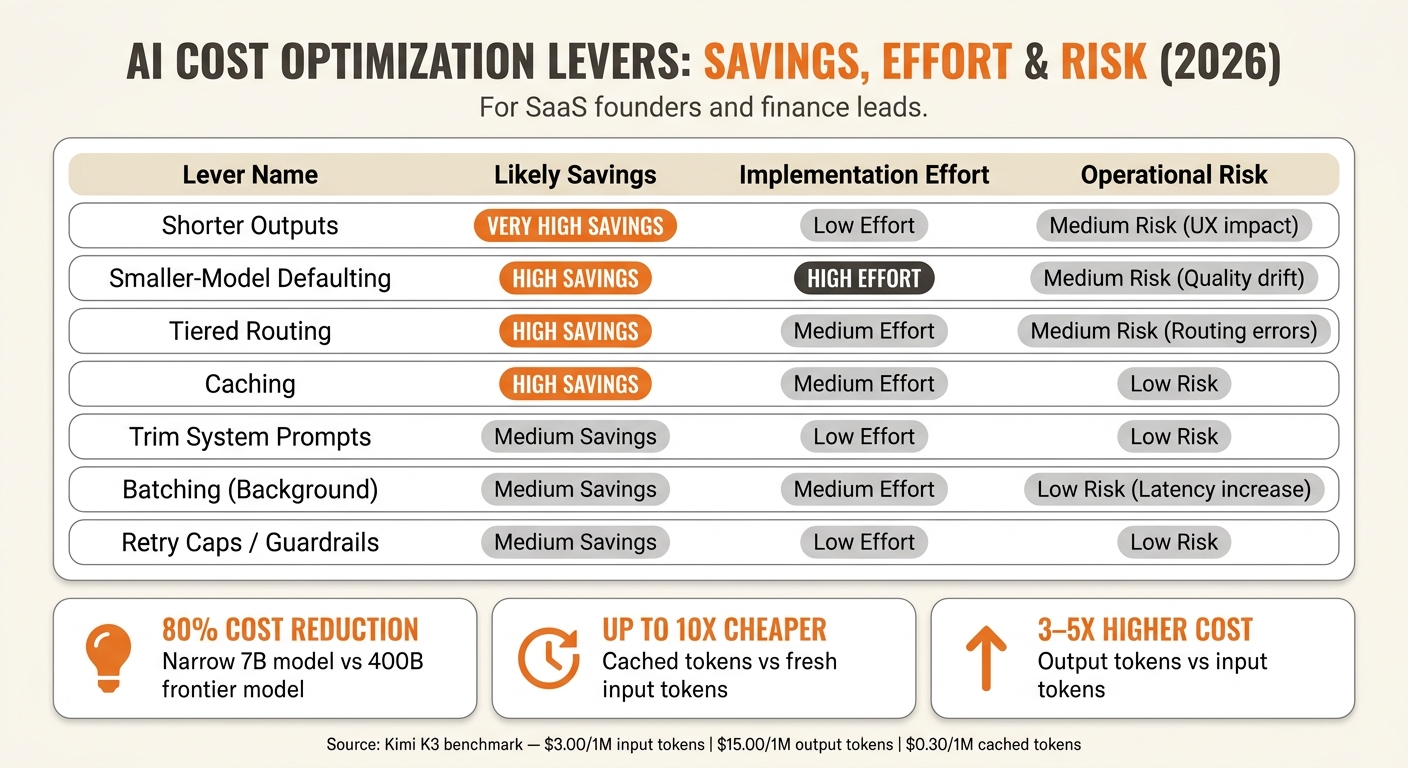
AI Cost Optimization Levers: Savings, Effort & Risk for Founders (2026)
With inference, serverless, and orchestration split into separate layers, you have more control over gross margin. The upside is simple: you can cut AI spend without making the product worse.
The Highest-Confidence Ways to Cut Inference Costs
Output tokens are your biggest cost driver. They usually cost 3 to 5 times more than input tokens because each output token requires more model work [1][3]. In plain English, the fastest lever is shorter outputs. Tell the model to stay concise, cut filler from system prompts, and set firm output length limits. Test before you ship so you don’t trade lower cost for a worse user experience.
Smaller-model defaulting is your best medium-term move if you want bigger savings. A purpose-built 7B parameter model can deliver 80% cost reductions versus a 400B parameter frontier model for narrow, well-defined tasks [1]. In other words, make the smaller model the default and require an explicit override for jobs that need deeper reasoning.
Caching is one of the most overlooked levers, and it works well. Cached input tokens can be up to 10 times cheaper than fresh input tokens [3]. If your product reuses the same system prompts or shared context, that’s close to free margin improvement. Batching background work such as reports, summaries, and async enrichment can also lower cost per token. However, it adds latency, so use it for non-real-time jobs.
Here’s a clean view of the main levers across savings, effort, and risk:
| Optimization Lever | Likely Savings | Implementation Effort | Operational Risk |
|---|---|---|---|
| Shorter Outputs | Very High | Low | Medium (UX impact) |
| Smaller-Model Defaulting | High | High | Medium (Quality drift) |
| Tiered Routing | High | Medium | Medium (Routing errors) |
| Caching | High | Medium | Low |
| Trim System Prompts | Medium | Low | Low |
| Batching (Background) | Medium | Medium | Low (Latency increase) |
| Retry Caps / Guardrails | Medium | Low | Low |
Tiered routing sits in the middle on effort, but it starts to pay back as usage climbs. Send simple requests to lightweight models and save frontier models for harder reasoning. If your product has task types that are easy to separate, build this early.
Once these levers are live, the next step is to check whether spend is dropping at the feature level, not just in the top-line bill.
A Simple Cadence for Tracking AI Burn and Margin Drift
Track burn by feature and workflow, not just by month. A blended monthly AI bill can hide leaks inside specific features, so keep an eye on cost per request, cost per customer, gross margin by product line, retry rate, and workflow-level spend spikes.
That last metric catches more problems than most founders expect. A single agentic workflow can generate 20 to 30 times more tokens than a standard chatbot exchange [1]. If you don’t track spend at the workflow level, those spikes stay hidden until they hit the monthly invoice.
When you know your actual cost per customer, pricing gets a lot less fuzzy. You can set tiers, usage caps, or effort-based pricing with numbers behind them instead of guessing while margin gets squeezed.
Review these metrics weekly during early growth, not monthly.
FAQs
How do I know when serverless is no longer the cheapest option?
Serverless stays cheap up to a point. After that, the math flips, and self-hosting starts to cost less than the per-token markup you pay an API provider.
Review the switch once your self-hosting marginal cost, including GPU rental and compute efficiency, stays below API pricing on a consistent basis. Also keep an eye on your Inference Efficiency Ratio. If it falls below 5:1, your current cost structure is likely unsustainable.
What should I track first to spot hidden AI cost leaks?
Start by tracking gross margin by workload or customer segment, not just in aggregate. That gives you a clear view of where the business makes money and where it leaks it.
Include all variable costs in that view:
- inference
- infrastructure overhead
- third-party API expenses
Also split visible token usage from hidden usage. Visible usage is the part customers can usually see. Hidden usage includes system prompts, reasoning steps, agent loops, and retries.
That split matters. In other words, a workload can look cheap on the surface while the back-end token burn tells a very different story.
Keep a close eye on the top 10% of customers by AI cost-to-revenue ratio. Those accounts often shape margin faster than anyone expects.
You should also track gross profit per million tokens as a real-time profitability signal. It gives you a fast read on whether usage growth is helping the business or quietly eating into margin.
How can I cut AI costs without hurting answer quality?
Treat inference like a constrained resource, not just overhead that goes up and down. Route simple tasks to lower-cost models, and send harder work to higher-performance models.
In other words, match model cost to task difficulty. A lightweight classifier, formatter, or extraction step usually doesn’t need your best model. Save that for the parts that call for deeper reasoning.
On the serving side, tighten the system with quantization, continuous batching, and careful KV cache management. Those changes can cut token spend and improve throughput without changing the user-facing workflow.
You also want guardrails that stop waste before it snowballs. Add:
- API throttles to control bursty usage
- Retry caps so failed calls don’t spiral
- Depth limits to stop agent loops from running too long
The good news is that these controls don’t just trim cost. They also make the system more predictable, which matters a lot when usage starts to climb.
Related Blog Posts
- How AI Companies Are Replacing the SaaS Magic Number & Why It’s Painfully Overdue
- How AI Companies Are Monetizing in 2026: Seats, Tokens, and the Hybrid Models Winning Right Now
- How AI Companies Are Monetizing in 2026: Seats, Tokens, and the Hybrid Models Winning Right Now
- The AI-Native Founder’s Build-to-Sell Stack: Tools to Ship and Sell an AI Product (2026)