
AI founders who hit revenue fast treat product, data, measurement, and sales like one system. I’d boil this article down to one rule: pick one main tool for each job, wire in measurement from day one, and add more only when revenue proves you need it.
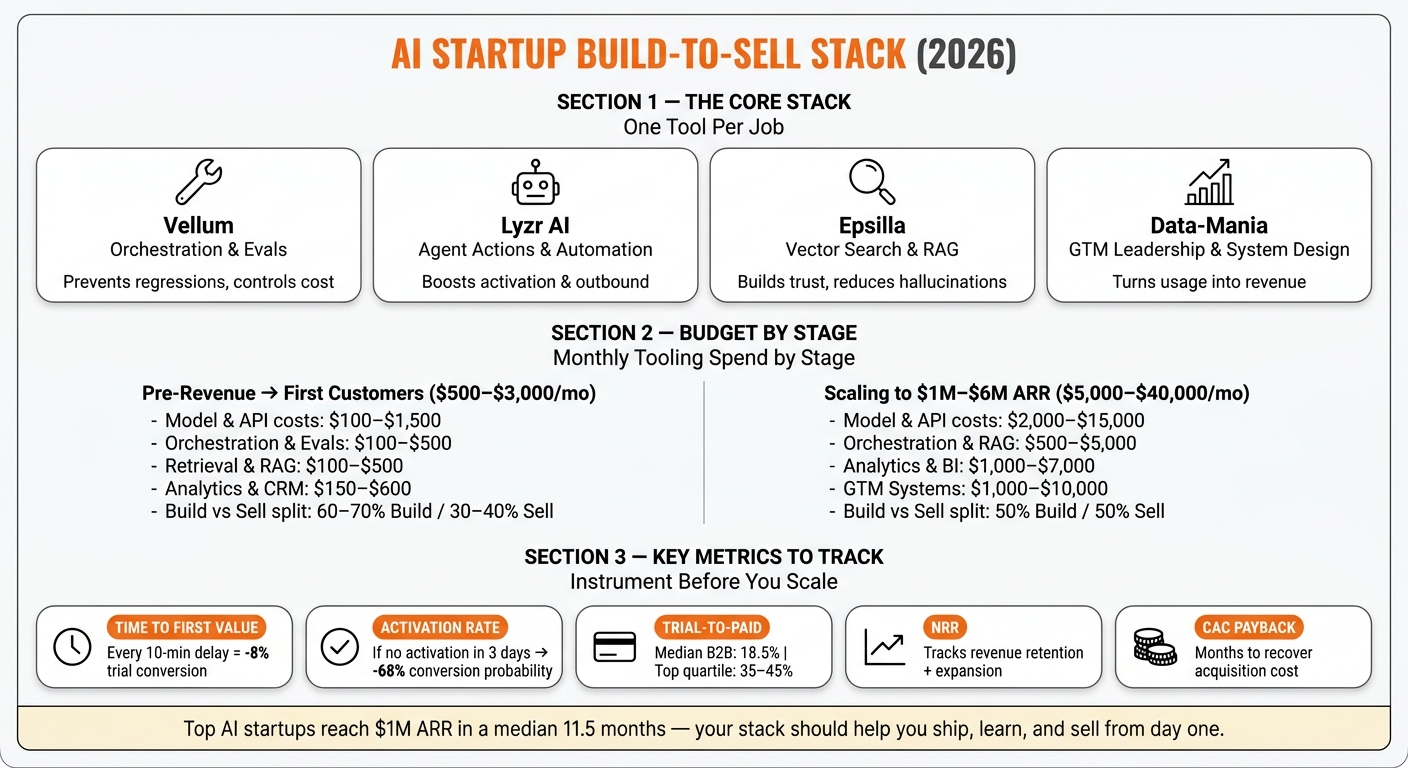
It might surprise you to hear that top AI startups reach $1 million in annualized revenue in a median 11.5 months. That pace puts pressure on your stack. You need tools that help you ship fast, ground outputs, track user value, and connect usage to pipeline. In this piece, the core setup is simple:
- Vellum for prompt workflows, evals, and production visibility
- Lyzr AI for agent actions inside the product and GTM flows
- Epsilla for vector search, RAG, and user memory
- Data-Mania for GTM system design, ICP, KPIs, and product-to-pipeline alignment
I also see a clear budget path in the article. Early teams usually spend $500 to $3,000 per month on tooling. As they move toward $1 million to $6 million ARR, that stack can grow to $5,000 to $40,000 per month, with spend shifting from mostly build to a more even split between build and sell.
Before you scale traffic or outbound, the article says to track a short list of signals:
- Time to first value
- Activation rate
- Trial-to-paid conversion
- NRR
- CAC payback
- Product events like retries, source views, workflow runs, and hallucination flags
The good news is that the article’s point is simple: start narrow, instrument early, and make every tool earn its place. Or put another way, a polished demo gets attention, but a stack tied to conversion and sales is what gets you paid.
AI Startup Build-to-Sell Stack: Tools, Budget & Metrics at a Glance
AI Agents: The Ultimate Tech Stack for Building Scalable AI Agents In 2025
Quick Comparison
| Tool / Layer | Main Job | Best Time to Use It | Revenue Link |
|---|---|---|---|
| Vellum | Orchestration, prompt versioning, evals, tracing | When you move past a basic chat UI into multi-step workflows | Helps cut regressions, control cost, and support paid product use |
| Lyzr AI | Agent actions and automation | When your AI needs to take actions, call APIs, or run steps | Helps with activation, support efficiency, and outbound personalization |
| Epsilla | Retrieval, semantic search, RAG | When answer quality or vector latency starts to slip | Helps with trust, stickiness, and personalization |
| Data-Mania | GTM leadership and system design | When you need ICP, KPIs, event schema, and pipeline alignment | Helps turn product usage into repeatable revenue |
If you’re building an AI product in 2026, this article’s message is clear: use a lean stack that helps you ship, learn, and sell from day one.
The minimum AI startup stack: one tool per job
Early AI startups slow down when the stack gets crowded. The cleanest setup is simple: give one primary tool to each core job, whether that’s model calls, logging, retrieval, usage tracking, or GTM workflows. Add another tool only when a bottleneck ties straight to revenue. If a tool doesn’t have a clear job, don’t buy it.
With that rule in place, choose tools based on stage and buyer motion.
How to pick AI product development tools for your startup
Pick tools by stage.
At the prototype phase, speed wins. Use tools with prebuilt templates for common AI patterns, native support for leading LLMs, and onboarding that doesn’t drag. A prototype tool should help you ship an observable feature in under 40 engineering hours.[3]
At the production phase, the bar moves up. You need environment separation across dev, staging, and prod, along with prompt versioning, rollback, role-based access controls, and documented uptime practices. For B2B products, cut any tool that falls short on data residency, SOC 2 alignment, encryption, or tenant isolation.[2][4] Once customer data touches your stack, those items are standard.
Buyer motion matters too. Self-serve products need product analytics. Sales-led teams need account-level insight and demo environments. Enterprise pilots need audit logs, customer-specific configuration, and private RAG.[1][5]
That narrows your build layer to three areas: orchestration, retrieval, and agent features.
What to budget from prototype to early revenue
Once you limit the stack, the budget usually follows the bottleneck.
For a lean team from pre-revenue through first customers, monthly tooling spend usually lands between $500 and $3,000. That often breaks down like this:
- Model and API costs: $100-$1,500/month
- Orchestration and evaluation: $100-$500/month
- Retrieval and RAG: $100-$500/month
- Product analytics plus CRM: $150-$600/month combined
As you move toward $1 million-$6 million ARR, the numbers climb. Model usage often reaches $2,000-$15,000/month. Orchestration and RAG tools move into $500-$5,000/month tiers. Analytics and BI tooling adds $1,000-$7,000/month, and GTM systems add another $1,000-$10,000/month. That puts the full stack around $5,000-$40,000/month.
For early teams, a good split is 60%-70% on build and 30%-40% on sell. Once sales starts to repeat, shift toward 50/50.
Ship the product: Vellum, Lyzr AI, and Epsilla in the core build stack
The build stack splits into three jobs: orchestration, retrieval, and agents. Together, they cover the path from the first prompt to a production system. Start with orchestration, because every layer after that depends on it.
Vellum for orchestration, evaluation, and production visibility
Vellum helps steady prompts, workflows, and production monitoring after launch. That matters because launch regressions can stall trials and renewals.
Your team gets prompt version control, workflow orchestration for multi-step LLM calls, automated evaluations against golden outputs, and traces that show latency, costs, and errors. In other words, you can catch regressions before users hit them, and you can keep spend and SLAs in check.
| Capability | What Vellum Handles | Why It Matters for Revenue |
|---|---|---|
| Prompt Versioning | Prompt version control across environments | Prevents production regressions |
| Workflow Orchestration | Managing multi-step LLM calls and logic | Supports premium workflow features |
| Evaluations | Automated testing of prompt outputs against golden outputs | Cuts support load |
| Observability & Traces | Real-time visibility into latency, cost, and errors | Controls latency and cost |
Use Vellum when prompts still move by hand between environments, or when you need side-by-side model testing before deployment. If you’re past a basic chat interface and you’re building multi-step workflows, this is the place to start.
Once the workflow is steady, the next layer is agent actions.
Lyzr AI for agentic product features and GTM automation
Lyzr AI adds agents that act for users. That shifts the product from a response system to an action-taking system people will pay for. Use it for in-app copilots, lead research, support triage, and content ops.
| Agent Use Case | Business Impact |
|---|---|
| In-app Copilot | Increases user activation and feature discovery |
| Lead Research Agent | Improves demo conversion rates by personalizing outreach |
| Customer Support Triage | Reduces first-response time and support ticket volume |
| Automated Content Ops | Lowers CAC by scaling organic marketing efforts |
Choose Lyzr AI when your roadmap includes agents that need to act, not just respond. If the agent needs to call an API, update a record, or run a sequence of steps, a plain LLM call usually won’t hold up in production.
Agent output still breaks without grounded retrieval. That’s where Epsilla comes in.
Epsilla for retrieval, semantic search, and RAG performance
Retrieval quality shapes whether users trust the product. It keeps answers grounded, so buyers trust what the system returns.
Epsilla handles vector storage, semantic search, and fast document retrieval so your RAG system can return relevant context on every call. It also supports persistent user memory across sessions, which lets you personalize at scale.
| Retrieval Job | How Epsilla Supports It | Downstream GTM Impact |
|---|---|---|
| Semantic Search | High-accuracy vector indexing of unstructured data | Users find answers faster, increasing product stickiness |
| Long-term Memory | Storing and retrieving user-specific context | Enables personalization |
| Knowledge Retrieval | Powering RAG with fast document fetching | Reduces hallucinations, building user trust in the AI |
Add Epsilla when your RAG system starts returning irrelevant answers or when vector search latency becomes noticeable to users. Both are signs of a retrieval bottleneck.
Measure and sell: analytics, GTM systems, and Data-Mania as the leadership layer
Shipping product is only part of the job. The stack also has to show revenue. Put your measurement layer in place before you spend money on paid acquisition or kick off outbound. Once people start signing up, those signals shape every sales and revenue call you make.
What to instrument before you scale acquisition
Set up the minimum measurement layer across your app, warehouse, and CRM, following GTM engineering benchmarks for 2026. Start with time to first value (TTFV), which is the time from sign-up to the first meaningful outcome. For AI products, this is one of the strongest early signals for conversion and retention. Every 10-minute delay in reaching first value costs about 8% in trial conversion[9], and if users do not activate within 3 days, the probability of conversion drops by 68%.[7]
Track product events in the app, send them to your warehouse, and sync them into the CRM using shared user and account IDs. Focus on activation, core feature usage, and retrieval-quality signals. That includes workflow runs, data-source connections, team invites, retries, thumbs-downs, hallucination flags, and source views.
Then turn those signals into PQLs and sales-assist triggers. In other words, your data should do more than sit in a dashboard. It should prompt onboarding when TTFV slips past 24 to 48 hours and alert sales when usage crosses your activation threshold.
| Metric | What to Measure | Why It Matters |
|---|---|---|
| Time to first value | Minutes from sign-up to first meaningful output | Strong early predictor of trial-to-paid conversion and retention |
| Activation rate | % of users who complete the defined value milestone | Shows whether onboarding is working |
| Trial-to-paid conversion | % of trials that convert to a paid plan | Median B2B SaaS trial-to-paid rate is 18.5%; top quartile reaches 35% to 45%[6] |
| NRR | Revenue retained plus expansion | Indicates whether the GTM motion can compound |
| CAC payback | Months to recover acquisition cost | Shows whether growth is efficient enough to sustain |
That data is not just for reporting. It becomes the input for GTM leadership.
How Data-Mania fits as the GTM leadership layer
This is where the stack stops being a set of tools and starts acting like a revenue system. Tools handle execution. Leadership sets ICP, positioning, channels, pipeline, and revenue ops.
Data-Mania, led by Lillian Pierson – a seasoned marketing leader and professional engineer with a background in data and AI consulting – provides GTM leadership and system design for AI-native startups. That work includes defining ICP, setting KPIs, designing the event schema that ties product telemetry to pipeline, and building the channel strategy that supports predictable revenue. Dedicated AI ownership is what moves teams from sub-$1M ARR into repeatable growth.[8]
Conclusion: The lean build-to-sell stack to start with
The shortest path from prototype to production and revenue
This stack covers the jobs that matter most: build, retrieve, measure, and sell. Leave one out, and quality slips, trust gets shaky, or revenue stalls. That’s why a lean stack stays tight until revenue shows you what to add next.
Add a tool only when it helps you ship, learn, or sell. If it doesn’t move one of those outcomes in a clear way, it doesn’t belong in the core stack yet.
Use Vellum for workflow control, Epsilla for grounded retrieval, Lyzr AI for product automation, and Zerve AI for data and experimentation. Once the build layer feels steady, connect usage to pipeline for AI-powered ROI forecasting. Tie product events to CRM before you scale acquisition.
Start narrow: one use case, a minimal stack, and instrumentation from day one. For the strategy behind the stack, see the Data-Mania essay The Secret to Building AI Software That Actually Sells, which goes deeper on the strategy. This is the shortest path from prototype to revenue. Prototype is the start. Revenue is the test.
FAQs
How do I choose which tool to add first?
Start with the biggest bottleneck in your workflow. Don’t start with feature-by-feature comparisons. Map out your process, then pick the tool that fixes the most immediate pain point, whether that’s scattered data or too much manual entry. It also needs to connect natively with your existing CRM.
For lean teams, this order tends to work well:
- Analytics first
- Content tools second
- Scheduling and automation after that
Before you commit, run a connection test to make sure the tools work together the way you expect.
When should I move from a prototype stack to a production stack?
Move when clear performance signals show your prototype stack is slowing growth. Base the call on what the work is telling you, not on some arbitrary timeline.
A few signals tend to show up first. Manual tasks start eating more than 5 hours a week. You hit free-tool limits for a full month, not just a random busy week. Or your team is tracking more than 50 active leads in a spreadsheet, which usually means the system is starting to creak.
In other words, these are the moments when a more scalable, automated production stack starts to make sense.
What should I track before spending on growth?
Before you spend a dollar on growth, set a pre-AI baseline over two quarters. Track your human SQL rates, touches to close, and overall win rates. That gives you a clean point of comparison, so you can tell whether AI is helping or just adding noise.
Keep your data clean and structured with the 10-Field Rule. In other words, if the inputs are messy, the outputs will be messy too. Fix data-flow dead zones, especially in marketing-to-sales handoffs, and give one owner, usually in RevOps, the job of validating predictive signals and managing retraining cycles.