
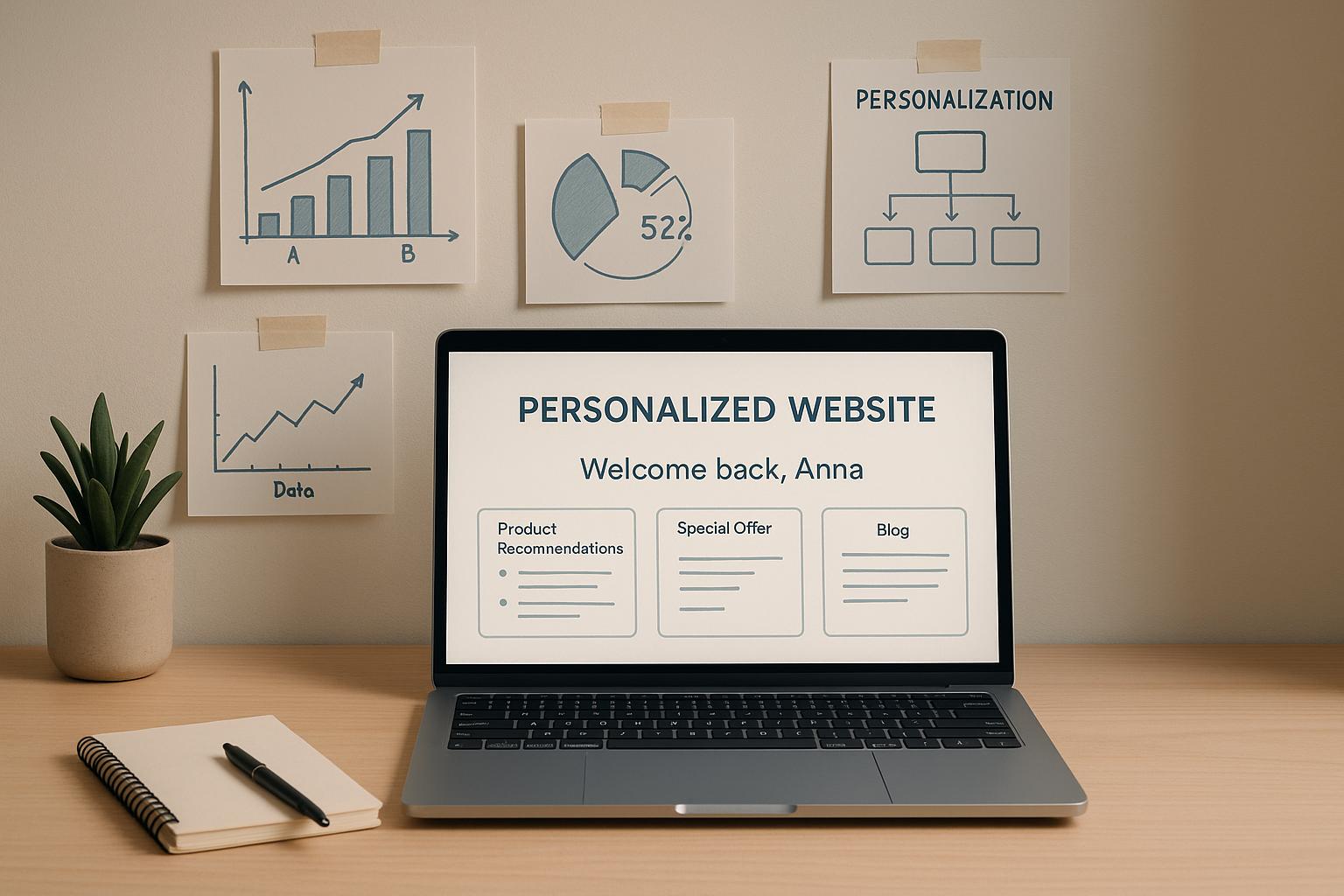

AI website personalization helps startups tailor their website experience for every visitor, boosting conversions and engagement. By analyzing user behavior, like browsing history or time spent on pages, AI tools predict what each visitor needs and adjust content, layouts, and calls to action in real time. For startups, this means more efficient use of traffic and resources – without increasing acquisition costs.
Key Takeaways:
- Why it matters: Startups using AI website personalization see purchase rates increase by 35% and order values rise by 21%.
- How it works: AI uses data like geolocation, device type, and user behavior to create tailored experiences.
- Where to start: Focus on high-impact pages – homepages, pricing, and feature pages – with small, testable changes.
- Tools to consider: Options like Amazon Personalize, Intellimize, and FunnelFlex.ai make implementation accessible for small teams.
- Compliance: Stay on top of privacy regulations like the CCPA and avoid unethical practices.
Here’s how to implement AI website personalization step by step, from simple rules-based changes to advanced, real-time AI-driven strategies.
#20 – Website marketing with AI: trust, personalisation, and creativity (Andy @ Orbit Media)
Building Blocks of AI Website Personalization
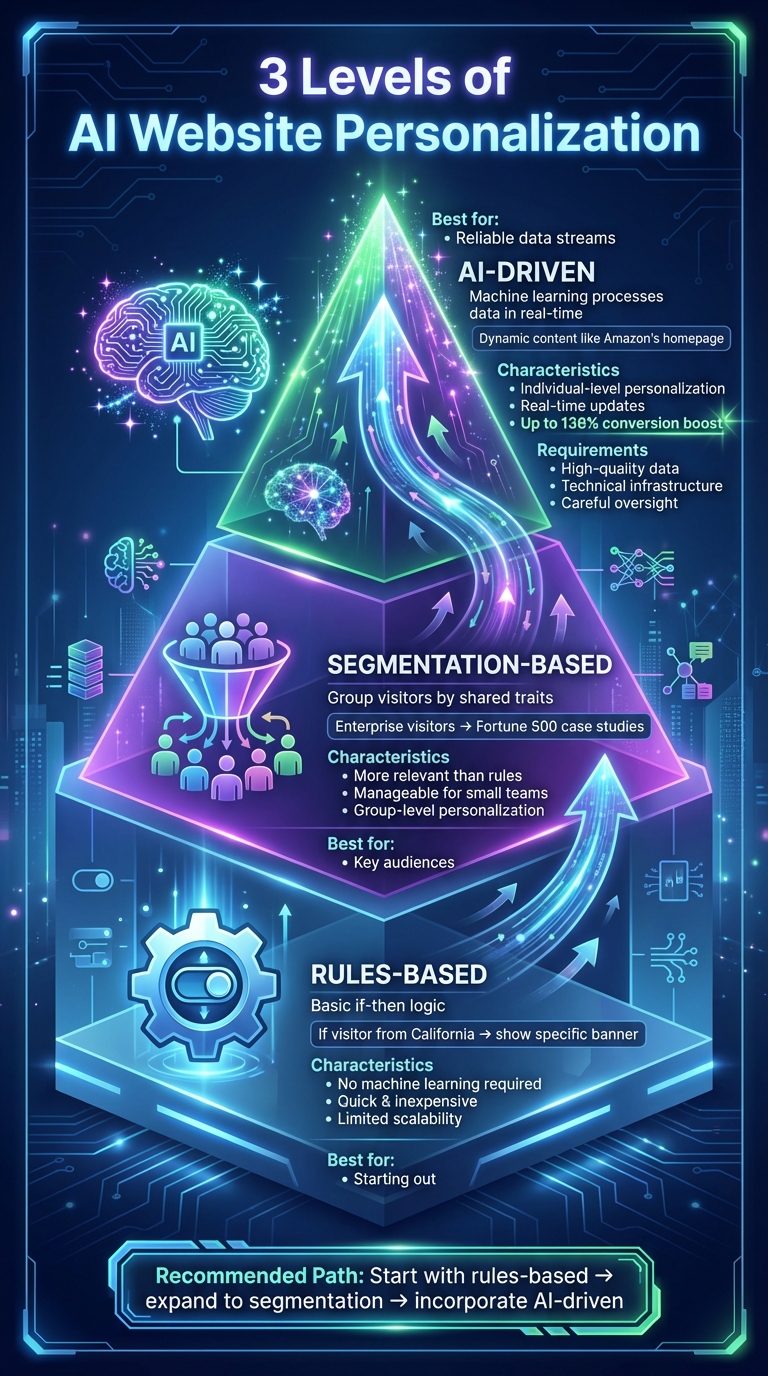
3 Levels of AI Website Personalization: From Rules-Based to AI-Driven
Creating personalized website experiences hinges on three main components: the level of sophistication, the quality of your data, and the AI methods you employ. These elements form the foundation for applying personalization effectively across your website, which we’ll explore further in this guide. personalization is not a one-size-fits-all solution – it evolves over time. You start with simple implementations and gradually add complexity as your data, traffic, and technical resources grow. Let’s break down the different levels of personalization and how they progress from basic to advanced.
3 Levels of Personalization
Rules-based personalization is the simplest way to begin. It works through basic if-then logic: for instance, if a visitor is from California, show them a specific banner; if they arrive via a paid ad, display a customized call-to-action (CTA) on the homepage. This method doesn’t require machine learning and can be set up using your content management system (CMS) or testing tools. While quick and inexpensive, it lacks scalability.
Segmentation-based personalization divides visitors into groups based on shared characteristics like industry, company size, lifecycle stage, or behavior. Each segment is then served tailored content. For example, enterprise visitors might see case studies featuring Fortune 500 companies, while startup founders are shown pricing options designed for leaner budgets. This approach offers more relevance than simple rules and is manageable for smaller teams. However, it still doesn’t cater to individual-level personalization.
AI-driven personalization takes things to the next level, using machine learning to process behavioral, demographic, and contextual data in real time. It dynamically updates content, layouts, and offers for each visitor. Think of Amazon’s homepage, which changes based on your browsing and purchase history – no manual rules required. Tools like Intellimize use real-time machine learning to adjust websites as they load, tailoring the experience for every visitor. This method offers impressive results: according to Bloomreach, personalized product recommendations and dynamic content can boost conversion rates by up to 136% [6]. However, it demands high-quality data, technical infrastructure, and careful oversight.
For most startups, a practical approach is to begin with rules-based personalization on a few high-impact pages, expand into segmentation for key audiences, and incorporate AI website personalization once you have reliable data streams and analytics in place.
Data Sources You Need
Data is the backbone of personalization. Startups should focus on three essential data streams: web analytics, CRM/marketing automation tools, and product usage data.
- Web analytics tools, such as Google Analytics, provide insights into visitor behavior, while your CRM captures lifecycle and account data.
- Product usage data from platforms like Amplitude or Mixpanel tracks metrics like feature adoption, login frequency, plan type, and in-app events. For instance, power users might see advanced features and case studies, while new users are shown onboarding guides.
Additional data sources, like customer support tickets or surveys, can further refine your personalization efforts. The key is maintaining a clean, reliable data pipeline and ensuring consistent user identifiers across your analytics, CRM, and product tools.
Privacy compliance is crucial, especially in the U.S. Adhere to regulations like the CCPA by informing users about how their data will be used. This typically involves a cookie consent banner that separates essential cookies from those used for analytics and personalization, along with an easy-to-find “Do Not Sell or Share My Personal Information” link. Once this foundation is in place, AI can effectively drive real-time personalization.
AI Methods That Drive AI Website Personalization
With the right data streams in place, AI methods can transform this information into highly personalized website experiences. Here are four common AI-driven approaches:
- Recommendation engines suggest products, content, or resources based on browsing history, similar-user behavior, or purchase patterns. For example, a B2B SaaS startup might use these engines to display case studies relevant to a visitor’s industry or role.
- Predictive analytics assigns scores to leads, assesses churn risk, or gauges purchase likelihood. This helps determine which visitors see specific CTAs or offers. For instance, high-intent users might see a “Book a Demo” button, while others are shown a brief product overview. Braze highlights that predictive analytics can reveal a visitor’s “likelihood to purchase” and preferred content format [5].
- Generative AI adjusts on-page copy and FAQs to align with visitor intent, segments, or past interactions. This includes tools like conversational assistants or on-the-fly headline variations that maintain your brand’s tone. Platforms such as Webflow Optimize allow marketers to experiment with these elements directly, without needing developer support.
- Adaptive interfaces modify layouts, navigation, and content order in real time, emphasizing the most relevant sections for each user. For example, enterprise visitors might see case studies first, while solo founders are directed to templates. This method is the most advanced and requires significant traffic and robust data streams.
To build a scalable AI website personalization system, consider starting with a simple yet effective architecture. Use a customer data platform (CDP) or an events pipeline to centralize behavioral data from web, product, and email channels with tools like Segment or Amplitude. Combine this with a CRM/marketing automation system as your record-keeping hub, and connect AI or personalization engines via APIs. Start small by defining a basic event taxonomy – such as page_view, signup, demo_request, or feature_used – and gradually introduce more advanced models. Whenever possible, use pre-built AI tools like recommendation engines or segmentation features before diving into custom development.
For startups without in-house marketing leadership, fractional CMO services or growth advisors, like those from Data-Mania, can help integrate AI personalization into broader strategies for go-to-market and product-led growth. This ensures a strong foundation for scaling your efforts effectively.
Where to Apply Personalization on Your Website
Once you’ve laid the groundwork for personalization, the next step is identifying the most impactful pages to customize. Focus on areas where visitors make key decisions – your homepage, pricing page, feature pages, and critical conversion points like signup or demo request forms.
The aim is simple: align what visitors see with their needs, based on their identity, behavior, and current stage in the buyer’s journey. Here’s how you can effectively apply personalization across your website as a startup.
Personalizing Homepage, Pricing, and Feature Pages
Your homepage often serves as the first impression for visitors, making it a priority for personalization. Adjust the hero section, copy, testimonials, and call-to-action (CTA) to resonate with specific visitor segments. For instance, enterprise visitors might see case studies from Fortune 500 companies and security features, while edtech visitors encounter examples tailored to schools and educational use cases.
Tools like FunnelFlex.ai can dynamically adjust homepage elements based on contextual signals like device type, location, referrer, or even the time of day [2].
Pricing pages are another high-impact area. Dynamic personalization here can drive conversions by presenting the most relevant plans or discounts. For example, a B2B SaaS startup might highlight enterprise pricing tiers and annual billing options for high-value visitors, while showcasing monthly plans for smaller businesses. Startups using Adobe Target’s machine learning capabilities have reported revenue increases of 10–25% on their pricing pages [4].
Feature pages also benefit from AI website personalization by helping visitors quickly locate what’s most relevant to them. Rearrange features, use cases, integrations, and case studies based on past interactions, and adjust CTAs accordingly. For example, enterprise prospects might see a “Book a security review” button, while smaller teams are encouraged to “Start a free trial” [4].
Resource hubs and content libraries can also be optimized with AI-driven recommendations. Instead of overwhelming visitors with endless blog posts or guides, AI tools like Personyze surface the most relevant content based on browsing history, increasing time-on-page by as much as 30% [4].
Beyond static personalization, dynamic, real-time adjustments can further enhance the user experience.
Real-Time Behavior-Based AI Website Personalization
Real-time personalization takes customization to the next level by responding to live visitor actions, such as clicks, scroll depth, or exit intent. This approach allows you to adapt the website experience in the moment, based on what the user is doing right now.
For example, exit-intent popups can be triggered when a visitor appears ready to leave. Tools like OptinMonster can display targeted offers, such as discounts, content upgrades, or a prompt to connect with sales, when the visitor’s cursor moves toward the browser’s close button. Fintech startups using exit-intent personalization have reported revenue increases of 15–25% [7].
Signals like scroll depth and time-on-page can also guide when to display CTAs. For instance, you might show a “Book a demo” button after a visitor scrolls through 50% of a feature page or spends 30 seconds reading. Recommendations can also be updated in real time – if someone browses an integrations page before visiting pricing, highlight those integrations on the pricing page. E-commerce startups using Dynamic Yield have achieved 20% conversion lifts by personalizing product listing pages based on scroll behavior [7].
Personalization by Journey Stage and Account
Visitors are rarely at the same stage in their buying journey, so tailoring the experience to their current stage can make a big difference. For those in the awareness stage, focus on educational content like blog previews, explainer videos, or industry reports. In the consideration stage, provide detailed product information through comparison tools, ROI calculators, or in-depth use cases. When visitors are ready to make a decision, use urgency and social proof – such as time-sensitive discounts or testimonials from similar companies.
For existing customers, personalization can include upsell opportunities, product tips, or content tailored to specific roles.
Account-based personalization (ABM) is particularly effective for B2B startups. This approach involves tailoring the website experience for specific companies or industries. Tools like Userled allow for real-time 1:1 landing pages, where each target account sees customized demos, case studies, and messaging. Other AI tools can dynamically swap content to deliver personalized pricing or features for enterprise visitors from target accounts. According to McKinsey, businesses that excel at personalization generate 40% more revenue from these efforts compared to their peers [4].
By aligning these tactics with your broader personalization strategy, you can create a contextually relevant experience for every visitor. These tailored interactions not only improve engagement but also drive measurable conversion improvements, supporting your startup’s growth goals.
For startups without dedicated marketing leadership, fractional CMO services from Data-Mania can help design and execute these strategies across your website and broader go-to-market efforts, including product-led growth and ABM initiatives.
sbb-itb-e8c8399
How to Implement AI Website Personalization
Taking a step-by-step approach to AI personalization can help drive measurable results. Start by aligning your strategy with specific business goals, choose tools that match your technical capabilities, and create a structured testing framework to refine and expand your efforts.
Set Your Strategy and Metrics
Before diving into tools or experiments, define what success looks like. Your AI website personalization goals should align with your broader business objectives. For instance, you might aim to boost demo requests by 20–30%, increase free-trial signups, or improve user engagement metrics like time spent on your site. A B2B SaaS startup, for example, might set a goal to increase demo requests by 25% within 90 days by showcasing tailored feature highlights to fintech visitors based on referral sources [4].
Focus on the pages that matter most. High-impact pages like your homepage, pricing page, and demo request flow are great starting points. Even small improvements on these pages can lead to noticeable revenue changes [4].
Choose metrics that directly reflect your goals. Your primary key performance indicators (KPIs) might include conversion rates, such as demo sign-ups or trial activations, with many startups targeting a 2–5% improvement. Secondary metrics could include engagement stats like session duration (aiming for a 20–50% boost), bounce rate reductions (10–30%), or click-through rates on personalized calls to action (15–40%). For U.S.-based startups, it can be helpful to express these goals in dollar terms, such as “Increase monthly MRR by $25,000 through homepage personalization” [4].
Once your goals and metrics are clear, you’re ready to choose the tools that best suit your business stage.
Choose Your Tools and Technical Setup
Pick tools that align with your startup’s size, budget, and technical expertise. If you’re an early-stage startup with limited engineering resources, client-side JavaScript tools with visual editors and built-in AI – like VWO, Intellimize, or FunnelFlex.ai – are a practical choice. These tools work by injecting a script into your site, allowing you to quickly display personalized content without heavy coding [4].
For more established startups or those with performance-sensitive products, server-side or hybrid setups might be a better fit. Options like Kameleoon server-side or Adobe Target integrate with your backend or edge logic to reduce flicker and improve performance, though they require more engineering effort. If you’re focusing on account-based marketing (ABM), platforms like Mutiny or Userled can personalize experiences using firmographic and intent data to target specific companies and roles [3].
Here’s a quick comparison of tool types to help guide your decision:
| Tool Type | Examples | Pros | Cons | Best For |
|---|---|---|---|---|
| Native CMS | HubSpot CMS, Webflow Optimize | Integrated; easier governance | Limited advanced AI; harder to scale | Simple rules (e.g., by location or device) |
| JavaScript-based | VWO, OptinMonster, FunnelFlex.ai | Fast to deploy; no-code; visual editors | Potential flicker; ad blocker interference | Budget-conscious startups seeking quick launches |
| Server-side APIs | Adobe Target, Kameleoon server-side | Better performance; cleaner data integration | Higher engineering lift; more complex testing; increased cost | Scaling or regulated industries |
Make sure the tool you choose integrates smoothly with your CMS, CRM, and marketing stack to avoid data silos. Also, verify that baseline tracking is set up in Google Analytics 4 and ensure event tracking is in place for key actions like demo requests, signups, or purchases [4].
Launch and Test Your Personalization
With your strategy in place and tools selected, it’s time to launch and measure your personalization experiments. Treat personalization as an ongoing process of experimentation. Start by crafting hypotheses using a simple template: “If we [personalization action], then [expected outcome] because [user insight].” For example, “If we show fintech-specific demos on pricing pages, then demo requests will increase by 25% because tailored content addresses their unique challenges” [4].
Rank your hypotheses by potential impact and segment your audience. Distinguish between new visitors and high-intent users identified through AI. Use no-code tools like OptinMonster for exit-intent experiments or FunnelFlex.ai for multi-variant AI testing. Run your tests for 1–4 weeks to ensure statistical significance (95% confidence, with at least 100 conversions per variant) [4].
Review the results to identify the best-performing variants, then refine and expand your efforts. Tools like Dynamic Yield can automate A/B testing with machine learning, selecting winning variants in real-time [4]. By setting up a continuous testing pipeline, startups can iterate faster and achieve better results. For example, Bloomreach case studies in e-commerce have shown conversion gains of 15–40% by running frequent tests [7].
Growing Your Personalization Program
Scaling your personalization efforts requires more than just increasing the number of experiments. It’s about creating a structured, legally compliant, and ethically sound program. To make this transition, focus on three core areas: adhering to privacy and ethical standards, building repeatable processes, and integrating website insights across multiple channels.
Privacy, Security, and Ethics
If you’re operating in the U.S., compliance with privacy laws like the California Consumer Privacy Act (CCPA) is non-negotiable. This means being transparent about the data you collect (e.g., clickstream data, device type, or location), obtaining explicit consent for non-essential tracking, and providing users with straightforward options to access, delete, or correct their data. You also need to honor “Do Not Sell or Share” requests where applicable [4].
Ethical personalization goes beyond the law. Avoid manipulative practices and ensure your AI systems don’t perpetuate bias. Set clear boundaries upfront – steering clear of personalization based on sensitive attributes like race, religion, or health – and eliminate deceptive tactics such as hidden pricing or misleading offers. Use behavioral and contextual data rather than inferred sensitive attributes for personalization. Regularly audit your program by conducting quarterly bias reviews. Compare conversion rates, discounts, and content access across key segments (e.g., by region or device type) to identify and address any unintentional exclusion or inequity.
To maintain trust, monitor risk indicators alongside growth metrics. For instance, keep an eye on opt-out rates for personalized experiences, customer support tickets mentioning terms like “creepy” or “tracking”, and alerts for unusual spikes in personalized impressions or discounts. A monthly “personalization health review” that pairs these risk metrics with revenue and engagement data can help ensure that growth doesn’t come at the expense of user trust.
Building a Personalization Program
Once you’ve run a few initial experiments, it’s time to create a scalable personalization program. Start by appointing a personalization lead – this is often someone in product marketing or growth. Develop an experiment backlog where each idea is framed as a hypothesis tied to a specific metric, such as conversion rates, demo requests, trial activations, or average order value. Use prioritization frameworks like ICE (Impact, Confidence, Effort) or RICE (Reach, Impact, Confidence, Effort) to decide which ideas to test next [2][6].
Establish a repeatable workflow: ideation → specification → design and implementation → quality assurance → launch → analysis → documentation → rollout or termination. Dedicate a fixed amount of engineering or no-code resources per sprint to support personalization efforts. Over time, organize your backlog into themes – such as onboarding, pricing, or customer retention – so your tests align with broader business goals [2][6].
Documentation is crucial for scalability. Maintain detailed records to ensure experiments are reproducible and new team members can onboard quickly. Key documents include:
- Experiment Record: Logs hypotheses, target audiences, traffic allocation, metrics, and outcomes.
- Playbook Library: A collection of proven strategies, like showing industry-specific social proof on pricing pages for repeat visitors.
- Data & Tracking Specs: Lists events and user attributes to ensure consistent tracking.
- Risk & Ethics Log: Tracks flagged issues and their resolutions.
Index these documents by user segment, URL, and metric to streamline future reviews of past experiments.
Here’s a practical timeline for building your program:
- Months 0–3: Launch 1–2 impactful, rule-based experiments.
- Months 3–9: Incorporate behavior-based personalization and standardize experiment templates.
- Months 9–18: Extend personalization to email and product experiences using website insights.
- Months 18–24: Automate targeting and consolidate your tech stack with AI.
Connecting Personalization Across Channels
Personalization becomes exponentially more effective when extended across channels like email, in-product experiences, and sales outreach. Sync key website behaviors – such as pages visited, products viewed, or pricing-page interactions – with your email platform. Use this data to customize subject lines, trigger lifecycle flows (e.g., abandoned-browse or pricing follow-ups), and include recommendations based on prior on-site activity [2][3]. Always include an opt-out link and remind users why they’re receiving the email (e.g., “You explored our analytics features last week”).
For SaaS products, create a unified customer journey map that spans marketing, signup, onboarding, and activation milestones. Use UTM parameters, campaign IDs, and user-declared interests (such as industry or role) to customize onboarding checklists, templates, and feature tours. For example, surface relevant starter projects or dashboards based on the user’s industry. Ensure consistency by mirroring website messaging within the product and use in-product behavior to refine website personalization – for instance, promoting features that drive activation or retention [2][3].
To align website, email, and sales efforts for account-based strategies, centralize identity resolution using a CRM or CDP. This allows you to link anonymous web visitors to known contacts once they submit forms or log in. Define shared account and contact segments, such as industry tiers or funnel stages, to coordinate website experiences and sales outreach. Feed website engagement data – like key pages viewed or session frequency – into your CRM so sales teams can see a concise activity summary. Use the same data to trigger personalized website banners for key accounts and targeted sales sequences [2][3]. A weekly review between sales and marketing teams can help identify high-intent accounts and align messaging and offers.
Conclusion
AI website personalization has become a key driver of growth for startups, offering measurable benefits. By implementing AI-driven strategies, startups can see purchase rates increase by 35% and average order values rise by 21%, leading to substantial revenue growth [1]. Take Personio, for instance – they reported a 46% and 45% lift in conversions across segments, along with a 62% jump in contact form submissions [4].
To get started, focus on one or two high-impact pages and craft a single, testable hypothesis. Use robust data tracking methods while ensuring privacy compliance. Begin with targeted A/B tests that run for 2–4 weeks, carefully documenting what works. Over the next 3–6 months, transition into behavior-based personalization, and within 9–18 months, expand these insights across multiple channels. Scaling effectively requires more than experimentation – it demands strategic expertise.
As your personalization efforts grow, strong leadership becomes essential to manage regulatory and technical challenges. For startups in the U.S., grappling with CCPA compliance, ethical AI considerations, and the complexity of modern personalization tools, a strategic approach ensures that efforts evolve from isolated tests to a cohesive growth strategy. Data-Mania’s Fractional CMO services are designed to help technology companies, including AI startups, SaaS platforms, and both B2B and B2C businesses. These services align personalization efforts with broader go-to-market strategies and product-led growth initiatives. Lillian Pierson, founder of Data-Mania, leverages her extensive experience in data and AI consulting to create phased personalization roadmaps, prioritize impactful segments and pages, and establish the data infrastructure needed for precise AI predictions.
“Lillian builds AI-native growth systems that help tech founders turn their data and technology advantage into predictable, scalable revenue.”
- Lillian Pierson, Founder, Data-Mania
AI website personalization involves using intelligent systems to learn, adapt, and deliver relevant experiences. With the right tools, strategy, and leadership, your startup can transform website traffic into long-term revenue growth, enabling cost-efficient customer acquisition and retention.
FAQs
How can startups use AI personalization while staying compliant with privacy laws?
Startups can stay on the right side of privacy regulations by embracing privacy-by-design principles and ensuring they secure clear, explicit consent from users before collecting or processing their personal data. Staying informed about critical laws like the CCPA and GDPR is crucial to sidestep legal complications.
For added protection, consider anonymizing or pseudonymizing data whenever feasible. Regular audits of your AI systems can help pinpoint and resolve any compliance shortcomings. Taking these steps not only keeps you aligned with privacy standards but also strengthens user trust.
What are the first steps for a startup to use AI for website personalization?
To kick off AI-driven website personalization, start by understanding your target audience – what they need, what they like, and what drives their decisions. Then, select AI tools that can track and analyze user behavior, like advanced analytics software or personalization platforms. These tools will help you gather the insights needed to make informed decisions.
Use this data to divide your audience into segments based on common traits or behaviors. This could include factors like browsing habits, purchase history, or demographic details. With these groups in place, deploy AI tools to create and deliver customized content or experiences tailored to each segment.
Lastly, keep a close eye on performance. Regularly review the results, tweak your strategies as needed, and use the insights to refine your approach. This ongoing process ensures your personalization efforts stay effective and engaging over time.
How can AI-driven personalization help startups increase conversions and revenue?
AI-powered personalization enables startups to increase conversions and revenue by crafting tailored experiences that resonate with individual users’ preferences and behaviors. By examining data such as browsing habits, purchase history, and demographic details, AI can suggest products, services, or content that feel specifically relevant to each user.
This approach does more than just improve user engagement – it fosters trust and motivates customers to shop more often and choose higher-priced options. The result? Higher conversion rates and increased average order values. For startups, it’s an efficient and scalable way to boost customer satisfaction while driving revenue growth.