Synter is an agent platform for paid media with its guardrails built in. I tested it live on a client call this week. Next, I’m pointing it at a few local short-term rentals.
Thursday, I’m on a video call with an enterprise AI client who’s deciding whether to switch a paused Google Ads account back on. While we talk, I go into Synter and ask it to audit conversion attribution set-up the last 2 years of campaign data.
About 3 minutes later, Synter gives me its answer. The ads themselves were fine. Unfortunately, the conversion count that the bidding algorithm had been optimizing toward for 13 months was wrong.
Here’s what Synter found, how the product works underneath, and how you can repeat the same audit on your own account.
Synter traced 97.5% of the account’s conversions to one action that counted repeat form submissions as new leads
These are the anonymized findings that Synter pulled from the account:
- The account spent nearly $15,000 on roughly 10,000 clicks across roughly 13.5 months of live campaigns. The first 9 months of the 2-year window that I asked about served nothing at all.
- Over 95% of all ~750 recorded conversions came from a single lead action that was imported from GA4. That action was set to count many per click, which means every repeat form submission from the same click registered as a brand new lead.
- Every conversion action carried the $1 default value. You can’t run value-based bidding on $1 placeholder values.
- One campaign’s target CPA sat around $100, several times higher than the other campaign’s ~$20 target. Google’s smart bidding, the automated system that sets each bid to hit your target CPA, beat both targets. Nobody appears to have checked whether a $100 lead was ever justified against pipeline value.
The account’s headline CPA, around $12 on its strongest campaign, sat entirely on the action that was configured to inflate its own count. Synter put it plainly: “the number proving it’s good is the least trustworthy number in the account.”
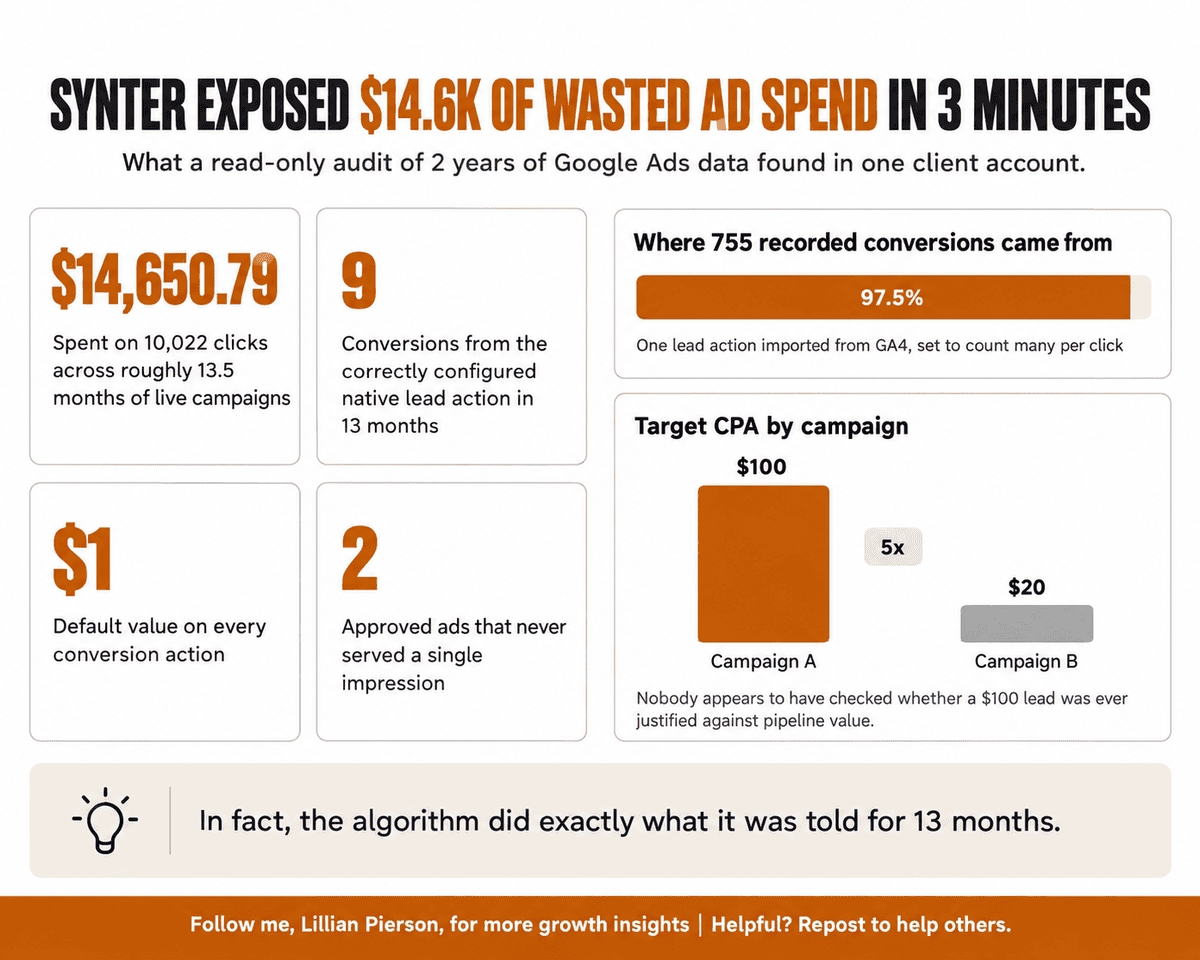
Smart bidding optimizes toward whatever signal it receives; when that signal counts repeat submissions as new leads, every budget decision downstream inherits the measurement error. In fact, the algorithm did exactly what it was told for 13 months.
Synter ran every one of those pulls read-only. It changed nothing in the account. It also labeled one finding as unverified, a possible double count between two form actions, because confirming it requires someone to inspect the tags on the website itself. An agent’s audit becomes safe for you to act on when it separates verified findings from unverified hypotheses, a distinction that carries real weight once that agent has access to your ad spend.
Joel Horwitz, who built Synter after he ran growth for Amp at Sourcegraph, told me that he designed the whole product around that principle. He describes ad platforms in one blunt line: “The only way they can work is if they have signal. Without signal, they’re literally useless.”
If your own account imports a GA4 event as its primary conversion, check its counting setting before you trust another CPA report.
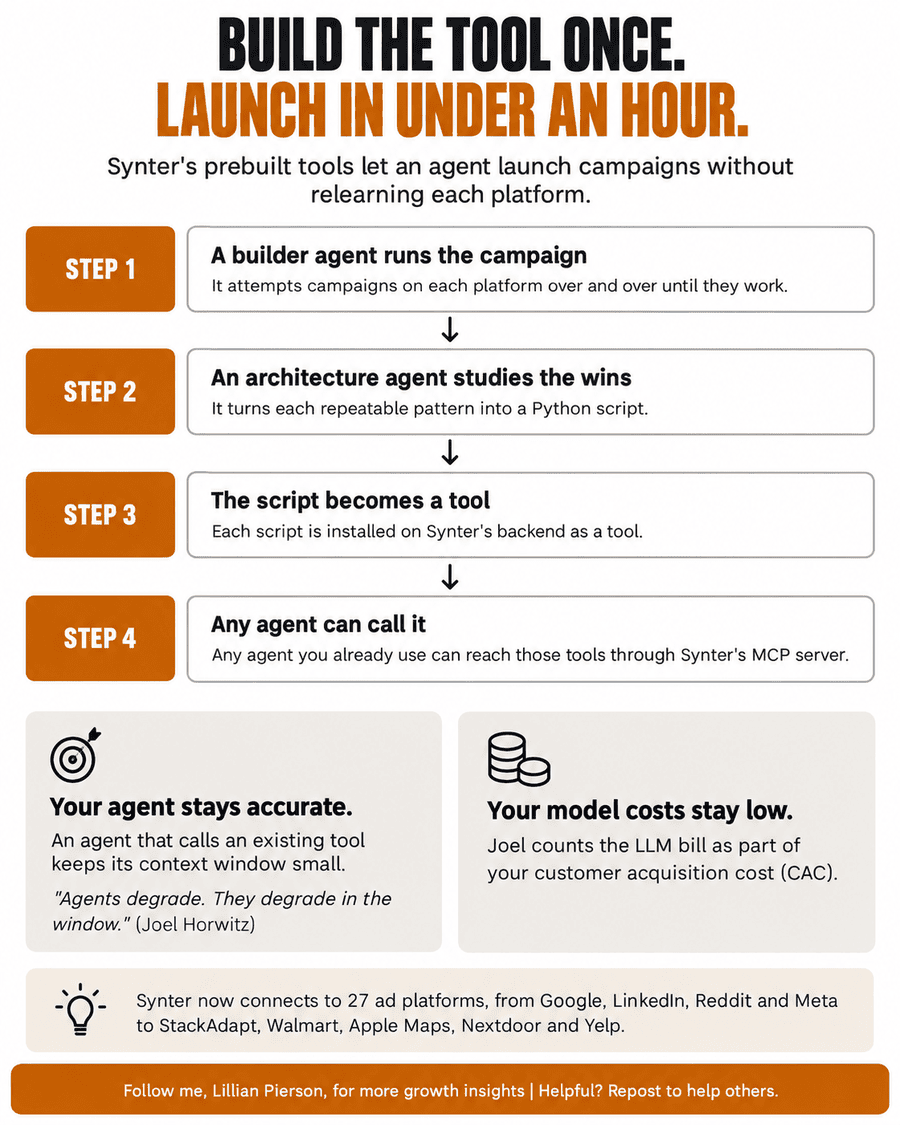
Synter’s prebuilt tools let an agent launch campaigns without relearning each platform
If you’ve wired an AI agent into your ad accounts, you probably handed it an API key and a skill file, which is a markdown file of instructions. Every time your agent touches an ad platform, it writes a fresh script for that platform’s interface from scratch.
Synter works the other way around. Joel walked me through how he built it. A builder agent attempted campaigns on each platform over and over until they worked. An architecture agent then studied the successful runs, turned each repeatable pattern into a Python script, and installed that script on Synter’s backend as a tool.
Because those tools already exist on Synter’s backend, Synter can launch a full-funnel LinkedIn campaign in under an hour. In Joel’s words: “It did that because the tools already exist.”
The design pays off for you in two specific ways:
- Your agent stays accurate. An agent that calls an existing tool keeps its context window small. A small context window protects accuracy, because, as Joel put it, “Agents degrade. They degrade in the window.”
- Your model costs stay low. Joel counts the LLM bill as part of your customer acquisition cost (CAC). He’s pointed about it: “So people are like, oh, I launched this ad campaign and I got a CAC of like $45. I’m like, but how much did you spend on AI to do it?”
Synter now connects to 27 ad platforms, from Google, LinkedIn, Reddit and Meta to StackAdapt, Walmart, Apple Maps, Nextdoor and Yelp. Any agent you already use can reach those tools through Synter’s MCP server.
In Horwitz’s assessment, the durable value in an agent product sits in the harness, meaning the tools, connections, guardrails and monitoring that surround the model. Models keep changing; the execution knowledge that is encoded in those tools is what your in-house team would otherwise have to rebuild on its own.
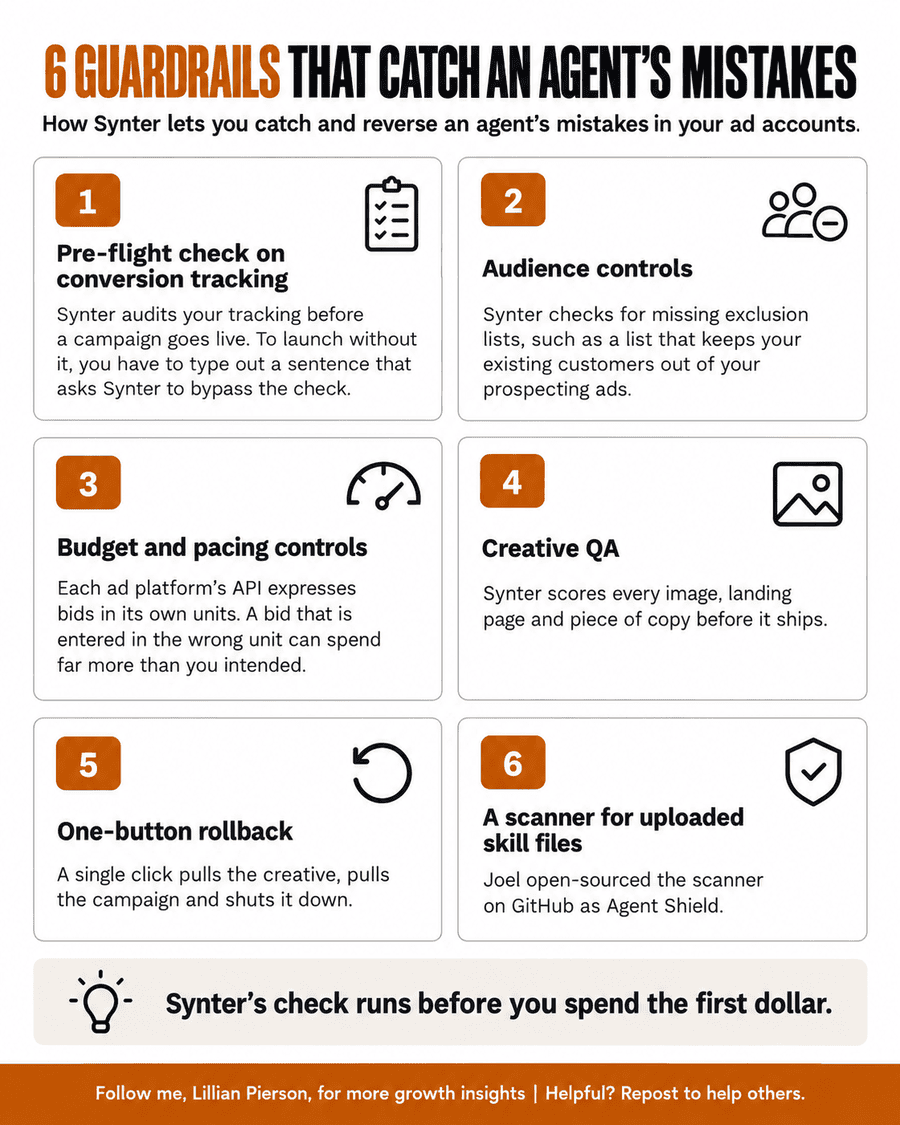
Six guardrails let you catch and reverse an agent’s mistakes in your ad accounts
Synter’s guardrails came out of real mistakes. Joel told me about one of the earliest. Joel had dropped a screenshot of a LinkedIn settings screen into the agent while he was building a client’s campaign. Without asking, the agent posted that screenshot to the client’s LinkedIn profile.
Today, Synter wraps your campaigns in these six controls:
- A pre-flight check on conversion tracking. Synter audits your tracking before a campaign goes live. If you want to launch without it, you have to type out a sentence that asks Synter to bypass the check.
- Audience controls. Synter checks for missing exclusion lists, such as a list that keeps your existing customers out of your prospecting ads.
- Budget and pacing controls. Each ad platform’s API expresses bids in its own units, some of them down to a millionth of a dollar. A bid that is entered in the wrong unit can spend far more than you intended. As Joel reminded me, “Google will take your money. Like they have no problem with that. And there are no refunds.”
- Creative QA. Synter scores every image, landing page and piece of copy before it ships. Joel described what a failing score looks like: “It’s like, this got a 70 out of 100. Like, the text is the wrong font. Like, the image isn’t on brand. You have the wrong logo.”
- One-button rollback. A single click pulls the creative, pulls the campaign and shuts it down.
- A scanner for uploaded skill files. Joel built one after users started uploading third-party skill files into Synter, some of which can carry malicious instructions. He has since open-sourced the scanner on GitHub as Agent Shield.
The pre-flight check applies the same logic as the audit I ran for my client. The difference is timing. Synter’s check runs before you spend the first dollar, while my audit ran after 13 months of spend.
Funny thing is, those guardrails have cost Joel at least one deal. An e-commerce operator forgot to exclude his own customers from a Meta campaign. Synter refused to launch it. “And Synter was like, if you run this, you’re going to market your own customers,” Joel told me. The operator concluded that Synter didn’t work and went with another option.
Your Google Ads change log shows you which work to hand to an agent first
When you connect a new account, Joel’s first move is to pull the change log and see what the people who manage your ads have actually been doing. Joel wrote a prompt for his customers that pulls the change log for them: “Pull down the changelog from Google AdWords and look at everything that’s been going on in this account over the last year.”
His rule for what to automate first is simple: “automate the things that are already pretty well understood.” In practice, that means keyword analysis, conversion and goal adjustments, and creative rotations.
Well, creative itself stays with people for now (Joel was blunt about that). “I don’t still really trust agents to do creative. I just don’t,” Joel said. Agents excel at research, especially once you connect them to your CRM, your ad accounts and your product analytics. At that point, an agent can analyze every stage of your funnel in depth.
At Sourcegraph, a change log review like this one, with agents picking up the routine work, took Joel’s monthly cost for paid media management from $50,000 plus 12.5% of ad spend down to $5,000.
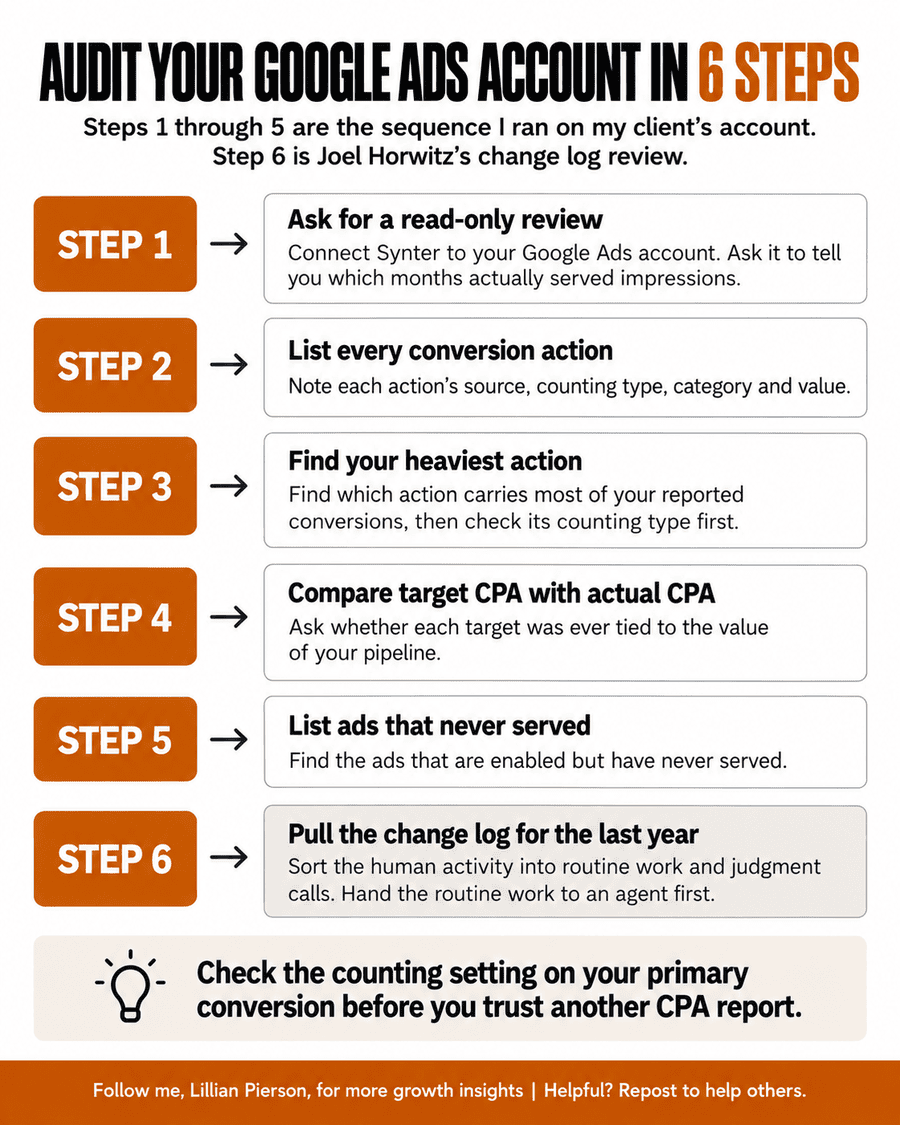
Reproduce This Win. Steps 1 through 5 are the sequence I ran on my client’s account. Step 6 is the change log review that Joel runs on every new account. You can run all six on yours this week.
- Connect Synter to your Google Ads account and ask for a read-only review of the full window you care about. Ask it to tell you which months actually served impressions.
- List every conversion action with its source (native or imported), its counting type (one per click or many per click), its category and its value.
- Find which action carries most of your reported conversions, then check that action’s counting type first.
- Compare each campaign’s target CPA with its actual CPA, and ask whether each target was ever tied to the value of your pipeline.
- List the ads that are enabled but have never served.
- Pull the change log for the last year and sort the human activity into routine work and judgment calls. Hand the routine work to an agent first.
Usage-based pricing lets a 5-person team start on Synter at $500 a month
If you’re pricing an agent product of your own, Joel’s path is worth studying. He started with a flat subscription of about $300 a month. He then moved to a subscription plus 3% of ad spend, which mirrored how agencies charge at a fraction of the rate.
If you’ve ever priced on spend, you’ll recognize both ends where that model lost him deals. A low spender who ran heavy analysis generated LLM costs that the fee never covered. A company that was spending roughly half a million to a million dollars a month on ads walked away at contract stage, once its CEO saw what 3% added up to.
A percentage-of-spend model decouples price from cost to serve; light spenders with heavy usage erode margin, while heavy spenders see a fee that scales past the cost of an internal build. Synter’s current pricing tracks usage instead:
- $20 a month for a single seat, pay as you go.
- $500 a month for up to 5 people, which converts straight into usage credits, with on-demand charges past that.
- Negotiated enterprise fees on the spend that Synter actually manages: 3% when you bring your own ad accounts. The rate rises to 7% when Synter provides the advertiser seat on a platform like StackAdapt.
Synter’s local ad channels let a small business like mine run campaigns without an agency
I manage short-term rental homes as a local side hustle. Fact of the matter is that low season is when those homes need bookings most… That’s where I’m pointing Synter next.
The local ad channels that Joel has added, such as Nextdoor, Yelp and Apple Maps, let a small business run its own campaigns without hiring an agency. He told me about a local HVAC business near his home in Oregon that can now run Nextdoor ads directly. A small business typically pays an agency around $2,700 a month for that kind of work. “That’s your mortgage, right?” Joel said.
The pre-flight check is the guardrail I care about most here. Before my first low-season campaign goes live, Synter will audit the conversion tracking on my direct-booking site.
If you run paid campaigns of any size, start with the read-only audit above. It tells you whether the conversion action that your bidding algorithm optimizes toward counts each lead once.
P.S. Joel told me he knew Synter had made it as a brand on a drive to his son’s soccer practice. Voice agents used to hear “Synter” and spell it C-E-N-T-E-R. That day, he asked his car to check a LinkedIn campaign by name. The agent got the spelling right. Joel told his son, Max, “I think I’ve made it.”
About the Author
Lillian Pierson, P.E., is a fractional CMO and licensed Professional Engineer. She has generated over $7M in revenue for B2B tech and enterprise AI brands, including SingleStore, Domino Data Lab, and other industry standard-setting startups.