
If AI gets your brand wrong, fix the source, the entity data, and the outside references. That’s the playbook. I’d log the exact bad answer, sort it as a fact error, framing problem, or entity mix-up, then correct the pages and profiles that taught the model to say it.
It might surprise you to hear that AI search traffic can convert at 14.2% vs. 2.8% from organic search. So when ChatGPT, Perplexity, or Gemini uses old pricing, wrong features, or a bad label like “outdated” or “low-cost provider,” that can hit pipeline before a buyer even visits your site.
Here’s the short version:
- Step 1: Record the exact claim, prompt, engine, cited URLs, and date.
- Step 2: Trace the source across your site, schema, knowledge panels, and cited third-party pages.
- Step 3: Fix your source of truth first, especially page copy,
Organizationschema, andsameAslinks. - Step 4: Correct outside profiles, review sites, directories, and publisher pages that repeat the bad claim.
- Step 5: Recheck prompts on a set schedule, because AI answers shift and citation drift can hit 40% to 59% month to month.
The challenge here is that AI systems pull from many places at once. Most AI citations come from third-party sources, while 44.2% of citations point to content in the first 30% of a page. In other words, your top-page copy matters, but outside pages often shape the final answer more.
I’d also watch for two quiet problems:
- Missing attribution: AI uses your ideas or data and leaves your brand name out.
- Wrong attribution: AI gives your data, stats, or framework to another company.
However, this is fixable if you keep the process simple:
- Tighten the first 40 to 60 words on key pages
- Check
robots.txtso AI crawlers can access your site - Clean up entity details across LinkedIn, Crunchbase, Wikidata, and your site
- Send short, fact-based correction requests to publishers
- Re-test the same prompts 2 to 4 weeks later
- Run weekly checks and a monthly audit across about 30 prompts
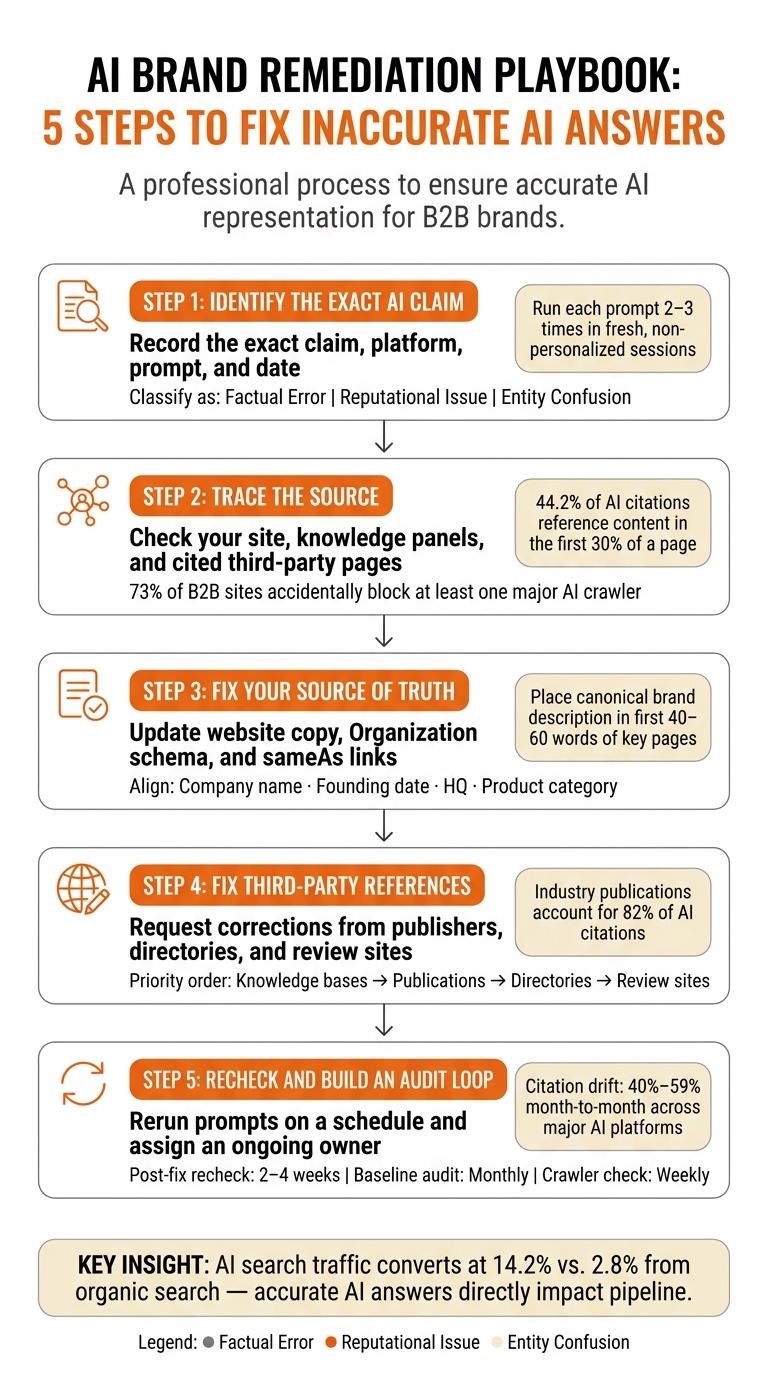
AI Brand Remediation Playbook: 5-Step Fix Process
Managing Your Brand’s Reputation with Large Language Models
Quick comparison
| Problem type | What it looks like | What I’d fix first |
|---|---|---|
| Fact error | Wrong price, feature, date, or market | Website copy, cited articles, stale listings |
| Framing problem | Harmful labels or slanted wording | Review sites, media coverage, market profiles |
| Entity mix-up | Your brand blended with another company or founder | Schema, knowledge panels, Wikidata, Crunchbase, LinkedIn |
| Missing attribution | Your work shows up without your name | Source wording, attribution signals, profile alignment |
| Wrong attribution | Your ideas credited to someone else | Cited sources, publisher pages, entity records |
The good news is that you do not need to guess. I’d treat this like a brand data cleanup: find the claim, find the source, fix the source, then recheck the engines on a schedule to show up in AI search results consistently.
Step 1: Identify the Exact AI Claim That Is Wrong
Before you fix anything, pin down the exact claim, platform, prompt, and date. That gives you a clean trail to follow in the next step. It also gives you proof, so you can trace the source and fix the error where it started.
Capture the claim, platform, prompt, and date
Run each prompt 2 to 3 times with paraphrased versions in a fresh, non-personalized session. Log each answer check in a spreadsheet, with one row per result. Treat descriptor words as evidence too, because they often shape brand sentiment just as much as the core claim.
| Column | What to Record |
|---|---|
| Date / Engine / Prompt / Variation # | e.g., Aug 5, 2026 / Gemini / "Best CRM for startups" / Variation 2 |
| Exact Wording | The verbatim claim or description the AI provided |
| Brand mentioned? | Y/N – whether your brand appeared at all |
| Where it appears | Where your brand showed up (1st, 3rd, buried in a paragraph) |
| Sentiment / Descriptors | Exact adjectives used (e.g., "expensive", "outdated", "market leader") |
| Cited URLs | The specific source link the AI engine referenced |
| Other brands named | Other brands mentioned in the same answer |
Once your log is in place, classify the error before you touch any source.
Classify the issue as factual, reputational, or entity-related
After you log the claim, sort it into the right bucket. This matters because the error type shapes the fix path.
- Factual error: the model gives wrong data.
- Reputational issue: the facts may be right, but the framing hurts you.
- Entity confusion: the model blends your brand with another company, product, or founder.
| Issue Type | Primary Symptom | Fix Priority |
|---|---|---|
| Factual Error | Wrong price, feature, or date | Update your site and cited third-party pages to optimize AI brand visibility |
| Reputational | Negative adjectives, harmful framing | Address review signals and sentiment sources |
| Entity Confusion | Mixed with another brand or founder | Fix Knowledge Graph signals and schema |
If answers swing a lot across platforms, that often points to an entity issue rather than a simple factual mistake [2]. Use that classification to decide which source to inspect first in Step 2.
Step 2: Trace the Source Behind the AI Answer
Use the error type from Step 1 to decide where to look first: owned pages, entity records, or third-party references. AI answers often echo pages, profiles, and structured data. Your job here is simple: find where the bad answer started before you edit anything.
Check your site, knowledge panels, and cited pages first
Start with the sources you control to ensure your brand is represented accurately. Review your homepage, About page, product pages, and any press or media pages to improve brand visibility in AI search engines. Check whether the first 40 to 60 words on each key page plainly say what your brand does and who it serves.
Placement matters more than most teams expect. Content near the top of a page gets cited more often, and 44.2% of AI citations reference content found in the first 30% of a page [2]. If your positioning up top is weak, vague, or old, that can turn into the answer AI gives.
Then check Google and Bing knowledge panels for old entity details, source links, and conflicting descriptions. After that, test your schema markup with Google’s Rich Results Test. Missing or broken Organization schema can make your brand identity fuzzy in AI answers.
Also review your robots.txt file. Make sure you aren’t blocking AI crawlers like GPTBot or PerplexityBot by accident. 73% of B2B sites inadvertently block at least one major AI crawler [2], and that can steer AI systems toward older or third-party data instead of your current pages.
After that, move to the URLs the AI engine cited. In Perplexity and Google AI Overviews, those links often appear right in the answer. Search the exact descriptor phrase. If you see the same wording across engines, that usually points back to one source page.
Here’s the pattern I’d use:
- Factual errors often start on owned pages or cited articles
- Reputation issues often start on review sites
- Entity confusion often starts in knowledge bases or panel data
Once you spot the likely source, rank your fixes by how often that source shows up across answers.
Rank fixes by source authority and repeat visibility
Authority matters because the source that repeats most often usually shapes how AI describes your brand. One factual mistake in a high-authority article can outweigh dozens of smaller correct mentions. Fix the sources that appear most across ChatGPT, Perplexity, and Gemini first.
| Source Category | What to Inspect | First Fix |
|---|---|---|
| Owned Website | Homepage, About page, product pages, and schema markup | Unblock AI crawlers and update old positioning in the first 100 words of key pages |
| Knowledge Bases | Wikipedia, Wikidata, Crunchbase, and LinkedIn company profiles | Inconsistent entity names or old founder and headquarters data |
| Third-Party Media | Industry publications, press releases, analyst reports, and major news archives | Factual errors in high-authority articles the AI cites most often |
| Review Platforms | G2, Capterra, Trustpilot, and industry-specific directories | Recurring negative descriptor words or old pricing and feature data |
| Knowledge Panels | Google Knowledge Panel and Bing entity data | Missing sameAs links in schema that connect the brand to its official profiles |
Prioritize the highest-authority sources that repeat across platforms. Then use what you find to update your source of truth and entity data in Step 3.
Step 3: Correct Your Source of Truth and Brand Entity Data
After you spot the source, fix the records that taught AI the wrong version. Once you know where the error comes from, correct the brand facts AI systems look at first: your site, schema, and entity profiles.
Update canonical website copy and structured data
Your website is the one source you control end to end, so start there. Give AI systems one clear answer about what your brand does, who it serves, and what category it fits.
Put your main brand answer, company description, and product summary in the first 40 to 60 words of the page. Use specific language, and keep it consistent with your canonical brand facts.
Then review your Organization schema and move it into static HTML. Include your official name, founding date, headquarters, and product category. Static HTML with schema markup parses far more reliably than JavaScript-rendered content [2].
Use that same canonical wording across every profile AI may cross-check.
Fix Wikidata or Wikipedia only if the brand is legitimately listed there
If your brand already appears in entity databases, fix wrong records there before they keep showing up in AI answers. If your brand already has a Wikipedia or Wikidata entry, correct factual errors only, and use third-party citations. Follow Wikipedia’s NPOV policy and skip promotional language.
Align entity details across profiles and sameAs links
Even if your website and schema are clean, AI systems still cross-check your brand facts against outside profiles. If your company name shows up one way on one profile and differently somewhere else, that mismatch creates entity confusion. Unfortunately, AI may hedge, blend details, or default to the version that appears most often.
Standardize these details across your website, LinkedIn company page, Crunchbase profile, and any industry directories:
- Exact legal or brand name
- Founding date
- Headquarters location
- Primary product category
Then use the sameAs property in your Organization schema to link your website to each verified profile. In other words, you’re telling AI crawlers these profiles belong to the same entity, which cuts down on mixed descriptions.
| Entity Detail | Where to Align |
|---|---|
| Company name | Website, LinkedIn, Crunchbase, schema |
| Founding date | Website, Wikidata, Crunchbase |
| Headquarters location | Schema, LinkedIn, verified profiles |
| Product category | Homepage copy, schema @type, Crunchbase |
| Official profiles | sameAs array in Organization schema |
Once these core entity details match, move to outside references that still conflict with them.
Step 4: Fix Third-Party References That Reinforce the Error
Once you’ve fixed your own records, turn to the outside pages AI still leans on. This step goes after the pages that keep teaching AI the wrong version of your brand. Most AI citations come from outside sources, so stale descriptions can outweigh even clean owned pages.
Request factual corrections from publishers and data sources
When an AI answer includes a specific false claim, trace it back to the exact cited page that fed the error. Then use a simple correction process: identify the exact inaccurate statement, send a short request backed by evidence, cite a canonical source like your official website or a press release, and log the submission date plus any reply you get.
Keep each request short and factual. Include:
- the inaccurate statement
- your canonical source
- the submission date in your log
If the same negative descriptor phrase keeps showing up, trace it to the source that used it first and request a correction there.
Fix listings and profiles that shape how AI describes your brand
Business directories, app marketplace listings, founder bios, and association membership profiles all shape how AI talks about your brand. When those descriptions drift or conflict, AI gets confused about the entity. The fix is simple: make the wording match the canonical brand description from Step 3.
The table below shows where to spend time first and what you can expect from each fix:
| Third-Party Source Type | Correction Method | Expected Impact |
|---|---|---|
| Knowledge Bases (Wikipedia, Crunchbase, LinkedIn) | Submit factual corrections using canonical brand facts. | High: Improves entity recognition and factual grounding. |
| Industry Publications & Analyst Reports | Submit evidence-backed requests citing canonical site data. | High: Fixes the source of 82% of AI citations [2]. |
| Business Directories & Profiles | Standardize company descriptions and founder bios. | Medium: Reduces entity confusion and improves sentiment. |
| Review Sites & Marketplaces | Update summaries and respond to inaccurate descriptor phrases. | Medium: Shifts brand positioning. |
| Press Mentions (Outdated) | Request updates or provide contextualized new data. | Low/Medium: Prevents AI from retrieving stale facts. |
Start with the sources at the top of the table. In other words, fix the pages most likely to shape AI answers first. Then line up every profile with the canonical brand description from Step 3. After those updates go live, rerun the same prompts and check whether the corrected description starts to appear.
Step 5: Recheck AI Answers and Build an Ongoing Audit Loop
Once your source fixes are live, rerun the same prompts from Step 1 and compare the new results with your original log. AI models pull sources over and over, so what an engine said last week can shift by today. A fixed schedule helps you keep the process steady instead of reacting only when something goes wrong.
For ongoing monitoring, weekly manual checks are the minimum, and monthly re-audits are the sweet spot for a usable baseline from about 30 prompts [3][4].
Re-test the same prompts on a set schedule
Rerun the same prompts across ChatGPT, Perplexity, and Gemini. Plan a recheck 2 to 4 weeks after major corrections go live, since visible changes in AI answers often show up within 1 to 4 weeks after optimization. That is much faster than the 3 to 6 months organic rankings often need to show movement [1].
However, one check will not tell you much. AI outputs are probabilistic, so you need repeat runs. Use 2 to 3 paraphrased versions of each prompt in fresh sessions. That gives you a mention rate instead of one frozen snapshot [3]. Log every shift against your original baseline, including the exact descriptor words the AI uses for your brand.
Use this cadence after corrections:
| Check Type | Frequency | What to Look For |
|---|---|---|
| Post-correction recheck | 2–4 weeks after fixes [1] | Confirm whether the corrected description appears |
| Ongoing baseline | Monthly [4] | Broader citation footprint and sentiment shifts |
| Technical access | Weekly [2] | Ensure AI crawlers aren’t blocked by robots.txt |
Turn remediation into a repeatable process
Citation drift can hit 40% to 59% month to month across major AI platforms, so the sources behind last month’s answer may be gone by the next review [5]. In other words, if a corrected answer starts to drift again, your team should already know who owns the next move.
Assign one owner across marketing, PR, SEO, and leadership. Keep a fixed prompt panel, a running log, and a monthly review. That makes AI answer accuracy part of brand governance instead of a one-off cleanup.
FAQs
improve brand sentiment AI search SEO strategies
To improve brand sentiment in AI search, treat your brand like a clear, machine-readable entity instead of relying on old-school SEO alone.
Keep your brand data accurate and consistent across trusted third-party sources. If your company name, product details, pricing, founder info, or positioning shifts from site to site, AI systems can piece together the wrong story. In other words, messy data leads to messy answers.
On your own site, make your content easy for machines to parse. That means direct-answer content that responds to the exact questions people ask, plus schema markup that gives search systems more context. Think plain language, clean structure, and pages that don’t bury the answer under five paragraphs of throat-clearing.
You’ll also want to track brand mentions and sentiment across search results, review platforms, forums, and publisher sites. When AI tools surface inaccurate or negative answers, publish factual corrections and distribute them through the same kinds of sources those systems tend to trust. The goal is simple: give machines better inputs so they return better brand output.
how AI describes your brand
AI describes your brand by blending training data with live web signals into a working picture of who you are. It doesn’t pull from a simple lookup table. Instead, it leans toward information that shows up often, comes from trusted sources, and stays consistent across the web.
If your brand details are thin or conflict from one source to another, AI can fill in the blanks the wrong way or misread nearby signals. The good news is that you can improve accuracy by giving it a consistent, authoritative, machine-readable source of truth across your digital presence.
brand sentiment in AI answers
Treat AI like a knowledge-synthesis engine. If you want better brand sentiment in AI answers, make your brand’s strengths just as clear, structured, and firm as any negative claim.
Start by checking the prompts people use to surface your brand. That helps you spot negative narratives, weak framing, and plain old hallucinations before they spread.
Then publish fact-dense, steady content and keep your entity data aligned across trusted sources. In other words, don’t leave the model to guess. Give it the same facts in the same form wherever your brand shows up.
It also helps to respond to negative reviews with a calm, professional tone and put work into accurate third-party coverage. When outside sources describe your company well, AI systems have better material to pull from.
Track sentiment and citation accuracy over 30 to 90 days. That window gives you enough time to see whether the pattern starts to shift.