
If I had to boil this down to one line, it’s this: pick the AI marketing ops tool you can control, audit, and trust under pressure.
Most teams shop software by feature list and price. I’d start somewhere else. I’d define workflows, approval rules, RBAC, security checks, and reporting needs first, then score vendors against those rules with a 0 to 5 rubric.
Here’s the short version of the framework:
- Start with governance
- List the workflows tied to pipeline, revenue, and risk
- Split AI use into draft, approve, and execute
- Set human checkpoints for high-stakes actions
- Set pass/fail rules early
- Require SSO, MFA, encryption, audit logs, and data controls
- Require prompt logs, tool-call history, and version history
- Cut any vendor that can’t show clear handling for PII, rollback, or approvals
- Score the tool on the work that matters
- Workflow design and failure handling
- Permissions and workflow-level access control
- Security review cadence and prompt-injection testing
- Reporting like cost-to-serve, time-to-decision, win rates, P50/P95 latency, and blocked policy attempts per 1,000 runs
- Integration depth, especially bi-directional CRM sync and API actions
- Weight your shortlist by risk and business impact
- The sample rubric uses:
- 25% Security & Compliance
- 20% Permissions & RBAC
- 20% Workflow Design, Approvals, and Failure Handling
- 15% Reporting & Auditability
- 10% Integrations & Data Quality
- 10% Implementation Effort
- The sample rubric uses:
- Check fit before you buy
- PLG teams usually care about volume and PII masking
- Sales-led teams often need routing, proposal drafting, and role-based access
- ABM teams need tighter account-data limits
- Hybrid teams need cross-team approval gates and shared reporting rules
- Plan rollout before go-live
- Set naming rules
- Assign data owners
- Define report ownership
- Baseline current cycle time, error rates, and cost-to-serve
- Set kill criteria before launch
Quick comparison
| What to assess | What I’d look for | What should stop the deal |
|---|---|---|
| Workflows | Multi-step flows, state changes, rollback, visible error states | Silent failures, weak recovery paths |
| Permissions | Workflow-level RBAC with read, draft, approve, execute rights | Loose access for high-risk actions |
| Security | SSO, MFA, encryption, audit logs, prompt-injection testing | No logs, poor access controls |
| Reporting | Pipeline, cost-to-serve, latency, error logs, safety logs | No view into AI performance or review steps |
| Integrations | Native CRM sync, API actions, schema-change alerts | Heavy dependence on thin connectors |
It might surprise you to hear that the article’s core point is pretty simple: the best AI MOps software is usually the tool with the strongest control model, not the flashiest automation demo. The rest of the piece shows how I’d turn that idea into a buying process your team can use.
Step 1: Define Your Governance Requirements Before Reviewing Any Tool
Before you look at tools, define the workflows, users, tasks, and failure costs the software needs to support. Start with the actual work, the people doing it, and what a mistake would cost. Then turn governance into a buying checklist before you sit through a demo.
List the Workflows That Actually Drive Business Results
Start with the workflows tied to pipeline, revenue, and compliance risk: prospecting, proposals, intake triage, routing, research, and scheduling.
For each workflow, document the cost, cycle time, win rate, and top error types. That baseline gives you a benchmark for later. It also helps you decide whether AI should draft, triage, or execute. Those decisions become your evaluation criteria in Step 2.
Keep a clear line between AI that drafts or recommends and AI that executes. A workflow that drafts copy or suggests next steps can follow one set of rules. A workflow that updates records, calls tools, or triggers external actions needs tighter control. Anything that acts on its own needs human checkpoints, audit logs, and a rollback plan.
Map Roles, Permissions, and AI Execution Rights
Once the workflows are clear, assign read, draft, approve, and execute rights for each one. Also name the people who own governance, such as data owners, AI champions, human reviewers, and RevOps leads, so accountability is clear from day one.
By default, AI agents should run in draft-only mode. They can draft, summarize, or flag issues, but higher-risk actions should wait for human approval. That access model should line up directly with the permissions you score next.
Set Minimum Standards for Security, Privacy, and Reporting
Use these standards to screen out weak vendors before you score features.
| Category | Must-Have | Nice-to-Have | Disqualifier |
|---|---|---|---|
| Security | SSO, MFA, encryption at rest and in transit, and controls against malicious prompts and data leakage | Rate limits and tool access controls | No audit logs or access controls |
| Privacy | PII masking and configurable retention and deletion policies | Data lineage visibility | No clear rules for handling sensitive data |
| Audit Trail | Prompt logging, tool call history, and version history | – | No traceability for AI-driven actions |
| Reporting | Cost-to-serve, time-to-decision, win rates, and safety incident logs | – | No visibility into workflow performance or safety |
| Workflow Safety | Human approval for high-stakes actions | Feature flags and rollback controls | No human approval checkpoint for irreversible actions |
If a platform cannot meet your must-haves, it should not make the shortlist. Use these minimums as pass/fail filters in Step 2.
Step 2: Evaluate the Software Against Core MOps Criteria
Now that you’ve documented your governance requirements, you can compare each platform against the same yardstick. The point here is simple: make sure each tool can support your standards in actual day-to-day use. This is where your governance requirements turn into a vendor scorecard.
Workflow Design, Approvals, and Failure Handling
Check whether the platform can support multi-step workflows, state changes, exceptions, and rollback. You also want a clear path from assistive use to autonomous execution, but only after the system has hit the success thresholds you’ve already defined.
Set rollback triggers before the pilot. Be specific about the failure points that should force an immediate rollback. If a vendor can’t clearly explain how rollback and containment work, treat that as a red flag.
Resilience matters just as much. Ask what happens when a sync breaks or an AI output fails in the middle of a workflow. You want visible error states, documented fallback paths, and a way to track error types and latency. Silent failures and manual escalation are a bad sign. In this part of the review, failures should block rollout.
Permissions, Security Controls, and Compliance Readiness
Test RBAC at the workflow level, not only at the user level. You need fine-grained control, with read, draft, approve, and execute rights set for each workflow. Least-privilege enforcement should come built in as the default.
For higher-risk actions, the bar should be higher. That includes anything that updates records, triggers external calls, or sends communications. The platform should require explicit human approval before execution.
Ask for proof of the security review cadence, named data owners, and prompt-injection testing aligned to OWASP Top 10 for LLM Applications. If the vendor can’t show that proof, that’s another red flag.
Reporting, Integrations, and Data Quality Support
Reporting should include lead stages, pipeline influence, and cost-to-serve. That’s the baseline. On top of that, the platform should also show latency metrics (P50/P95), error-type logs, and blocked policy attempts per 1,000 runs.
You also need visibility into human oversight. If you can’t see where AI outputs were reviewed, edited, or escalated by a person, you can’t rely on the performance data. Those results should feed into the weighted scoring step later.
Integration depth matters more than connector count. Look for bi-directional native sync with your CRM. Also confirm that the platform supports API-based tool execution. In other words, it should be able to call APIs and take action across your stack, not just move data from one place to another.
If your team cares about data quality over time, schema-change alerts are non-negotiable.
Use the table below to score each platform during vendor review. Add a qualitative score from 1-5 and note any concerns or decision points as you go.
| Evaluation Dimension | Criteria to Verify | Qualitative Score (1–5) | Decision Notes |
|---|---|---|---|
| Workflows | Multi-step planning, state changes, human review gates, rollback triggers, and recovery paths | Flag silent failures and missing rollback documentation | |
| Permissions | RBAC depth at the workflow level, least-privilege enforcement, and approval controls for high-risk actions | Confirm data owners are named per workflow | |
| Security | Proof of security review cadence, named data owners, prompt-injection testing (OWASP Top 10 for LLM Applications), rate limits, token management, and incident response readiness | Ask for a security review schedule and evidence of testing | |
| Reporting | Lead stages, pipeline influence, cost-to-serve, latency (P50/P95), error-type logging, and blocked policy attempts | Must distinguish AI-generated vs. human-verified results | |
| Integrations | Bi-directional CRM sync, API-based tool execution, and schema-change alerts | Flag heavy reliance on third-party connectors |
Use these scores to build the weighted rubric in Step 3. Next, you’ll turn them into a weighted shortlist.
Step 3: Build a Weighted Scoring Rubric and Shortlist
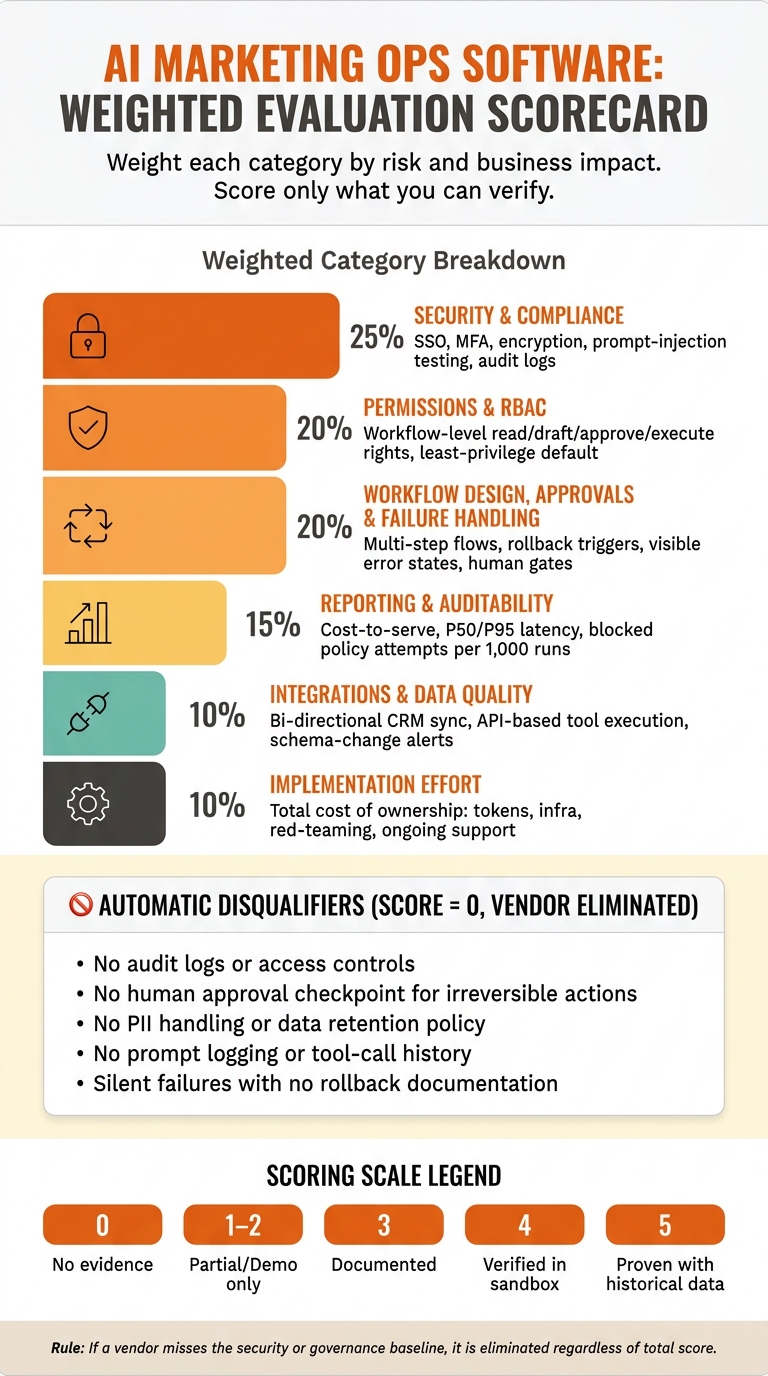
AI Marketing Ops Software Buyer’s Scorecard: Weighted Evaluation Framework
Weight Criteria by Risk, Revenue Impact, and Implementation Effort
Now take your vendor notes and turn them into a weighted scorecard. Put the most weight on risk and business impact. That usually means security and permissions sit at the top, workflow and reporting fall in the middle, and usability and rollout effort carry less weight.
There’s one rule that sits above the whole rubric: if a tool misses your minimum security or governance baseline, it’s out, no matter how high the rest of its score looks [1]. Those baselines are hard stops. They aren’t something you trade off for a better demo or a lower price.
When you score implementation effort, look past seat cost. Include total cost of ownership: tokens, infrastructure, red-teaming, and ongoing monitoring and support [1]. After you set the weights, score each vendor based only on proof you’ve checked yourself.
Score Evidence, Not Promises
The goal here isn’t to reward the flashiest demo. It’s to rank the tool that your team can govern, audit, and scale safely.
Use a 0-5 scale, and score only what you can verify. Ask vendors to run your historical test set through the system so you can check accuracy, factuality, and error rates before you commit [1][2]. Ask for access to a test environment, then confirm that audit logs, data retention behavior, and human-in-the-loop gates are visible and working [1][2].
For security, ask for documented threat modeling for prompt injection and data exfiltration, aligned to the OWASP Top 10 for LLM Applications [1]. For reporting, verify that the system keeps full logs of prompts, tool calls, and model versions [2].
If a vendor can only show demo-only claims and won’t let you test edge cases or review docs, score them lower. In other words, score only what the vendor can prove in:
- a historical-data test
- a live sandbox
- visible logs
Use those proofs to fill in the rubric below.
Turn Scores Into a Shortlist
Once you’ve scored each platform, multiply each score by its weight to get a weighted category score. Then add those numbers to get a final score for each vendor. Apply the same disqualifiers before you rank anything.
Use the rubric below to compare platforms the same way every time:
| Evaluation Category | Weight | Score (0–5) | Weighted Total |
|---|---|---|---|
| Security & Compliance | 25% | ||
| Permissions & RBAC | 20% | ||
| Workflow Design, Approvals, and Failure Handling | 20% | ||
| Reporting & Auditability | 15% | ||
| Integrations & Data Quality | 10% | ||
| Implementation Effort | 10% | ||
| TOTAL | 100% |
Use the weighted total to build a shortlist, then validate the top candidates against your GTM motion and team structure in Step 4. The shortlist is your first filter. Step 4 checks whether the top option fits your growth model and rollout plan.
Step 4: Confirm Fit for Your Growth Model and Implementation Plan
Match the Software to Your GTM Motion and Team Structure
Use your shortlist score to test operational fit, not just feature depth. The weighted shortlist should tell you whether the tool fits how your team actually sells, routes, and reports.
Start with permission complexity. Product-led teams usually need broad access to usage data with strict PII masking. Sales-led teams often need role-based access for sales and marketing ops. ABM teams need tighter limits around sensitive account data. Hybrid teams usually need approval gates across departments.
Then line up the platform’s controls with your GTM motion. Use the table below to check whether your top-scoring tool fits your current motion and reporting needs.
| Growth Model | Workflow Needs | Permission Complexity | Reporting Emphasis | Risk Profile |
|---|---|---|---|---|
| Product-Led (PLG) | High-volume automated triage; self-service onboarding bots | Low; broad access to usage data with strict PII masking | Conversion funnels; time-to-value; virality coefficients | Low |
| Sales-Led | Predictive lead scoring; automated proposal drafting; meeting scheduling | Medium; role-based access for sales vs. marketing ops | Pipeline velocity; CAC by channel; sales rep productivity | Medium (PII and contact data) |
| Account-Based (ABM) | Intent data monitoring; hyper-personalized content for specific stakeholders | High; restricted access to sensitive account data | Account penetration; stakeholder engagement; win rates | High |
| Hybrid | Cross-functional handoffs; multi-channel orchestration | Very High; approval gates across departments | Attribution modeling; LTV; GTM efficiency | Medium-High (data silos) |
If the platform takes action instead of only drafting, tighten your approval and impact checks. In other words, once a tool can do things on its own, the bar gets higher. Confirm that human-approval checkpoints are documented before rollout [3].
Plan the Rollout: Access Reviews, Taxonomy, and Reporting Ownership
Once the tool fits your motion, lock down the operating rules before launch. Before go-live, set naming standards, assign data owners, define approval gates, and schedule access reviews.
A few pieces matter most:
- Naming standards: Use a shared naming convention for campaigns, assets, and AI-generated outputs so audit logs stay readable.
- Data ownership and lineage: Assign a named owner to each critical data field, and document consent, PII rules, and retention policies so teams don’t create unauthorized data copies.
- Approval gates: Document which AI actions need human sign-off before execution, and build those checkpoints into the platform before go-live.
- Ownership of report definitions and metrics: Set a regular review cadence for permissions, and make sure one person owns each reporting definition.
Baseline your current cost-to-serve, cycle time, and error types before launch. That gives you a clear point of comparison and lets you set post-launch kill criteria [1][2].
How Data-Mania Can Support the Decision Process
Data-Mania can help define requirements, build KPI frameworks, and spot governance gaps before you buy.
Conclusion: Choose the Tool That Strengthens Control, Trust, and Scale
This framework keeps speed tied to control. Start by setting governance, then test workflows and security, weigh risk against revenue, and confirm GTM fit.
AI adoption is broad, but measurable value still comes from governance and a disciplined rollout. That is why the winning choice is the most governable tool, not the most automated one.
Choose the tool that makes reporting trusted, permissions defensible, and decisions better informed.
After launch, keep the controls current. Use this as a working framework. Revisit scoring weights and access reviews as workflows and autonomy expand.
FAQs
How do I weight security vs. workflow features?
Put security first when a workflow touches high-risk data or high-risk actions, such as customer records, regulated content, or writes to CRM and billing systems. Security gaps tend to get expensive fast, and they’re much harder to fix later than workflow issues.
Use workflow fit as the first filter, but treat security as a hard limit. That means you should require:
- Role-based access controls
- Least-privilege permissions
- Strong encryption
- Clear retention practices
- Logged, auditable actions
Keep human-in-the-loop review in place for medium- and high-risk outputs.
What should I test in a vendor sandbox?
Use the sandbox to confirm the software fits your marketing operations without adding data silos or manual cleanup work.
Test:
- API connectivity and connectors with your CRM and automation platforms for real-time data sync
- High-priority, repeatable workflows that your team runs often
- Governance features like role-based permissions, data security guardrails, and the ability to monitor or override AI outputs
When should AI stay draft-only?
AI-generated content should stay in draft mode when it needs human review for accuracy, brand voice, and factual integrity before it goes live.
For public-facing assets, use a human checkpoint every time. That means someone on your team should review, guide, and edit the output before publishing. It keeps your brand in control, and it helps you catch mistakes before your audience sees them.