



Want to connect your CRM with other tools without the headache? Here’s the quick version: CRM API integration lets your systems talk to each other in real time. No more manual data entry or CSV imports. Think of it as building “data highways” between platforms like Salesforce, HubSpot, or Zoho CRM.
Why does this matter? For startups, scattered data kills productivity. Sales, marketing, and support teams often work with incomplete customer info, wasting time and missing opportunities. With CRM API integration, you get a single, up-to-date view of your customers, automate workflows, and improve decision-making.
Key Takeaways:
- What it does: Automates data sharing between systems (e.g., CRMs, billing platforms, marketing tools).
- Why it matters: Saves time, reduces errors, and gives you real-time insights.
- Common Use Cases: Sync leads from marketing tools, update customer records with product usage, or track payments in your CRM.
- How to start: Set clear goals, map your data, and choose the right integration approach (build it, use iPaaS, or go with a unified API provider).
The hard part is getting it right. But with clear goals, secure authentication (OAuth 2.0), and smart error handling, you’ll avoid common pitfalls like mismatched data or rate-limit errors. Ready to dive in? Let’s break it down step by step.
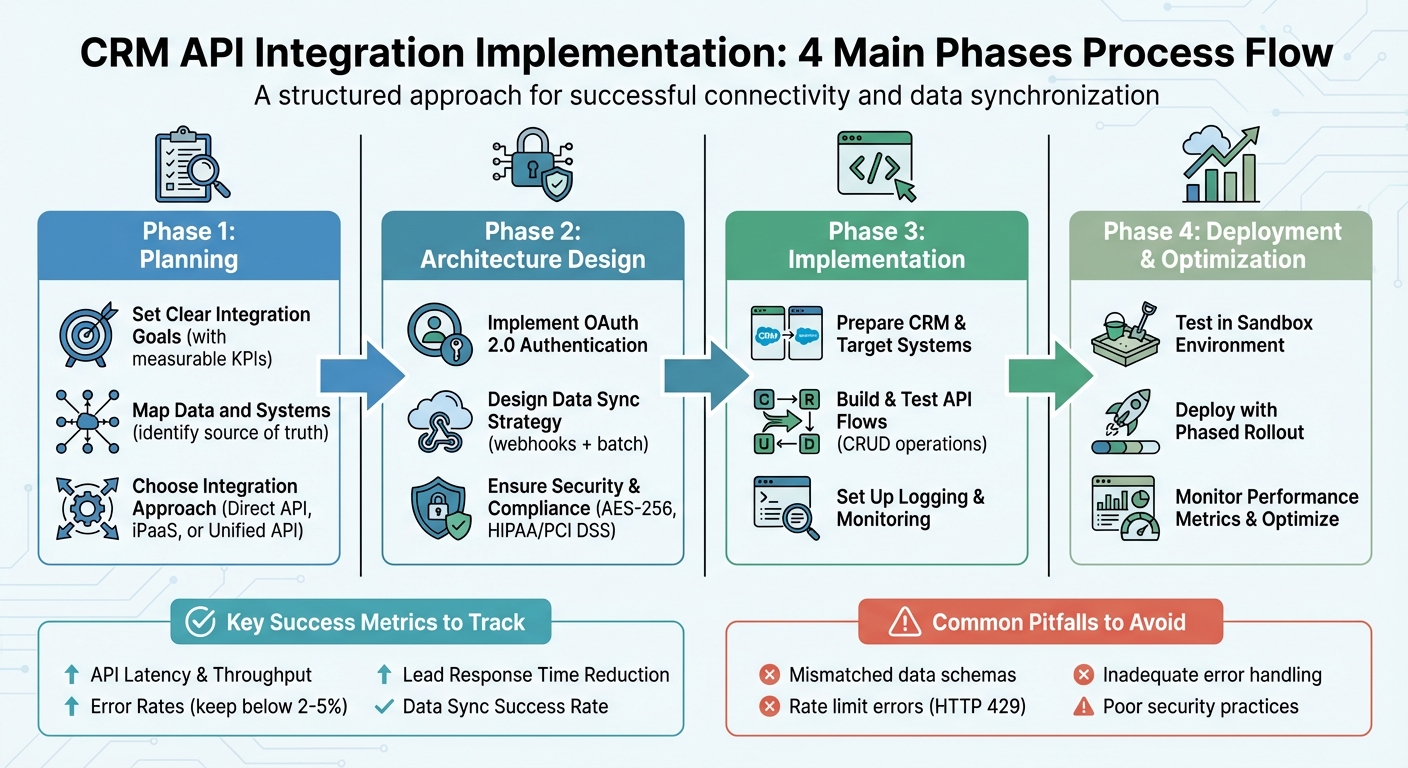
CRM API Integration Implementation Process: 4 Key Phases
Planning Your CRM API Integration
Setting Clear Integration Goals
Start by defining specific, measurable goals for your integration, tied to key performance metrics. Vague objectives won’t guide your team or demonstrate ROI. For example, aim to reduce lead response time from 3 hours to 30 minutes within 90 days or decrease duplicate contact records from 12% to 3% in one quarter. Other potential targets include improving sales conversion rates, enhancing forecast accuracy, or increasing marketing campaign returns – for instance, adding $25,000 in monthly recurring revenue (MRR) per quarter.
Before setting these goals, establish baselines for your current processes. Measure metrics like average lead assignment time, the percentage of incomplete contact records, or the hours spent weekly on manual data entry. Next, set time-bound targets and align each KPI with a specific integration feature. For example, implementing real-time lead capture via API can speed up response times, while automated deduplication rules can enhance data quality. This ensures every technical decision ties back to a business outcome, giving you clear benchmarks to evaluate post-deployment success.
Once your goals are in place, document how data flows between your systems to ensure alignment.
Mapping Data and Systems
With goals clearly defined, the next step is to map out your data and the systems involved. Start by listing all the tools that handle customer data – your CRM, marketing automation platform, billing system, product analytics, support helpdesk, and others. For each system, identify the key data objects (e.g., Contacts, Accounts, Opportunities, Tickets, Subscriptions) and designate which system serves as the source of truth for each data element.
Develop a concise field mapping document that includes the following details: source, target, data type, transformation rules (e.g., converting timestamps to UTC, standardizing phone numbers to the U.S. format +1 (XXX) XXX-XXXX, normalizing currency to USD), and validation rules (e.g., rejecting records without an email address or enforcing valid ZIP codes for U.S. addresses). Also, establish data precedence rules to handle conflicts – for instance, if the same email address is updated in both your CRM and marketing tool, determine which system’s update takes priority. Keep these mappings and rules updated alongside your technical specs, especially when adding new fields or integrating additional systems.
Choosing the Right Integration Approach
When it comes to implementation, you have three main options: building a direct API integration in-house, using an integration platform (iPaaS) like Zapier or Make, or leveraging a unified API provider to handle multiple CRMs. Your choice depends on factors like complexity, control, internal expertise, budget, and timeline.
- Opt for a direct API integration if you need maximum control and custom logic, especially when integration is central to your product or data strategy.
- Choose an iPaaS solution for speed and simplicity when connecting standard SaaS tools, particularly if you have limited development resources.
- Go with a unified API provider if your product needs to support multiple CRMs (e.g., Salesforce, HubSpot, Pipedrive, Zoho) through a single, normalized interface.
Many U.S.-based startups take a hybrid approach: they use iPaaS for quick wins and standard SaaS connections while building direct integrations for core product-to-CRM or analytics pipelines. For startups where integration plays a critical role in driving growth, external expertise – like fractional marketing or data leadership from Data-Mania – can help align technical efforts with revenue goals and ensure your architecture scales effectively as your business grows.
Designing a Scalable and Secure Integration Architecture
Authentication and Authorization
Once your data flows are mapped out, securing authentication becomes a top priority. For CRM API authentication, OAuth 2.0 is widely recognized as the standard. Platforms like Salesforce, HubSpot, and Zoho offer OAuth 2.0, enabling integrations to access CRM data without directly managing user passwords. Instead, the process involves exchanging authorization codes for temporary access tokens and longer-lasting refresh tokens.
To safeguard these tokens, store them in a secure secrets manager such as AWS Secrets Manager. Use an integration user with only the necessary permissions, and ensure tokens are rotated regularly. Keep an eye out for 401 or 403 errors, as they may indicate token issues or unauthorized access attempts.
If you’re working with older systems that rely on API keys or Basic authentication, treat these credentials with the same care as passwords. Store them securely, rotate them periodically (e.g., every 90 days), and limit their use to specific IP addresses whenever possible. Additionally, enforce HTTPS (TLS 1.2 or higher) for all API calls to ensure data encryption during transmission.
Handling Data Sync and Transformation
To meet integration requirements, balance real-time and batch synchronization. Use webhooks for real-time updates on critical events, while relying on batch sync for larger operations to optimize efficiency. A transformation layer is essential for reconciling schema differences, such as combining first and last names, formatting U.S. currency (e.g., $1,234.56), or converting dates to MM/DD/YYYY. Standardize timestamps to UTC for internal processing, while converting to ET or PT for user-facing displays.
When dealing with transient errors or rate limits (HTTP 429), implement retry logic with exponential backoff. For example, after a failed request, wait 2 seconds, then double the wait time with each subsequent attempt (4 seconds, 8 seconds, etc.). This prevents your integration from overwhelming the CRM API during temporary outages. Additionally, leverage batch APIs like Salesforce Bulk API or HubSpot batch endpoints whenever possible. These reduce the overhead of processing individual records and help you stay within daily API call limits.
With synchronization running smoothly, the next focus is securing data and maintaining compliance.
Ensuring Security and Compliance
Protect data at rest using AES-256 encryption and mask sensitive information in logs. Maintain structured audit logs (e.g., JSON format) that include API requests, responses, timestamps, and user IDs. Retain these logs for at least 90 days, and integrate with monitoring tools to track trends and set up real-time alerts. For instance, flag unusual activity like spikes in error rates or unauthorized access attempts.
In regulated industries, compliance is non-negotiable. For healthcare, HIPAA requires encrypted data, stringent access controls, detailed audit logs, and business associate agreements for vendors handling protected health information (PHI). In the financial sector, PCI DSS mandates practices such as tokenizing payment data, segmenting networks, and conducting regular security audits. To meet these standards, use CRMs that align with compliance requirements, mask sensitive data in testing environments, and always prioritize OAuth 2.0 over less secure authentication methods.
Finally, test your integration thoroughly in a sandbox environment with sample data before moving to production. This step is critical when handling sensitive information like PHI or personally identifiable information (PII). Proper preparation minimizes risks and ensures smooth deployment.
Step-by-Step Implementation of CRM API Integration
Preparing CRM and Target Systems
Start by creating an integration-specific user with limited permissions to ensure restricted data access. Enable API access in your CRM settings, and gather critical details like the base URL, API version, client ID/secret or API key, authentication endpoints, and rate limit information provided by the vendor.
Set up OAuth 2.0 by configuring redirect URIs and defining necessary scopes such as contacts.read and contacts.write. Store all credentials securely using tools like AWS Secrets Manager or HashiCorp Vault to avoid hard-coding them into your source code or committing them to version control. Separate development and production environments should use distinct credentials, and anonymize non-production data to safeguard privacy.
Building and Testing API Flows
Once your credentials and environments are ready, begin implementing and testing API workflows. Develop CRUD operations (create, read, update, delete) for essential entities like contacts. Include robust error handling to log context, differentiate between HTTP 4xx and 5xx errors, and retry transient failures using exponential backoff.
If your CRM supports webhooks or event subscriptions, use them to enable near real-time updates rather than relying on constant polling. Design event handlers to be idempotent by verifying unique identifiers, such as a combination of contact_id and event_id, to prevent duplicate processing. For time zones, store timestamps in UTC and convert them to the appropriate local time zones (e.g., Pacific or Eastern) when displaying data. Additionally, ensure that currency fields are correctly mapped to USD or handled according to your multi-currency settings.
Logging and Monitoring
Once your API flows are operational, set up continuous monitoring to ensure performance and reliability. Log every outbound request and inbound response, capturing details like status codes, endpoints, latency, and correlation IDs. To comply with U.S. privacy standards, redact sensitive information such as Social Security numbers or full credit card details. Use structured logging in JSON format with fields like integration_name, crm, operation, status, duration_ms, user_id, and record_id to make searching and dashboard creation more efficient.
Track key metrics, including success rates per endpoint, average and 95th percentile API latency, records synced per hour, and webhook event outcomes. Set up alerts via tools like email, Slack, or PagerDuty for issues such as error rates exceeding 2–5% over five minutes, increasing webhook backlogs, or rising latency. Regularly review logs for data quality issues – like invalid email formats or missing required fields – and update your validation rules to address these problems.
sbb-itb-e8c8399
Testing, Deployment, and Optimization
Testing and Troubleshooting
After implementation, thorough testing ensures your integration is ready for deployment. Use a sandbox environment that mirrors production to catch potential issues early. Follow a structured testing approach, often referred to as a testing pyramid: start with unit tests to verify core functionality, move on to integration tests that validate complete workflows (such as confirming a new lead appears in the CRM with the correct status), and finish with regression tests to ensure no existing features break before release.
Don’t overlook edge cases. Test scenarios like required field validation, duplicate detection, handling HTTP 429 responses, timeouts, and network failures with exponential backoff mechanisms. Confirm data accuracy by spot-checking records in both systems – make sure dates, currency amounts (in USD), phone numbers, and IDs match perfectly. Implement robust error logging that captures details like timestamps, correlation IDs, endpoint names, and stack traces. Additionally, set up alerts to flag error spikes, latency issues, or drops in transaction volume.
These steps help you prepare for a smooth and controlled deployment.
Deploying with Confidence
A phased approach to deployment minimizes risk. Begin with a pilot group, such as a single sales team or region, and closely monitor both technical indicators (like error rates and latency) and business outcomes (such as lead response times and data accuracy) before rolling out to a broader audience. Feature flags can be a lifesaver here, allowing you to toggle specific flows on or off and enabling quick rollbacks if needed.
Have a clear rollback plan in place, complete with predefined thresholds (e.g., an error rate above 5% sustained over ten minutes) and detailed steps to address any partial or inconsistent data generated during an issue. Schedule deployments during low-traffic hours to minimize disruption. A pre-deployment checklist should ensure all tests are passing, documentation is current, monitoring dashboards are active, alerts are configured, and access controls follow a least-privilege model.
Once live, the focus shifts to ongoing optimization to meet both technical and business objectives.
Optimizing Performance and Impact
Keep a close eye on technical metrics like API latency, throughput, rate-limit usage, and error rates, alongside business metrics such as lead response times, logged activities, and pipeline accuracy. A 2022 report by Cleo highlighted that 89% of IT leaders acknowledged poor integration negatively affects business performance [1], emphasizing the need for continuous monitoring.
Improve performance by batching bulk operations instead of processing records individually, using selective field queries to retrieve only necessary data, and introducing caching for read-heavy endpoints where real-time updates aren’t critical. Regularly review and clean up unused fields and workflows to reduce complexity and API usage – this is especially crucial if your CRM charges based on call volume. Post-launch reviews are also essential for refining error handling, updating schemas, and incorporating user feedback to keep the integration running smoothly and effectively.
Mastering HubSpot API: Pt. 1 Platform Integration with Custom Coded Actions. Operations Hub
Conclusion
Integrating a CRM API successfully starts with a solid foundation – clear objectives, well-mapped data flows, and secure authentication methods like OAuth 2.0. These steps are critical to avoiding common pitfalls that derail nearly 40% of integration projects[2]. Issues such as mismatched data schemas or missed rate limits (e.g., HTTP 429 errors) can lead to costly setbacks. By prioritizing robust error handling and thorough testing in sandbox environments, you can build integrations that grow with your business rather than crumble under pressure.
Once deployed, ongoing monitoring and optimization are essential for maintaining performance. Key metrics like API latency, sync success rates, and error logs serve as early indicators of potential problems. Regular reviews can also help identify unused workflows, streamline batch operations, and fine-tune data transformations to keep your integration running smoothly.
A strong technical foundation is just the beginning. Aligning your integration with broader business strategies amplifies its impact. For technology companies navigating the complexities of marketing technology stacks, strategic direction can transform a functional integration into one that delivers measurable results. Data-Mania’s Fractional CMO services, led by founder Lillian Pierson, provide SaaS startups, AI firms, and other tech-driven businesses with the expertise needed to optimize martech ecosystems. With a deep background in data and AI consulting, Pierson helps companies align CRM integrations with go-to-market strategies, automate customer journeys, and ensure technology investments deliver ROI.
Whether you’re tackling your first integration or enhancing an existing one, the fundamentals remain the same: plan carefully, secure and test thoroughly, and continuously refine. These principles not only unify disconnected systems but also empower your teams with real-time data, setting the stage for sustainable and scalable growth.
FAQs
What are the main advantages of integrating a CRM API for startups?
Integrating a CRM API allows startups to take the hassle out of repetitive tasks by automating them, ensuring data stays in sync across platforms without constant manual input. This not only boosts efficiency but also cuts down on errors, saving both time and valuable resources.
When systems are connected, businesses unlock richer customer insights and can craft tailored experiences that resonate with their audience. Additionally, streamlined workflows mean teams can work smarter, improving productivity and freeing up energy to focus on growth and meeting customer expectations.
What’s the best way to integrate a CRM API for my business?
When deciding on the best integration approach, it’s essential to align your choice with your business goals, available technical resources, and specific data needs. If your priority is real-time and scalable data exchange, an API-based integration is a strong option. For those seeking more flexibility without heavy coding, middleware solutions can simplify the process. On the other hand, if your workflows demand precise customization, custom development may be the way to go.
Take a close look at your team’s technical skills and how much control you want over the integration process. These factors will guide you toward the method that aligns best with your business objectives.
What mistakes should I avoid when integrating a CRM API?
To ensure your CRM API integration goes off without a hitch, steer clear of these frequent pitfalls:
- Skipping thorough planning and documentation: Without a clear roadmap or well-documented requirements, you risk confusion and costly errors down the line. Take the time to map out every step of the process.
- Overlooking API rate limits: Ignoring these limits can cause disruptions in functionality. Be sure to design your integration with these restrictions in mind to avoid service interruptions.
- Ignoring error management: Robust error-handling mechanisms are essential. They help you effectively deal with unexpected issues, ensuring smoother operations.
- Skipping sandbox testing: Always test in a controlled sandbox environment before going live. This approach helps you identify and fix potential problems early, saving time and resources.
- Neglecting data security: Protect sensitive information by adhering to encryption standards and privacy regulations. Data security should never be an afterthought.
- Poor team coordination: Miscommunication among developers, project managers, and stakeholders can derail the entire process. Keep everyone aligned through clear and consistent communication.
By addressing these common missteps, you can simplify your integration process and sidestep avoidable challenges.