


In just one weekend, you can create an AI-driven lead scoring system that helps your sales team focus on the leads most likely to convert. You don’t need a data team or advanced technical skills – just the right tools and a clear process. Here’s the plan:
- Why It Matters: Sales teams waste hours on unqualified leads. An AI scoring model prioritizes leads based on Fit, Intent, and Timing, boosting ROI by up to 77% and response rates by 10x.
- Start Simple: Use 5–7 key signals (e.g., job title, demo requests, pricing page visits). Avoid overloading the system with unnecessary data.
- AI’s Role: AI tools enrich data, standardize messy inputs, and automate scoring – no custom models or coding required.
- Quick Wins: By Sunday night, you’ll have a system that routes hot leads to sales in under 5 minutes, with clear tiers for follow-up:
- A (Hot): Immediate outreach
- B (Warm): SDR follow-up
- C (Nurture): Marketing drip campaigns
- D (Cold): Archive or suppress
This guide walks you through the process step-by-step – from collecting signals to automating lead routing – so you can launch a scoring model your sales team will trust and use.
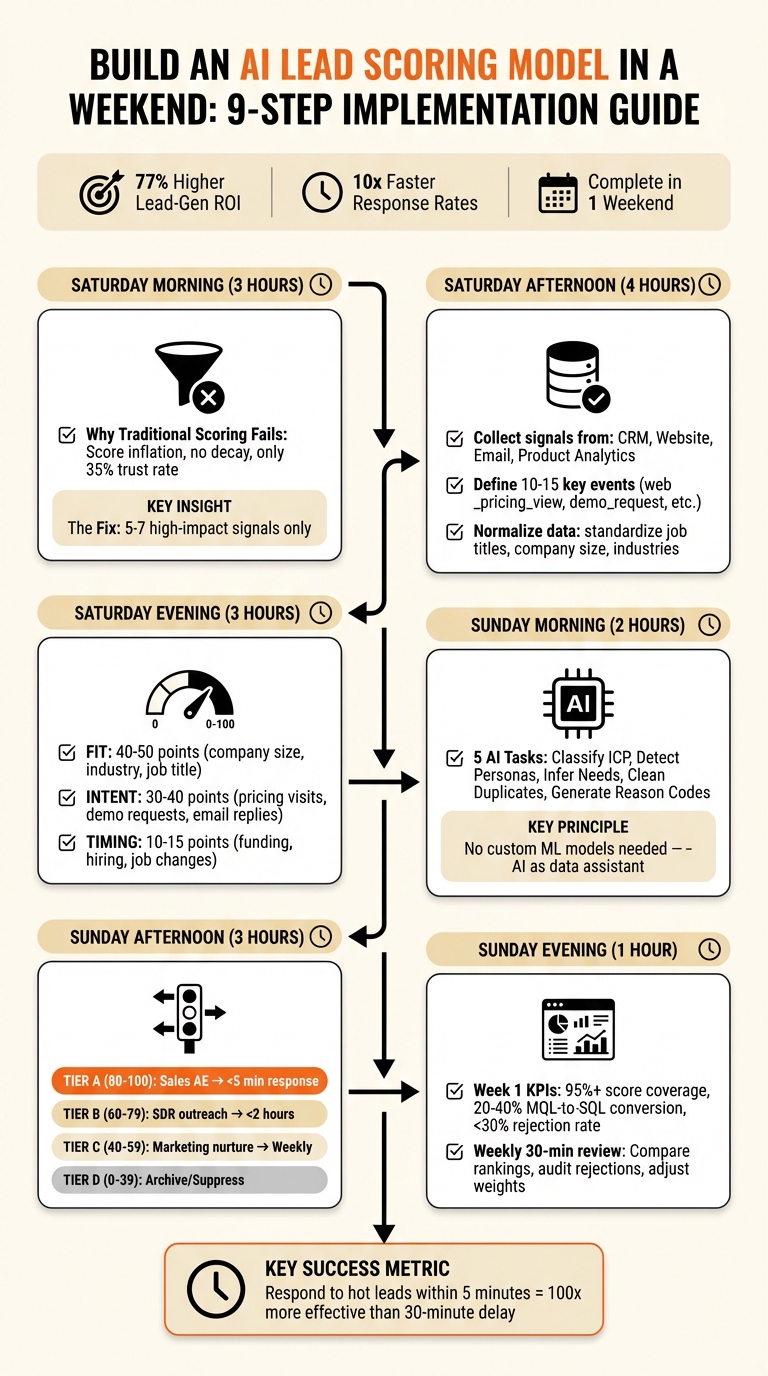
9-Step Weekend AI Lead Scoring Implementation Process
Step 1: Why Most Lead Scoring Fails (and How to Avoid It)
The Problem with Traditional Lead Scoring
Traditional lead scoring stumbles because it tries to measure everything. These models assign points to every small action – email opens, social media likes, newsletter clicks – without limits or deductions. This approach leads to "score inflation", where even low-intent actions eventually turn every lead into a Marketing Qualified Lead (MQL) [1][5].
"Most lead scoring models fail not because the math is wrong, but because they score too many things, never decay, and set MQL thresholds that nobody trusts." – Rome Thorndike, Playbook Author, The RevOps Report [1]
Another major issue is the absence of score decay. For example, a lead that visited your pricing page six months ago might still hold a high score, causing sales teams to waste time pursuing dead ends [5][6]. To make matters worse, only 35% of sales professionals fully trust the accuracy of their company’s data [8]. When MQLs are consistently unreliable, sales teams lose trust in the system, creating frustration and inefficiency.
Gut-driven MQL thresholds compound the problem. When sales teams receive unqualified leads labeled as MQLs, their confidence in the process erodes further [1][5]. Clearly, traditional lead scoring needs a rework – one that simplifies the approach and rebuilds trust.
A Simple Approach: Signals + AI Enrichment
The solution lies in a streamlined, signal-focused model. Start with a Minimum Viable Model that uses only 5–7 high-impact signals. These should be actions that strongly correlate with closed-won deals, such as demo requests, pricing page visits, email replies, and specific job titles [1][7]. Ignore the noise from less meaningful activities.
"Lead scoring is prioritization. That’s it." – AI Lead Scoring for Solo Founders [7]
This signal-based strategy avoids the pitfalls of traditional models. It enables real-time evaluations instead of batch processing leads once a day. Speed matters – responding to a lead within 5 minutes instead of waiting an hour can increase connection rates by 10x [7]. Incorporating lightweight AI enrichment further boosts efficiency by automatically pulling firmographic data, freeing sales reps from manual data entry, which consumes 70% of their time [8].
This approach creates a system that’s simple, fast, and transparent. By focusing only on what matters, you’ll build a lead scoring model that sales teams trust and use, setting the stage for the steps that follow.
sbb-itb-e8c8399
Step 2: The Minimum Viable Model (Fit + Intent + Timing)
Breaking Down the Scoring Formula
A solid lead scoring model revolves around three key elements: Fit, Intent, and Timing. Each one answers a specific question about your lead and works together to prioritize efforts effectively.
Fit addresses "Who are they?" This is the foundation of lead viability and B2B customer acquisition and relies on static data like company size, industry, job title, and tech stack. Think of it as a consistent filter – someone like a VP at a 500-person SaaS company in your target market scores high, while a student with a Gmail address scores low [1][5].
Intent answers "What are they doing?" It measures behaviors such as visiting your pricing page, requesting demos, replying to emails, or downloading case studies. These signals are dynamic and fade quickly – a pricing page visit yesterday signals urgency, but one from six months ago doesn’t carry the same weight [5][7].
Timing focuses on "When should we act?" It highlights urgency using trigger events like recent funding announcements, hiring growth, contract renewals, or a key contact switching jobs. These moments often signal the right time to engage [7][2].
The recommended weighting for these components is: Fit (40–50), Intent (30–40), and Timing (10–15). While Fit ensures you’re targeting the right audience, Intent and Timing are what drive immediate action. For example, a lead with a perfect Fit but no Intent should be nurtured, while a lead with strong Fit and high Intent should go straight to sales [1].
"Lead scoring is not about labeling people. It’s about prioritizing motion." – LeadOps.io [5]
Once you’ve scored your leads, the next step is turning those scores into actionable tiers.
Scoring Tiers and Routing
After calculating scores, organize them into clear tiers for action:
| Tier | Score Range | Profile | Action |
|---|---|---|---|
| A (Hot) | 80–100 | Strong ICP match with high intent (e.g., demo request, pricing page visit in the last 7 days) | Route to sales immediately; send a Slack alert to the AE; target a response time under 5 minutes |
| B (Warm) | 60–79 | Good fit with moderate intent or partial fit with high intent | SDR light-touch outreach; personalized email sequence; aim for a response time under 2 hours |
| C (Nurture) | 40–59 | Partial fit with low intent | Marketing automation; educational content drip; monthly check-ins |
| D (Cold) | 0–39 | Poor fit or inactive | Suppress from sales; assign to a long-term newsletter or archive |
Tier A leads require immediate attention. Reaching out within 5 minutes can increase connection rates by 10× [7]. Tier B leads, while less urgent, still need a personal touch – an SDR email, webinar invite, or retargeting ad can work well. Tier C leads should stay in marketing’s hands, receiving educational content until their engagement picks up. Meanwhile, Tier D leads should be deprioritized to avoid wasting sales resources [6][2].
Recency matters too. Don’t send a lead to sales just because they’ve hit a high score if their last high-intent action happened months ago. Make sure at least one high-intent action occurred within the past 7 days before assigning them to Tier A [5]. This ensures your sales team focuses on leads actively engaging with your content.
Is Your Startup Falling Behind Its AI-Native Competitors?
Step 3: Saturday Morning – Collect Your Signals in 3 Hours
What Signals to Collect
You don’t need a fancy data warehouse to start scoring leads. The idea is to gather signals from tools you’re already using – your CRM, website, email platform, and product analytics (if you run a product-led business). These tools provide all the data you need to create a functional scoring model.
Begin with CRM fields like lifecycle stage, opportunity stage, job title, company size, industry, and last activity date. Then, look at website behavior using your analytics or marketing automation tools. Pay attention to high-intent pages such as pricing, integrations, security, and demo request forms. Add email signals like replies and meeting bookings, along with webinar and content interactions (e.g., registrations, attendance, and downloads). For product-led businesses, track key activation events like trial signups, hitting feature usage milestones, inviting teammates, or connecting integrations [4][6].
"Lead scoring is prioritization. That’s it. When 10 leads come in, you can’t talk to all of them immediately. Lead scoring tells you which 3 to call first." – AI Shortcut Lab [7]
Stick to the "Rule of 5-7": focus on 5 to 7 high-value signals that you can collect consistently. Tracking too many signals can overwhelm your system and dilute scoring accuracy. For example, a single demo request or pricing page visit is far more telling than someone reading a dozen blog posts [5][4].
Start with What You Have
This isn’t the weekend to build new infrastructure. Instead, take advantage of native integrations between your CRM (like Salesforce or HubSpot) and your marketing automation platform to sync data automatically [6][4]. If your tools don’t integrate directly, use no-code automation platforms like Zapier, Make, or n8n to transfer data in real time – no coding required [7][10].
For firmographic data gaps (such as company size, revenue, or tech stack), turn to enrichment waterfalls. Tools like Clay can query multiple data providers in sequence until they find what you need [8]. Use webhooks to instantly feed form submissions into your scoring system. Acting fast matters: reaching out to a lead within 5 minutes instead of 30 makes you 100× more likely to connect [6].
Before scoring anything, clean up your data using an MQL to SQL lead qualification checklist. Standardize freeform job titles into consistent categories and use picklists for fields like Industry and Company Size instead of allowing free text entries. This avoids issues like someone typing "tech" instead of "technology", which could throw off your model [4].
Once your signals are collected and your data is tidied up, you’ll be ready to move on to defining and standardizing events in Step 4.
Step 4: Saturday Afternoon – Define 10-15 Events and Normalize Them
Event Taxonomy: Examples and Rules
After gathering your signals, the next step is to standardize how you name and track events. Consistency is critical – if one tool labels an action as "pricing_page_view" and another as "viewed pricing", your automation tools may fail to connect the dots.
To avoid this, use a naming convention like object_action_status (e.g., web_pricing_view). This format clearly communicates the event type and its source. Additionally, ensure every event is tied to both a person (the contact) and an account (their company). Even if the data isn’t perfect, linking it to a person and account adds structure and value to your scoring model [4].
Begin with 10–15 key events that have historically shown a strong connection to closed deals. Here’s a practical list to get started:
-
web_pricing_view -
web_integration_view -
web_security_view -
web_demo_request -
email_click -
email_reply -
meeting_booked -
trial_created -
activation_completed -
integration_connected -
webinar_registered -
webinar_attended -
content_downloaded -
linkedin_engaged -
champion_changed_jobs
These events focus on actions that help distinguish serious buyers from casual browsers.
"More scoring inputs ≠ better scoring. A scoring model should separate signal from noise – not amplify it." – LeadOps.io [5]
Once your event taxonomy is established, the next step is to normalize your data across platforms.
How to Normalize Data
With standardized events in place, it’s time to clean and align raw data into consistent formats. This ensures your scoring model accurately captures buyer intent and provides AI lead scoring benefits for both sales and marketing teams.
Data from different tools can be messy. For instance, one platform might list a job title as "Head of Growth", another as "Growth Lead", and yet another as "VP Marketing." To your scoring system, these may appear as entirely different roles, even though they represent similar positions. Group job titles into standardized "Role" and "Seniority" categories so they align properly (e.g., all become "Marketing Manager") [4].
Apply the same logic to other fields like company size, industry, and location. Use controlled picklists to standardize free text entries. For example, convert terms like "tech" into "Technology" or map ranges like "11-49 employees" into predefined numeric brackets (e.g., 50–200, 201–500). This ensures your scoring rules function accurately [4].
Other key normalization practices include:
- Capping event scores: For example, assign 10 points for the first pricing page view, but score additional views within 24 hours as 0 [4].
- Flagging personal email domains: Lower scores for domains like Gmail or Yahoo, as well as generic role-based addresses like info@ or hello@, since these often indicate lower buying intent [4].
Businesses that implement lead scoring effectively see up to a 77% improvement in lead-generation ROI by enabling sales teams to focus on the most qualified prospects [6].
The SIMPLEST Way To Build An AI Lead Scoring Assistant (AI Automation)
Step 5: The Scoring Rubric That Works
Once your events are standardized, it’s time to assign point values to them. Use a 0–100 scale, dividing scores into Fit (50 points), Intent (40 points), and Timing (10 points). This framework takes the raw data from your defined events and transforms it into actionable scores, making lead routing more effective.
Start with the essentials – focus on 10–15 signals that have historically aligned with closed deals. Only add complexity when absolutely necessary.
Fit Signals: Pinpoint Your Ideal Customers
Fit signals help you assess whether a lead aligns with your Ideal Customer Profile (ICP). These signals rely on firmographic and technographic attributes, with points awarded based on their resemblance to your best customers [5][8].
High-value fit signals include:
- Target industry match: Add +10 to +15 points for industries like SaaS, Healthcare, or Financial Services.
- Company size in range: Assign +10 to +20 points for companies with 50–500 employees.
- Decision-maker job title: Award +20 to +25 points for roles like VP of Marketing or CTO.
- Tech stack alignment: Add +10 to +15 points for companies using tools like Salesforce, HubSpot, or Slack.
- Geographic match: Grant +5 points for leads operating in your target regions.
Negative points help filter out poor fits. For example:
- Subtract –20 to –30 points for competitor email domains.
- Deduct –10 points for student or academic keywords.
- Remove –5 to –10 points for leads using personal email addresses like Gmail or Yahoo [5][6].
If a lead’s fit score falls below a certain threshold – say, 15 points – they shouldn’t reach MQL status, no matter how engaged they seem [1].
Intent Signals: Highlight High-Interest Actions
Intent signals measure active interest based on behavior. Prioritize high-value actions, but be sure to cap scores to avoid manipulation [5].
Examples of high-intent actions and point values:
- Demo or trial request: +25 to +50 points – this is a strong sign of purchase intent.
- Pricing page visit: +15 to +30 points, with a cap of +20 per week to avoid inflation from repeated visits.
- Email reply: +20 points.
- Webinar attendance: +10 to +15 points.
- Product activation event: +20 points for milestones like completing onboarding or inviting a teammate.
- Integration connected: +15 points.
- Case study or whitepaper download: +10 to +12 points.
- Email click on high-intent topics: +6 points for subjects like "implementation guide."
Prevent gaming the system. For example, award full points for the first pricing page visit, but reduce subsequent views within 24 hours to 0–2 points. Similarly, cap total points from low-value actions like email opens at 10 to ensure passive engagement doesn’t inflate scores [4][5].
"A scoring model should separate signal from noise – not amplify it."
- LeadOps.io [5]
Timing Signals: Gauge Readiness
Timing signals capture external factors that suggest a lead might be ready to buy. These often come from third-party data or LinkedIn activity, adding a final layer of prioritization [7][8].
Key timing signals and their point values:
- Funding announcements: +6 to +10 points for events like Series B funding or later.
- Hiring for budget-related roles: +4 to +5 points for positions such as Head of Revenue Operations or VP of Sales.
- Champion changed jobs: +5 points if your contact moves to a new company.
- Category "topic surge": +10 points for increased research activity in your category, as indicated by tools like Bombora.
Timing signals often act as tiebreakers. For instance, a company that recently raised funds and is hiring aggressively should rank higher than one with no recent activity.
To keep your scoring relevant, apply 25–50% score decay every 30 days of inactivity [1][6]. This ensures your team focuses on leads with current intent instead of outdated signals.
With your scoring rubric in place, the next step is setting up automation rules for lead routing.
Step 6: Where AI Fits (Without Building a Model)
You don’t need to hire data scientists or create custom machine learning models to make AI work for you. Think of AI as a data assistant – it organizes, enriches, and categorizes your information, turning messy inputs into structured, usable data.
The trick is to let AI handle repetitive data tasks while you stay in control of decisions. It fills in gaps, standardizes data, and clarifies lead scores. This can cut down on the manual work that takes up 70% of a sales rep’s week [8].
AI Tasks for Lead Scoring
AI can take on these five key tasks without requiring any machine learning expertise:
- Classify ICP: AI evaluates firmographic data like company size, revenue, and industry to determine if a lead fits your Ideal Customer Profile (ICP). For instance, it might tag a lead as "Tier A" if it’s a Series B SaaS company with 50–200 employees, or "Tier C" if it’s a solo founder with no funding.
- Detect Personas: Job titles can be messy and inconsistent. AI can map titles like "Growth Lead", "VP Eng", or "Vice President of Engineering" into standardized roles, ensuring your scoring rules work even when job titles vary.
- Infer Needs: AI extracts key details – like pain points, budget, or urgency – from unstructured text. For example, if a lead mentions "Need this ASAP for Q2 launch" in an email, AI can flag it as urgent and adjust the lead score accordingly.
- Clean Duplicates: Duplicate records clutter your data. AI can spot and merge duplicates, whether it’s two entries for the same person or bot activity creating redundant actions. This keeps your pipeline clean and reliable.
- Generate Reason Codes: AI can explain lead scores in plain language. Instead of showing a vague "87/100", it might provide a breakdown: "+20 for visiting the pricing page three times this week, +15 for attending a webinar, +10 for matching company size." This clarity helps sales reps make smarter decisions.
"If you ask a human to manually review 200 leads a day, you are setting money on fire."
- Ninad Pathak, Factors.ai [8]
A great example of this in action is Clay, a platform that raised $40M in Series B funding. It uses waterfall enrichment to pull data from over 100 providers. If one source doesn’t have a phone number or email, the system automatically checks the next source, improving match rates without manual effort [8].
These tasks work alongside your signal-based scoring model, improving data quality and delivering insights your team can act on.
AI Implementation Guardrails
To make AI outputs reliable, you need structure and oversight. Without these, you risk creating "black box" scores that your team may not trust.
- Structured Outputs: Use AI tools that return structured data, like JSON, with clear fields for confidence levels and reasoning. For example:
{"Score": 85, "Confidence": "High", "Reasoning": "Pricing page visits + webinar attendance"}. This ensures clean integration with your CRM. - Confidence Scores: Include confidence levels – like "High", "Medium", or "Low" – with every AI assessment. This helps your team decide when to trust the AI or when a manual review is needed.
- Separate Fit and Intent: AI should evaluate static data (like firmographics) separately from dynamic behavior (like engagement). Intent signals should decay over time – by 25–50% every 30 days of inactivity – to avoid cluttering your pipeline with outdated leads.
- Human Overrides: Allow sales reps to manually tag leads as "false positive" or "real interest." Their feedback can refine AI logic over time. A model that’s 70% accurate but trusted by reps will outperform a 90% accurate model they ignore [9].
- Data Mismatch Checks: Set up automated checks to flag impossible data combinations, like a 5-person company claiming $500M in revenue. This prevents bad data from skewing your scoring.
In November 2025, Rithum reactivated its 6sense predictive platform after a two-year pause. By pairing AI scoring with structured workflows and human oversight, AI-driven opportunities made up 58% of their Q2 pipeline [9]. The success wasn’t just about the AI – it was the human-in-the-loop design that made the system both accurate and actionable.
With these guardrails in place, you can confidently integrate AI into your lead scoring process. Up next: setting up routing rules to turn these enriched scores into revenue.
Step 7: Sunday – Routing and Activation
Your lead scoring model is only effective if it drives timely action. A lead with a score of 85 sitting idle in your CRM for three days loses its potential impact. The goal is clear: fast-track high-intent leads to sales, nurture warm leads with tailored follow-ups, and suppress unqualified ones to keep your pipeline streamlined.
Tier-Based Routing Actions
Once your AI-driven lead scoring model delivers actionable tiers, the next step is turning those scores into revenue by routing leads to the right people and processes.
Each score tier should correspond to a specific action and owner. Tier A leads (75–100) are your hottest prospects – high fit and high intent. These should skip standard queues and go directly to Account Executives (AEs) or senior reps. As soon as a lead hits this threshold, trigger a CRM task, send a Slack alert with the lead’s score breakdown, and automatically email a calendar booking link (via tools like Calendly or HubSpot Meetings). Reaching out within five minutes of an MQL trigger is 100x more effective than waiting even 30 minutes [6].
Tier B leads (50–74) are warm but need additional qualification. Assign these to SDRs for personalized outreach, referencing their engagement (e.g., "I noticed you downloaded our security whitepaper"). Set a service level agreement (SLA) for first contact within 2–4 hours, and enroll these leads in a 5-touch sequence over 10 days, combining emails and calls.
Tier C leads (25–49) show partial fit or low engagement. Keep them in marketing automation for a "priority nurture" sequence. Send one email per week featuring content like case studies, ROI calculators, or industry insights – materials that build intent without pushing for a meeting.
Tier D leads (0–24) are unqualified and should be suppressed or archived. Leads such as competitors, students, or those inactive for over 90 days should be removed from active outreach to reduce unnecessary noise for your sales team.
| Tier | Score Range | Primary Action | Follow-up SLA |
|---|---|---|---|
| A (Hot) | 75–100 | Route to AE with calendar link | < 5 Minutes |
| B (Warm) | 50–74 | SDR outreach + discovery call | < 2–4 Hours |
| C (Nurture) | 25–49 | Automated nurture sequences | Weekly |
| D (Cold) | 0–24 | Suppression / Archive | No Outreach |
Beyond routing, it’s essential to integrate a feedback loop to refine your process over time.
Using Automation to Scale
With tier-specific actions defined, automation ensures these workflows happen efficiently and at scale.
Set up automated lead routing using round-robin distribution and real-time triggers for dynamic tier adjustments. For example, if a Tier C lead visits your pricing page three times in a week, they should automatically move to Tier A.
For solo founders or small teams without SDRs, automate Tier A leads to receive a plain-text email with a booking link. These trigger-based workflows often achieve open rates up to 8x higher than standard broadcast campaigns [6].
To continuously improve, implement a feedback loop where sales reps log a "Rejection Reason" for any declined MQLs. Use this data to recalibrate your scoring thresholds and weights monthly. For instance, if reps frequently reject leads from a particular industry or company size, tweak your fit scoring to filter them out earlier. Regular adjustments like this ensure your scoring model delivers the best return on investment [6].
Step 8: Track These KPIs in Week 1
With your model now live, it’s time to measure its impact on pipeline quality and sales efficiency. The first week is crucial for identifying early wins and addressing potential issues like scoring inflation. Focus on three key areas: production metrics (is the system functioning as expected?), distribution metrics (are leads getting to the right people quickly?), and conversion metrics (are high scores translating into revenue?). These insights will guide your weekly adjustments to keep the model performing at its best.
Production and Distribution Metrics
Start by verifying your scoring system’s coverage and enrichment rates. For Score Coverage, aim for over 95% of inbound leads to receive a score. If you notice gaps, double-check your event tracking setup or enrichment tool integrations. Similarly, monitor the Enrichment Match Rate, which measures how often tools like Clearbit or ZoomInfo successfully populate firmographic data. Match rates typically range from 60–80%, depending on your provider [8].
Next, assess how quickly leads are reaching your sales team. Lead Response Time – the time from an MQL trigger to the first sales contact – is critical. Reaching out within 5 minutes is 100x more effective than waiting 30 minutes [6]. Also, track SLA Compliance to ensure at least 90% of MQLs are contacted within 2 hours [10]. If your team struggles to meet this window, revisit your automated alerts or CRM task workflows from Step 7.
Conversion Metrics
The ultimate goal is to turn high-scoring leads into revenue. Monitor the MQL-to-SQL Conversion Rate, with a healthy baseline falling between 20–40%. AI-optimized systems can push this rate above 60% [6][10]. If your conversion rate drops below 20%, it may signal overly loose thresholds or poorly weighted scoring criteria. Additionally, keep the Sales Rejection Rate under 30% [6]. If rejection rates are high, require sales reps to log reasons for rejecting MQLs – this feedback will help refine your model.
"If your scoring model isn’t helping Sales close deals faster, it’s not finished. It’s just decorated." – LeadOps.io [5]
Lastly, keep an eye on False Positives (high-scoring leads that sales rejects) and False Negatives (leads that convert but were scored poorly). Review these weekly to recalibrate your model. For instance, if you spot closed-won deals that never reached the MQL threshold, you might be overlooking an important signal – such as demo requests or LinkedIn engagement – that should carry more weight [5].
Step 9: The Weekly Iteration Loop
Once your lead scoring and lead qualification tools for routing automation are in place, the next step is ensuring your model keeps up with changing buyer behaviors. Regular tuning is essential – buyer patterns shift, and your model needs to adapt. A 30-minute weekly review is all it takes to spot calibration issues and refine your approach. This consistent effort is what separates effective, pipeline-driving models from those that quickly lose relevance.
30-Minute Weekly Review Checklist
This quick weekly review is designed to keep your lead scoring model sharp and aligned with real-world results.
Set aside 30 minutes every Friday afternoon to go through these five key tasks:
- Compare top leads with sales rankings: Look at your top 20 leads by score and compare them to how the sales team ranks them. If there’s a big gap, it’s time to recalibrate [1].
- Analyze high-score non-converters: Check leads with scores of 80+ that didn’t move forward to SQL or opportunity. These are often inflated by low-intent actions like multiple blog visits or email opens [1][5].
- Spot false negatives: Review recently closed-won deals that didn’t meet your MQL threshold. Look for overlooked signals, such as engagement on LinkedIn or activity from niche industries. Adjust or add one signal each week based on what you find [5][7][8].
- Audit sales rejection reasons: Examine why sales reps are rejecting MQLs. If "Not the right company" is a frequent reason, your firmographic weights may need adjustment. If "Not ready" is common, you might be overvaluing early-stage behaviors like newsletter sign-ups [6].
- Check score decay: Leads that haven’t engaged in 30+ days should have their scores drop by 25–50%. This keeps your pipeline focused on active prospects [1][6].
Keep a Scoring Changelog
Tracking your adjustments is key to maintaining a disciplined, iterative approach.
Use a scoring changelog to document every change you make. A simple Google Doc or Notion page works perfectly. Include the date, the change, and the reason behind it. For instance:
"March 7, 2026: Reduced webinar attendance points from +10 to +5 because Q1 data showed attendees converted at the same rate as non-attendees."
Organize your changelog into two sections: fit signals (static data like company size or industry) and intent signals (dynamic behaviors like page views or email replies). Fit signals rarely need updates, while intent signals demand more frequent tweaks [5][8]. If a signal requires constant adjustment, consider removing it. The goal isn’t perfection – it’s steady improvement. Aim for a model that gets 5% better every month while staying simple enough for your team to use effectively.
Conclusion: Your Lead Scoring Model is Live
With routing and KPI tracking in place, your lead scoring model is officially live. You’ve accomplished something many think requires months of effort and a full data team. By Sunday night, you’ve launched an AI-powered system that blends fit data, intent signals, and timing triggers to route leads instantly.
Your model may not be flawless, but it’s already proving its worth. Businesses using lead scoring report up to 77% higher lead-generation ROI [6]. This success stems from focusing on action over perfection. Your system differentiates between fit and intent, automatically reduces the impact of stale engagement, and builds trust in the "Qualified" label for your sales team.
"Lead scoring isn’t just another sales tool – it’s your competitive edge in a world where speed wins deals." – Apollo.io [3]
To keep the momentum going, schedule brief weekly reviews and monthly audits to refine your model. These regular check-ins help maintain a strong MQL-to-SQL conversion rate (targeting 20–40%) [6] [8]. Quarterly reviews will ensure your ICP definitions align with the customers who consistently close. This system isn’t a "set it and forget it" solution – it’s a dynamic engine that improves every week [5].
You’ve also cut down on hours of manual lead triage [7] [8]. Now, your team can respond to leads within five minutes, ensuring consistent and reliable follow-up. That’s not just efficiency – it’s a lasting competitive advantage.
This live system transforms raw lead signals into actionable insights, driving steady growth and operational efficiency.
FAQs
What tools do I need to set up AI lead scoring in a weekend?
To get AI lead scoring up and running in just a weekend, you’ll need a few essential tools for data collection, enrichment, and automation. Start with a robust CRM like HubSpot or Salesforce to manage your leads. Add access to an AI API, such as GPT-4, to handle the scoring logic. Use data integration platforms like Zapier or n8n to connect your systems seamlessly. Implement event tracking to capture engagement signals, and set up workflow automation to handle scoring updates and lead routing. With these tools, you can create an efficient and streamlined process in no time.
How do I choose the 5–7 buyer intent signals that matter most?
To identify genuine interest and urgency, pay attention to intent signals like demo requests, email replies, visits to pricing or security pages, webinar participation, and product activations. Start by creating a clear list of these events, ensuring they are well-defined and consistent. Assign weights to each signal based on how strongly they correlate with conversions. Be cautious about repeated signals – limiting them helps prevent manipulation. Focus on high-intent actions that are both easy to track and seamlessly integrated into your workflows for actionable insights.
How do I stop lead score inflation and keep scores fresh?
To keep lead scores accurate and relevant, make regular audits and updates to your scoring rules a priority. Begin by focusing on fit scoring to ensure leads align with your ideal customer profile, then integrate engagement signals step by step. Periodically adjust the weights assigned to different actions, and set limits on repeat events to prevent score inflation. For added precision, require at least one high-intent action – like a demo request – before routing leads to sales. Conduct quarterly reviews to identify and address false positives and negatives, ensuring your model remains reliable and effective.