
I opened Teams to find the message every fractional CMO dreads: "The sign-ups aren’t showing up in the product."
This wasn’t a new client. We were two months into active PMF validation testing for a SaaS startup. We’d already built the landing page, launched the ads, and watched the traffic roll in. Retention rates were good but conversions were far too low. Everything should have been working.
Except nothing was working.
The conversion events were being leaked by a website architecture problem. The sign-up form collected emails. Those emails hit HubSpot. But users never made it into the product. Leads were leaking everywhere. The Elementor-to-HubSpot integration broke every time someone touched the form. The in-house platform was so rigid that even basic changes required dev tickets. What should have taken a week stretched into two months of troubleshooting, patch fixes, and mounting frustration.
What might surprise you you is that this wasn’t a scrappy pre-seed team. This company was nearly a decade old. They had revenue. They had customers. But their GTM infrastructure was held together with duct tape and hope.
Honestly, DIY systems make sense, you know, early on. Paid SaaS subscription tools for payments and CRM are egregiously overpriced, and I don’t blame technical founders for wanting to build their own solutions. I’ve been a CMO for SaaS products with DIY setups, and when done right, they’re not a stumbling block.
But there’s a shelf life. What works for validation crumbles under scale. And by the time you realize it, you’re bleeding leads, burning budget, and scrambling to retrofit workflows that should have been engineered from the start.
In other words, many B2B teams rely on scattered tactics instead of a repeatable SaaS go-to-market strategy. This chaos slows growth, lets leads slip through cracks, and makes it impossible to see what’s actually working.
This piece is about fixing that. Not with more tools, but with 10 repeatable workflows that turn GTM chaos into a system you can actually scale.
What’s in this guide:
- 10 step-by-step GTM workflows for signals like pricing page visits, scraped leads, or LinkedIn engagement
- Key metrics to track (e.g., reply rates, speed-to-lead, no-show rates)
- Common pitfalls like poor CRM sync or outdated data – and how to fix them’
- How to choose the right GTM motions
Motion Index (Jump links)
- Motion 1: Contact Data Scraping
- Motion 2: De-anonymize Website Visitors
- Motion 3: DM LinkedIn Commenters
- Motion 4: Multi-Channel Outbound
- Motion 5: Pre-Call Calendly Sequence
- Motion 6: Inbox Management
- Motion 7: Sync Lead Replies to CRM (Basic)
- Motion 8: Lead + Lifecycle Sync (Advanced)
- Motion 9: Content-Led Outbound
- Motion 10: Content Lead Capture
Why now? In 2026, buyers move fast and expect fast, relevant follow-up. The biggest advantage of GTM motions is speed-to-lead and consistency. When teams respond quickly and route signals reliably, more conversations turn into meetings and pipeline. (That’s why “5-minute response” benchmarks show up in so many revenue teams’ operating guides.)
This article’s core takeaway is this: Start with one motion (like de-anonymizing website visitors or automating multi-channel outreach). Track its results, refine, and layer on more. Pipeline growth depends on it.
10 GTM Motion Workflows for B2B Lead Generation and Pipeline Growth
What is a GTM Motion?
A GTM motion is a repeatable workflow that turns a specific buying signal (like a pricing-page visit or LinkedIn engagement) into a next-step action (route, outreach, follow-up) with tracked outcomes in the CRM. Unlike standalone tools or channels, motions combine these elements into a cohesive workflow [7][12].
Here’s a simple example: when a prospect visits your pricing page, a motion springs into action. It enriches their contact data, assigns them to the appropriate sales rep, sends a personalized email within five minutes, and logs the entire interaction in your CRM. This integrated approach shows why motions consistently outperform isolated campaigns.
The difference becomes clear when you compare motions to one-off campaigns. Imagine a campaign pulls in 500 leads in a month. Without an established motion, those leads might sit untouched. In contrast, a motion ensures every lead is processed efficiently, and is the basis for building a predictable system for growth that can be tested and refined over time [1].
| Aspect | Manual Lead Generation | Automated GTM Motion |
|---|---|---|
| Response Time | Hours to days | Seconds (immediate routing) |
| Consistency | Varies by rep skill/mood | Uniform execution for all leads |
| Scalability | Limited by team size | Handles unlimited volume 24/7 |
| Reliability | Leads often overlooked | Ensures no lead goes uncontacted |
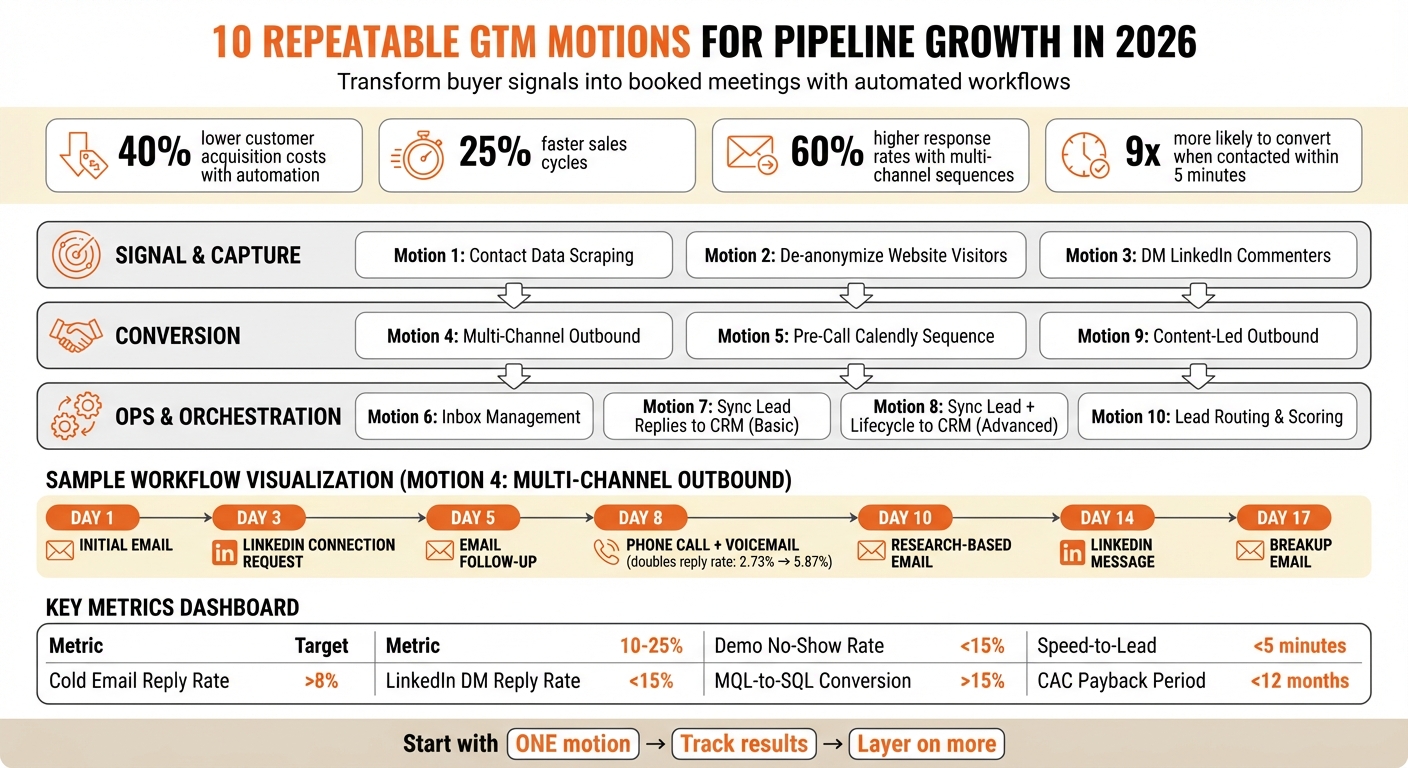
The impact of adopting motions is hard to ignore. Companies that automate their lead generation workflows report a 40% drop in customer acquisition costs and a 25% faster sales cycle [7].
Why GTM Motions Are Vital in 2026
The way B2B buyers engage has shifted dramatically. Today’s buyers research independently, interact across multiple platforms, and expect lightning-fast responses. Studies show that leads contacted within five minutes are three times more likely to convert compared to those who wait 30 minutes [7]. Manual systems simply can’t keep up.
Automation has made these repeatable workflows indispensable. AI now handles the tedious tasks – data entry, research, follow-up scheduling – leaving sales reps free to focus on building relationships [7]. This creates a system that runs around the clock, reacts in seconds, and scales without needing to expand your team.
Modern GTM motions also leverage signal-based selling. Instead of sending generic messages to cold prospects, teams now act on first-party intent signals, such as visits to pricing pages, whitepaper downloads, or LinkedIn activity [3]. This shift from generic outreach to targeted relevance has resulted in 60% higher response rates for multi-channel automated sequences compared to single-channel manual efforts [7].
"GTM motions determine whether startups scale rapidly or struggle to find repeatable growth." Jan, databar.ai [1]
The takeaway is clear here… without structured motions, teams waste time on low-priority tasks, miss out on high-intent leads, and fail to pinpoint what’s working. With motions in place, every signal is actionable, workflows are trackable, and growth becomes far more predictable.
GTM Motions vs. GTM Strategy
Think of GTM strategy as your big-picture roadmap. It outlines your business goals and answers key questions like: Who are we targeting? What value do we provide? Which markets should we prioritize? Strategy sets the overall direction.
GTM motions, meanwhile, are the practical workflows that bring that strategy to life. For instance, if your strategy focuses on targeting mid-market SaaS companies with content-driven outbound efforts, your motions define the exact steps to execute it, like identifying LinkedIn commenters, enriching their data, sending personalized outreach, and syncing responses to your CRM.
In short, strategy is the blueprint, while motions are the construction team. Strategy tells you what to build, while motions guide you through how to build it. A strategy without motions is just a theoretical plan, while motions without strategy risk running efficiently in the wrong direction.
"Speed is only useful if you are running in the right direction." Joel Barker (cited by OutboundSync) [9]
Next, we’ll break down step-by-step GTM motions that translate this strategy into action.
The 3 Layers of GTM Motions
Every GTM (Go-to-Market) motion falls into one of three layers, functioning like an assembly line for your pipeline [7]. Each layer has a specific role: identifying prospects, engaging them, and keeping your systems running smoothly.
This structure helps avoid common pitfalls like disconnected tools and siloed data [2]. By categorizing motions into these layers, you can focus on quick wins through automation before expanding to more complex, multi-channel strategies. This step-by-step approach ensures each motion builds on the previous one, thereby establishing a seamless flow.
Signal & Capture Motions
In the GTM framework, signal and capture motions are the starting point. These motions are designed to detect intent and transform anonymous activity into actionable leads using a lead qualification checklist. They monitor key triggers, such as visits to your pricing page, funding announcements, or LinkedIn interactions [3][7].
For instance, website tracking tools can de-anonymize visitors, while workflows that scrape contact details from databases or directories help create a qualified lead record. These leads then transition into the next layer: conversion motions.
Conversion Motions
Once you’ve identified a lead, conversion motions take over to move them toward a meeting. These workflows rely on multi-channel outreach, combining email, LinkedIn, and phone calls with automated follow-ups that are tailored to the intent signals you’ve already captured [1][7]. Companies that use multi-channel sequences see a 60% higher response rate compared to those that stick only to single-channel manual outreach [7].
Here’s a telling statistic: 80% of sales require at least five follow-up attempts, but 44% of salespeople stop after just one [1]. Conversion motions address this gap by automating follow-ups and adjusting based on a lead’s engagement. Once a lead converts, they’re seamlessly handed off to the orchestration layer, where data integrity and proper routing take center stage.
Ops & Orchestration Motions
This final layer is the backbone that ties everything together. It manages prioritizing MQLs, SQLs, and PQLs, routing, CRM synchronization, and ensures your data remains clean, unified, and enriched [8][2]. Without this layer, leads are at risk for falling through the cracks, weakening your pipeline.
"RevOps defines the ‘rules of the game,’ while GTM Engineers ‘build the playing field and make sure the game runs without interruption.’" – Leadle [2]
Take Udemy, for example. In 2025, they used Fullcast‘s Revenue Command Center to automate lead-to-account matching and routing, cutting their annual planning time by 80% [8]. Effective orchestration reduces friction and ensures every lead reaches the right rep in an efficient manner.
10 GTM Motion Examples (Step-by-Step Workflows)
Here are 10 detailed GTM motion workflows designed to help you streamline processes and implement effective customer acquisition strategies for B2B. Each motion is built around a three-layer framework, thus ensuring a smooth flow from capturing signals to driving conversions. Each example includes triggers, required data, step-by-step instructions, expected outcomes, CRM updates, key metrics, common pitfalls, and ways to improve performance.
Motion 1: Contact Data Scraping
Purpose: Quickly build a targeted lead list when volume is a priority.
Trigger: You’ve identified your Ideal Customer Profile (ICP) – criteria like company size, industry, or tech stack – and need fresh prospects.
Inputs: Firmographic data (e.g., company size, revenue, location) and technographic data (e.g., tools prospects use), sourced from niche directories and databases.
Workflow:
- Define ICP criteria (e.g., SaaS companies with 20–300 employees in North America).
- Use a data orchestrator to gather contacts from multiple sources.
- Enrich contact details with email, LinkedIn, and phone numbers, then remove duplicates to keep your CRM clean.
- Validate emails in real time to avoid bounces.
- Export the verified list to your outbound sequencer.
Outputs: A clean, verified lead list ready for outbound campaigns. This list can also feed directly into Motion 4: Multi-Channel Outbound.
CRM Fields to Update:
- Lead Source (e.g., "Scraping")
- ICP Match Score
- Enrichment Date
- Email Validation Status
Key Metrics: Contacts scraped, enrichment completion rate (target: 80%+), email validation pass rate, cost per verified contact.
Common Pitfalls: Using outdated databases can lead to data decay rates of 30–70% annually [8]. Skipping deduplication creates duplicate outreach, which hurts your brand, and failing to validate emails risks high bounce rates, which will damage your sender reputation.
Improvement Tip: Add intent signals – like recent funding announcements or tech stack changes – to prioritize which contacts to engage first.
Motion 2: De-anonymize Website Visitors
Purpose: Convert anonymous website traffic into actionable leads by identifying high-intent visitors.
Trigger: A visitor lands on high-value pages like /pricing, /demo, or product documentation.
Inputs: IP addresses, tracking pixels, page visit history, and time spent on site.
Workflow:
- Install tracking pixels on high-intent pages.
- Capture IP addresses and use reverse lookup to identify companies.
- Enrich company records with firmographic details and decision-maker contacts.
- Score visits based on pages viewed and time spent.
- Route qualified visitors (e.g., those from ICPs viewing pricing pages) to your outbound sequencer.
- Sync identified leads to your CRM with visit context.
Outputs: Enriched company and contact records with intent data, ready for personalized outreach.
CRM Fields to Update:
- First Visit Date
- Pages Viewed
- Intent Score
- Lead Source (e.g., "Website Visitor")
Key Metrics: Visitor identification rate, high-intent page visits, enrichment success rate, and conversion rate from visitor to reply.
Common Pitfalls: Tracking generic pages instead of high-intent ones wastes resources. Delaying outreach can hurt conversions – contacting leads within 5 minutes boosts conversion rates by 9x compared to later follow-ups [2]. Impersonal initial messages can also deter engagement.
Improvement Tip: Set up automated alerts (via Slack or email) for C-level visitors from target accounts so reps can follow up immediately.
Motion 3: DM LinkedIn Commenters
Purpose: Turn social engagement into qualified leads by targeting prospects who are already interacting with relevant content.
Trigger: A prospect comments on your post, your CEO’s post, or other industry-relevant content.
Inputs: LinkedIn profile details of the commenter, the post they engaged with, and their comment.
Workflow:
- Use automation to monitor posts for new comments.
- Collect commenter profiles to gather key details like name, title, company, and LinkedIn URL.
- Qualify leads based on ICP fit (e.g., job title, company size, industry).
- Send a personalized connection request or DM referencing their comment.
- If they accept or reply, enrich their record with additional contact details.
- Route qualified leads into a nurture or outbound sequence.
Outputs: Warm leads with engagement context, ready for personalized outreach.
CRM Fields to Update:
- Lead Source (e.g., "LinkedIn Engagement")
- Engagement Type (comment/like/share)
- Original Post URL
- First Touchpoint Date
Key Metrics: Commenters captured, connection acceptance rate, reply rate, and conversion of leads into outbound sequences.
Common Pitfalls: Overly salesy messages can kill the conversation. Dropping links without context feels spammy, and ignoring the content of a comment can make your outreach seem generic.
Improvement Tip: Use AI to craft opening messages that reference both the post topic and the commenter’s insights. High-engagement replies should be routed to sales quickly.
Motion 4: Multi-Channel Outbound
Purpose: Create a coordinated outreach strategy across email, LinkedIn, and phone for consistent engagement.
Trigger: A new lead is added to an outbound campaign.
Inputs: Verified email address, LinkedIn profile URL, and phone number.
Workflow:
- Day 1: Send an initial email.
- Day 3: Send a LinkedIn connection request with a short note.
- Day 5: Follow up with an email referencing the first message.
- Day 8: Make a phone call. If unanswered, leave a voicemail (voicemails can double reply rates from 2.73% to 5.87% [10]).
- Day 10: Send a research-based email mentioning recent company news or a mutual connection.
- Day 14: Send a LinkedIn message (if connected).
- Day 17: Send a final breakup email with the subject "Should I close your file?"
Pause the sequence when a lead responds, and sync outcomes to your CRM.
Outputs: Booked meetings, engaged replies routed to sales, and suppression of negative responses.
CRM Fields to Update:
- Sequence Name
- Current Step
- Last Touch Date
- Channel of Reply (email/LinkedIn/phone)
- Reply Sentiment (positive/neutral/negative)
Key Metrics: Emails sent, LinkedIn connection rate, phone connect rate, total replies, reply rate by channel, and meetings booked.
Common Pitfalls: Repeating the same message across channels can feel robotic. Poor timing between touches (ideally 1–3 business days apart) can overwhelm prospects. Failing to pause the sequence after a response can lead to redundant follow-ups.
Improvement Tip: Use AI-generated openers tailored to recent prospect activity. These openers can lift first-message replies by 61% [10].
The challenge here is that building these workflows feels slow at first. You’re documenting processes, mapping failure points, and setting up redundancies. It’s tempting to skip this and just ‘launch.’ But six months later, when your head of sales is asking why 30% of leads never got followed up on, you’ll wish you’d engineered it right the first time.
Motion 5: Pre-Call Calendly Sequence
Purpose: Minimize no-shows and ensure prospects are prepared for their calls, leading to better meeting outcomes.
Trigger: A prospect schedules a meeting using Calendly or a similar tool.
Inputs: Meeting time, attendee email address, and…
(Content continues in the next section.)
How to Choose the Right GTM Motions
Focus on the motions that directly address your pipeline challenges. The best approach is to align your efforts with existing resources and the gaps you’ve identified. Using the signal, conversion, and orchestration layers previously outlined, select GTM motions that effectively close those gaps. For most B2B companies, starting with outbound GTM motions is a smart move – they provide quick feedback, reliable results, and full control over the process [1].
If your strength lies in signal and capture, such as website traffic generated by SEO, ads, or content distribution, consider starting with Motion 2 (De-anonymize Website Visitors) and Motion 5 (Pre-Call Calendly Sequence). These motions are great for capturing high-intent signals from prospects who are already engaging with your brand. For example, between June 2024 and October 2024, the sales technology company Attention generated $1.2M in pipeline by focusing on accounts with specific triggers, like a 20% increase in SDR hires or job changes among champions [5]. Timing is critical here – leads contacted within five minutes are nine times more likely to convert than those contacted later [2].
To improve your conversion layer, especially if you’re seeing engagement on LinkedIn or Twitter but low reply rates, prioritize Motion 3 (DM LinkedIn Commenters) and Motion 9 (Content-Led Outbound). These motions transform social interactions into meaningful outreach. Personalized subject lines, for instance, can double reply rates (7% compared to 3%), while AI-generated openers referencing recent activity can boost first-message replies by 61% [10]. The key is to act quickly – signals like pricing page visits lose value fast and should be addressed within 48–72 hours [13].
If you’re starting from scratch and need volume, begin with Motion 1 (Contact Data Scraping) and Motion 4 (Multi-Channel Outbound). These foundational motions offer immediate feedback and help you establish control over your pipeline.
For issues like lost leads due to slow routing or poor CRM management, focus on fixing your operational layer. Start with Motion 6 (Inbox Management), Motion 7 (Sync Lead Replies to CRM – Basic), and Motion 8 (Syncing Lead + Lifecycle to CRM – Advanced). These actions ensure timely follow-ups and accurate CRM updates. A speed-to-lead audit can be a game-changer – if inbound leads take more than two hours to reach a sales rep, prioritizing routing automation is essential before launching new outbound campaigns [2]. Companies that automate lead generation workflows typically see a 40% reduction in customer acquisition costs and a 25% improvement in sales cycle time [7].
Metrics Dashboard: What to Track Weekly
To keep your go-to-market (GTM) strategies on track, it’s essential to measure the right metrics. Weekly monitoring ensures you’re focused on building pipeline rather than just generating activity. Below, the key performance indicators (KPIs) are grouped into three layers – signal & capture, conversion, and ops & orchestration – to help you quickly identify and address any weak points in your workflows. These metrics are the backbone of your GTM motions, ensuring smooth transitions between stages and maximizing efficiency.
For signal & capture, monitor lead volume by source – whether it’s scraping, website visitors, LinkedIn engagement, or content opt-ins. Pay close attention to your enrichment completion rate, which measures the percentage of leads with valid contact details. Other critical metrics include visitor-to-lead conversion and de-anonymization success rates. To maintain data quality, schedule quarterly hygiene checks to minimize data decay.
When it comes to conversion, focus on the following KPIs:
- Reply rate by channel: Set a target of over 8% for cold emails and 10–25% for LinkedIn DMs [14][11].
- Meeting booking rate: Track how many positive replies turn into scheduled calls.
- Meeting show rate: Aim for a no-show rate below 15% [14]. If your no-show rate exceeds this benchmark, tweak your pre-call sequence with reminders sent 24, 4, and 1 hour before the meeting.
- Meeting-to-opportunity conversion: Ensure your team is effectively qualifying leads during meetings.
For ops & orchestration, measure the following:
- Speed-to-lead: The time from receiving a signal to making the first contact. Strive for under 5 minutes for inbound leads, as prospects contacted within this window are three times more likely to convert compared to those contacted after 30 minutes [7].
- CRM hygiene: Track the percentage of leads with accurate stages, next steps, and no duplicates.
- Stuck opportunities: Identify deals that have been in the same stage for more than 14 days [14].
- Data quality: Poor data can cost businesses an average of $12.9 million annually. Regularly check your duplicate percentage and data fill rate [8].
Compiling these KPIs into a streamlined dashboard allows for quick diagnostics and timely adjustments.
| Metric Category | Key Weekly KPI | Target/Benchmark |
|---|---|---|
| Lead Capture | MQL-to-SQL Conversion | >15% [14] |
| Outbound | Cold Email Reply Rate | >8% [14] |
| Meetings | Demo No-Show Rate | <15% [14] |
| Efficiency | CAC Payback Period | <12 Months [14] |
| CRM Hygiene | Duplicate Percentage | <5% |
Every Monday, conduct a weekly dashboard review. Compare reply rates across channels to identify which platform resonates most with your ideal customer profile (ICP). If email reply rates drop below 5%, investigate deliverability issues by checking bounce rates, spam complaints, and domain reputation. When LinkedIn outperforms email, shift your focus to direct message engagement and content-driven outbound strategies. Even small improvements – like a 5–10% boost in reply rates – can significantly impact your pipeline over time [4]. By staying on top of these metrics, you ensure every GTM motion contributes to a well-oiled pipeline.
Common Failure Modes and How to Fix Them
In any complex GTM (Go-To-Market) motion, the system is only as effective as its weakest link. Problems like poor list quality, broken CRM sync, weak pre-call reminders, and generic messaging can derail even the most carefully designed strategies. These issues often snowball – bad data leads to bigger errors, and a single broken integration can make your pipeline invisible to the entire team. The good news? Most of these failures send early warning signals that can be addressed quickly with the right fixes.
Let’s dive into these common failure modes and how to address them, starting with data quality.
Poor List Quality
Bad data is a major vulnerability in outbound efforts. If your bounce rates exceed 2%, your sender reputation suffers, which can hurt the deliverability of future campaigns [10]. On top of that, B2B contact data has a staggering decay rate of 70.3% annually. This leads to "pipeline inflation", where outdated or duplicate contacts distort your growth metrics; This costs businesses an average of $15 million every year [15].
To fix this, implement real-time email verification and schedule quarterly data hygiene checks to clean up duplicates and refresh outdated contacts [10][15]. If your SDRs are spending more than 20% of their time manually cleaning lists, it’s a clear sign your system is already breaking down [2]. Clean data ensures your outbound campaigns are targeting accurate, actionable leads.
Broken CRM Integrations
When your CRM integrations fail, the ripple effects can be severe. Leads can get duplicated, unqualified prospects might slip through, and teams waste countless hours resolving data inconsistencies [16][18]. For instance, in September 2025, Delve resolved its disconnected spreadsheets and dashboards by adopting HockeyStack’s AI-powered platform. This move unified their workflows and connected all touchpoints to their key metric, "demos booked", enabling real-time attribution [18].
To prevent this, use an orchestration layer to unify workflows across platforms. Automate lead routing based on signals like job changes or intent, and establish shared data definitions across sales, marketing, and finance teams [16][17]. This alignment ensures smooth communication and eliminates redundant manual tasks.
Weak Pre-Call Reminders
Missed meetings often stem from ineffective pre-call communication. Relying on manual follow-ups increases delays and no-show rates. Research shows that leads contacted within five minutes are nine times more likely to convert [2].
Implementing multi-channel marketing automation for pre-call reminders – sent 24 hours, 4 hours, and 1 hour before meetings – can dramatically reduce no-shows and improve conversions [1][6]. And if a lead misses a meeting, trigger an immediate "re-book" sequence instead of waiting for a rep to follow up manually [6].
"The further you get in the process, the more automated it makes sense to get. You don’t want to be wasting your reps’ time with people that just aren’t responsive." – Forrest Dwyer, Close [6]
Generic Messaging
Generic messaging is one of the biggest reasons outbound efforts fail. Without personalization, your outreach blends into the noise and fails to stand out [1]. For example, personalized subject lines can double reply rates from 3% to 7% [10].
The solution? Shift from generic templates to hyper-personalized messaging. Use signals like recent funding, new hires, or content engagement to craft tailored messages. This approach can double your reply rates [10]. If your emails are getting high open rates but no replies, your messaging likely needs a revamp [1][5].
P.S. I still think about that validation project more than I’d like to admit.
Not because it failed… But because of how much time, budget, and momentum we burned fighting a system that was never designed to scale.
Here’s the thing… DIY solutions make perfect sense for validation. If you can vibe-code a landing page and validate PMF in a week, do it. The paid SaaS subscription tools for payments, CRM, and checkout flows are absurdly overpriced, and I don’t fault technical founders for building their own.
But there’s a moment, usually somewhere between "we have traction" and "we need to scale", where DIY infrastructure becomes a liability. The question isn’t whether to rebuild. It’s whether you’ll do it proactively or reactively.
The teams that win in 2026? They’re the ones who engineer their GTM workflows like products: with clear inputs, predictable outputs, and failure modes they’ve already mapped.
If you’re still running on duct tape and hope, now’s the time to fix it. Before your next fractional CMO, GTM engineer, or agency opens Slack to find that message.
FAQs
What are the advantages of using GTM motions compared to traditional lead generation methods?
GTM motions provide a structured and efficient way to develop pipelines by turning signals into consistent, multi-channel workflows. Unlike older lead generation practices that often depend on manual and uneven processes, GTM motions streamline repetitive tasks, enhance response and attendance rates, and keep CRM data clean and well-organized.
With an emphasis on data-driven strategies, GTM motions enable teams to work smarter, minimize mistakes, and ensure a steady stream of qualified leads, which is essential for scaling B2B companies.
How can companies maintain data quality and avoid common CRM sync issues?
Maintaining clean and reliable data in a CRM isn’t a one-and-done task – it’s an ongoing commitment. To keep your data in top shape, it’s crucial to enforce standardized field formats, validate essential details like email addresses and phone numbers, and set up automated workflows for de-duplication and enrichment. Restricting who can edit critical records and establishing clear sync rules ensures that every lead, response, or meeting outcome is accurately mapped to the appropriate CRM fields and stages. If a sync fails, it should immediately trigger an alert and a follow-up process to resolve the issue without delay.
To sidestep issues like lost leads or flawed reporting, integrate data checks directly into your workflows. For instance, verify lead attributes before routing them, update interest indicators and next steps after managing replies, and confirm deal stages after lifecycle updates. Regular audits are also key – track metrics such as duplicate records, enrichment rates, and stage accuracy to catch problems early. Assigning responsibility to a RevOps team member and documenting potential failure points, like "a broken CRM sync making pipeline data disappear", ensures your CRM remains a dependable tool for forecasting and strategic decisions.
What are the best strategies to turn high-intent website visitors into leads?
To turn high-intent website visitors into leads, treat their visit as a real-time opportunity and follow a structured, multi-step process. Start by identifying the visitor using IP tracking, linking it to a company or contact. Then, enrich this data with firmographic and technographic details to gain insights into their needs and preferences.
Once intent is detected, launch a personalized outreach immediately. This could be an email, a LinkedIn message, or even a phone call that references the specific page or product they viewed. Timing and relevance are crucial – acting quickly and, by tailoring the message to their interest, you’ll dramatically boosts response rates. At the same time, sync this information with your CRM to log the lead, assign follow-up tasks, and keep the process organized.
Keep an eye on key metrics like data enrichment success, response rates across channels, and how fast you respond to leads. These insights will help you uncover and resolve issues like poor data quality or workflow gaps. By combining precise timing, tailored communication, and automation, you can convert high-intent visitors far more effectively than relying on generic marketing tactics.
Related Blog Posts
- The AI GTM Engineer: The Missing Role Behind Scalable B2B Growth
- Fractional CMO for Startups: The GTM Engineering Approach (Systems, Not Campaigns)
- GTM Engineering Benchmarks 2026: Time-to-First-Revenue, CAC Payback, and Pipeline Velocity for B2B SaaS
- Best GTM Engineering Tools 2026: How to Choose (Orchestration, Data Quality, Attribution, and Integration Depth)